Creating estimated cycle reads
The Create Estimated Cycle Reads screen allows users to generate estimated meter readings for facilities that have missing or incomplete actual reads. This functionality helps maintain billing accuracy and continuity when actual readings are unavailable due to delayed meter data, system errors, or incomplete submissions from Local Distribution Company (LDC).
This process is particularly important in the billing workflow to ensure that customers are billed on time even when full meter data isn’t available. The system uses historical data and configurable estimation methods to generate reliable estimates.
Business use case
In natural gas billing, certain facilities may not transmit meter data on time due to hardware or communication issues. The Create Estimated Cycle Reads screen enables users to fill these gaps by estimating consumption using data patterns from previous cycles or historical averages.
Example
If the LDC has not provided actual usage data for October, the billing team can generate estimated reads based on the facility’s past three months’ consumption trend.
Benefits
- Ensures billing completeness even with partial or missing data.
- Minimizes manual estimation and human errors.
- Provides audit transparency through historical reference data.
- Allows configurable estimation methods based on data reliability.
Prerequisites
Before using the Create Estimated Cycle Reads (Billing) screen, ensure the following conditions are met:
- The user have the add or modify permissions for the Create Estimated Cycle Reads screen.
- The LDC, Facility, and customer data must exist in the system.
- All Rate/Rider configurations and Contract pricing details are defined and approved.
- All dependent billing data such as meter reads is validated to ensure data consistency.
Procedure to create estimated cycle reads
Step 1: Navigate to the Create Estimated Cycle Reads screen
- Log in to the nGenue application.
-
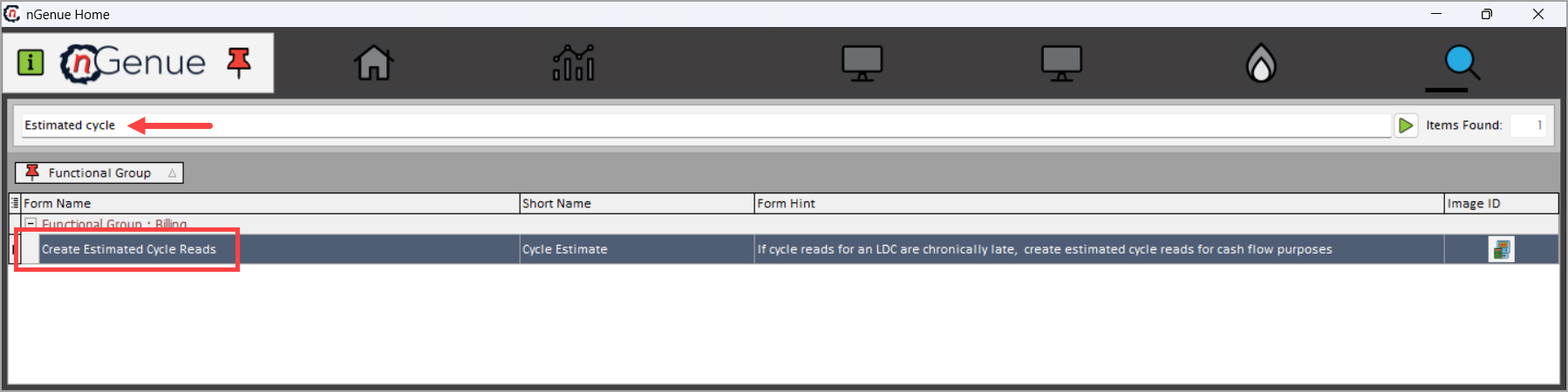
Click Search and enter Estimated cycle in the search bar.
-
Double-click Create Estimated Cycle Reads to open the Create Estimated Cycle Reads (Billing) screen.
-
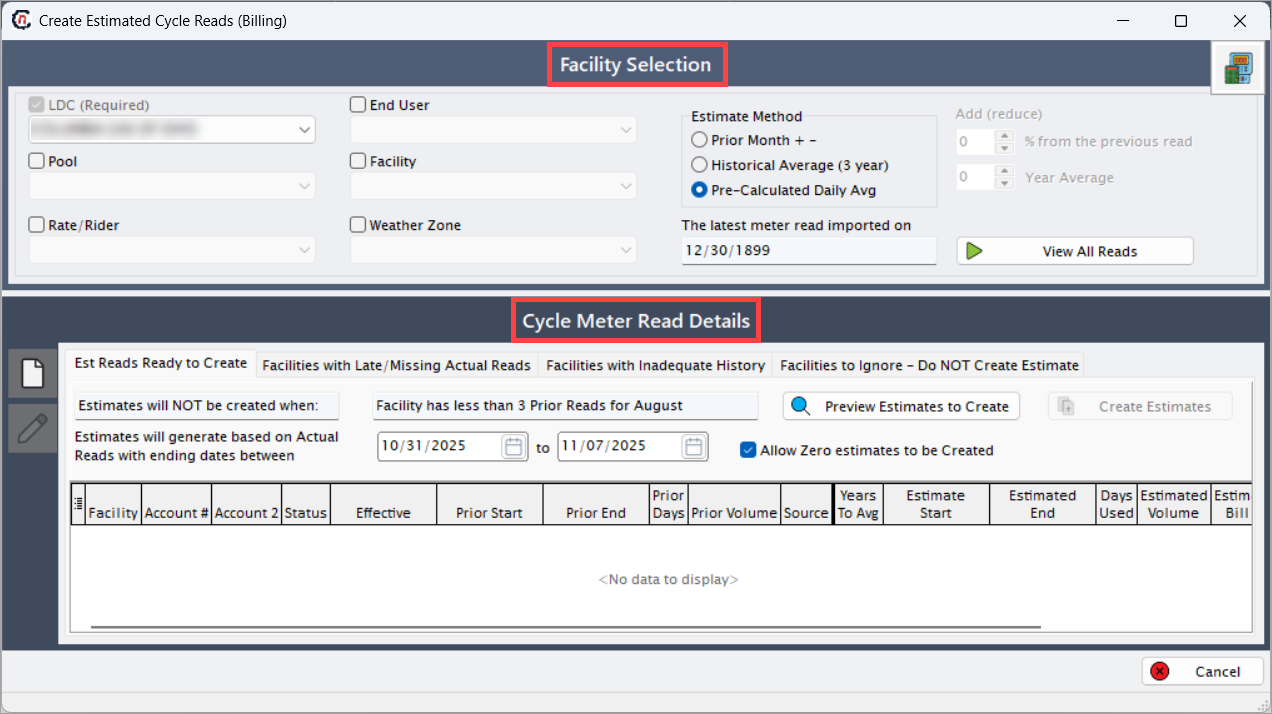
The screen is divided into two main sections:
- Facility Selection section
- Cycle Meter Read Details section
Facility Selection section
The Facility Selection section lets the user define which facilities or LDC to include in the estimation process. Users can filter by:
Fields Description LDC (Required) Select the local distribution company for which estimated reads are to be generated. When an LDC is selected, only the related facilities, pools, and end users appear in the selection lists. If not selected, the system cannot proceed with the estimation process. Pool Filters facilities that belong to a specific group or pool. When a pool is selected, only customers under that pool are considered for estimation. If left unselected, the estimation runs for all pools under the selected LDC. Rate/Rider Filters facilities based on their rate or rider category. When selected, only those facilities with the chosen rate or rider are included in the estimation. If not selected, the estimation includes all rates or riders associated with the LDC. Facility Allows narrowing the estimation to a specific facility. When a facility is selected, the estimation runs only for that facility. If left blank, the estimation includes all facilities under the chosen LDC or pool. End User Lets you select specific end users associated with the selected LDC or facility. When an end user is selected, only their readings are considered for estimation. If not selected, all end users linked to the selected LDC are included. Weather Zone Filters estimation based on a defined weather zone. When a weather zone is selected, estimation takes temperature and climate variations of that zone into account. If not selected, estimation assumes average conditions across all zones. Estimate Method Defines how the system calculates estimated usage. When a method is selected, the estimation uses that logic — for example, using the prior month’s usage, historical averages, or daily averages.
• Prior Month + -: Estimates are derived from the previous month’s usage, with a user-defined percentage increase or decrease applied.
• Historical Average (3 year): Estimates are based on the facility’s three-year historical average usage pattern by default.
• Pre-Calculated Daily Average: Uses the daily average consumption already calculated in the system to project estimated reads.Add (reduce) This field is enabled for the Estimate Method as Prior Month + -. This allows you adjust the estimated usage by increasing or decreasing a percentage from the previous read. When a value is entered, the system modifies the estimated usage accordingly. If left blank, no adjustment is applied to the estimation. Year Average This field is enabled for the Estimate Method as Historical Average (3 year). By default, the estimates are based on the facility’s three-year historical average usage pattern. However, you can override the usage years and enter the years for which the estimation is calculated. The latest meter read imported on Displays the date of the most recent meter read available in the system. This information is populated when you click on the Preview Estimates to Create button in the Cycle Meter Read Details section. When displayed, it helps verify that recent readings are used for estimation. If not displayed, users may need to import or verify meter reads before running estimation. View All Reads Opens a summary view in the Monthly/Cycle Meter Read History screen, showing all available meter reads for the selected LDC or facilities. When selected, users can review and confirm data accuracy before estimation. If not selected, the user remains on the main Create Estimated Cycle Read screen. 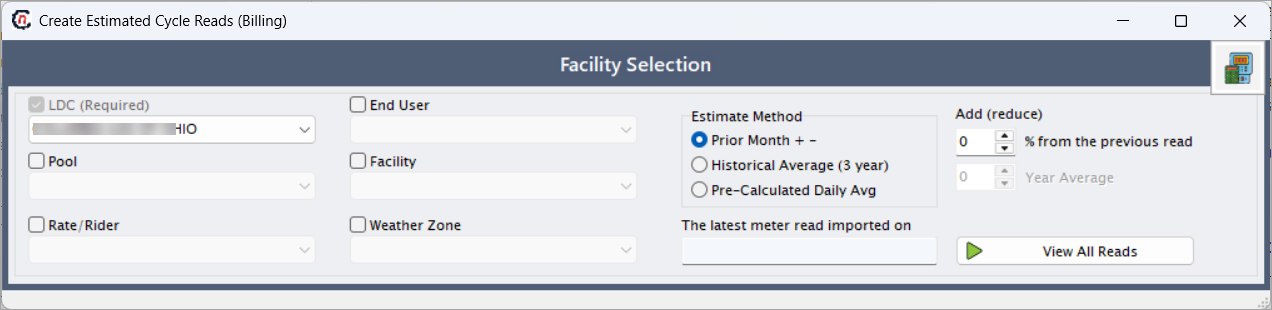
Cycle Meter Read Details section
This section displays information about facilities with missing or late reads, along with the estimated read calculation parameters. This section is divided into the following tabs:
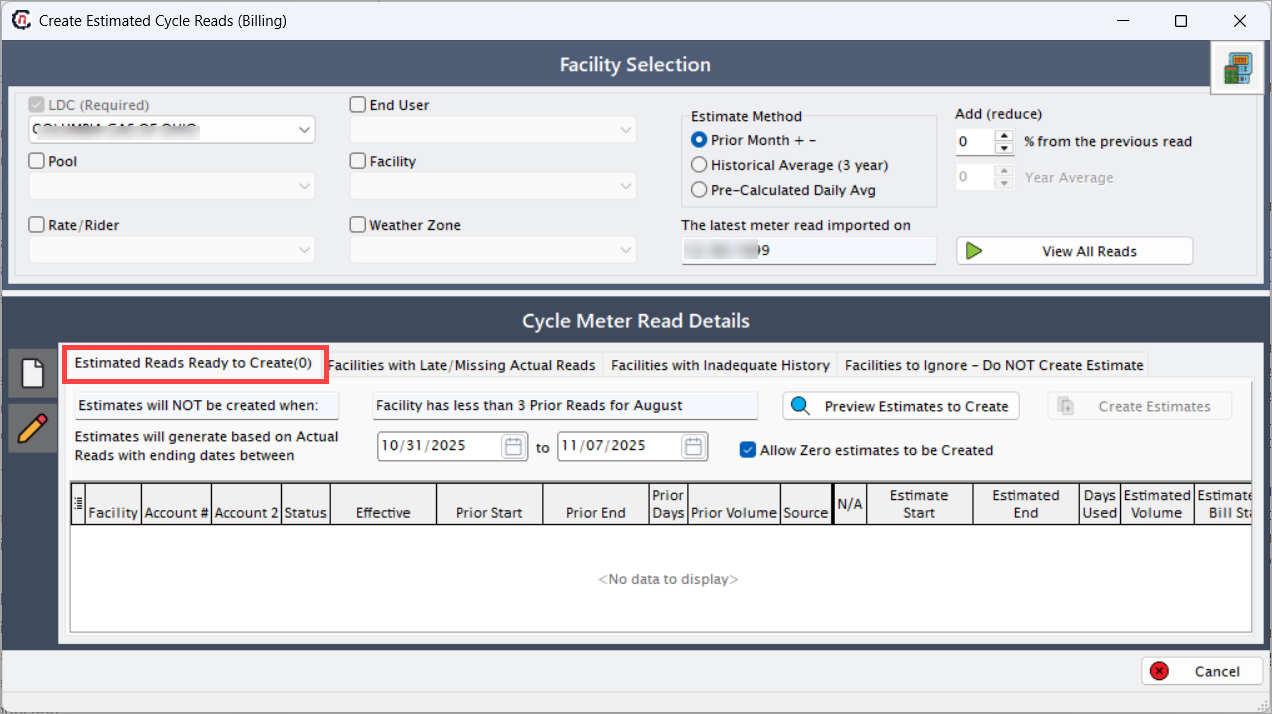
Estimated Reads Ready to Create tabThe Estimated Reads Ready to Create tab provides users with a comprehensive view of all facilities that meet the criteria for generating estimated reads based on the selected LDC, facility, or estimation method. This tab essentially serves as the workspace where users can validate, preview, and create estimated meter readings before they are committed to the billing database. It ensures that estimations are performed only for facilities that have sufficient historical data and meet the date range and configuration parameters defined in the upper section of the screen.
-
The “Estimates will NOT be created when” section acts as a validation control, clearly outlining conditions that prevent the system from generating estimates. A common scenario is when a facility has fewer than three prior meter reads, which may not provide sufficient data for a reliable estimation. In such cases, the system flags the facility in this tab, allowing users to identify gaps in historical data before proceeding. This proactive design minimizes the risk of generating inaccurate or incomplete estimates, ensuring billing accuracy and data integrity across cycles.
-
Users can define the applicable date range using the Estimates will generate based on Actual Reads with ending dates between fields. The system then filters actual reads within this range to calculate estimates. The option to Allow Zero Estimates to be Created gives flexibility in cases where facilities may legitimately have zero consumption for a given period (e.g., seasonal usage or inactive accounts). When this checkbox is enabled, the system includes such facilities in the estimation run to ensure completeness in reporting and data representation.
-
Finally, the Preview Estimates to Create button allows users to simulate the estimation process before committing changes to the database. This preview provides an opportunity to review and verify each generated record, ensuring that no anomalies exist in the estimation logic or resulting values.
-
Once the user confirms the preview results, clicking the Create Estimates button executes the estimation process, populating the database with the generated read values. These newly created estimated reads are then made available for subsequent billing and invoice generation in the Review Invoice Item Batch Details (Billing) screen. Overall, this tab provides a transparent, data-driven environment that balances automation with user oversight to maintain billing reliability and accuracy.
The Estimated Reads Ready to Create tab also displays a structured grid listing each facility that qualifies for estimation, along with detailed information as mentioned in the table below. These fields collectively help users understand how the system derives the estimated consumption.
Fields Description Facility Displays the facility for which estimated reads can be generated. Functionally, this identifies the specific customer location or meter point eligible for estimation. Technically, it is fetched from the facility master table based on the LDC selection and estimation criteria. Account # Shows the account number linked to the facility. Functionally, it allows billing teams to trace estimates to customer accounts. Technically, this is mapped from the account table associated with the selected facility. Meter # Indicates the meter number installed at the facility. Functionally, it helps identify which physical meter the estimation applies to. Technically, it is retrieved from the meter configuration in the facility setup. Prior Start Date Displays the start date of the previous meter read period used for estimation. Functionally, it defines the beginning of the data range for historical reference. Technically, it is derived from the previous actual read record. Prior End Date Displays the end date of the prior meter read period. Functionally, it marks the completion of the last valid actual read. Technically, it comes from the last meter read entry in the read history. Prior Days Shows the number of days covered in the prior read period. Functionally, it provides the duration reference for averaging consumption. Technically, it is calculated as the difference between prior start and prior end dates. Prior Volume Displays the consumption volume recorded in the prior read cycle. Functionally, this serves as the baseline for estimating future consumption. Technically, it is fetched from the historical usage data table. Years to Average Defines how many previous years of data are considered for the estimation calculation. Functionally, it allows the system to smooth out seasonal variations. Technically, it is derived from the estimation setup method selected above. Estimate Start Date Specifies the start date for which the new estimate will begin. Functionally, it determines the effective date for generating estimated reads. Technically, it is automatically populated based on the next expected read date configuration. Estimated End Date Specifies the end date for the estimated read period. Functionally, it determines when the estimation period concludes. Technically, it is calculated based on billing cycle configuration and prior end date. Estimated Volume Displays the calculated consumption volume for the estimation period. Functionally, it represents the system’s computed usage value for billing. Technically, it is derived using the estimation algorithm (for example, historical average or predefined formula).
Facilities Without Prior Period Read tabThe Facilities Without Prior Period Read section displays all facilities that lack a valid prior period meter read, which prevents the system from generating estimated reads for those facilities. This section serves as a validation and troubleshooting area that helps billing users identify missing or incomplete data before proceeding with the estimation process. It ensures data integrity and accuracy in the cycle read estimation process by highlighting facilities that cannot yet be included in estimation due to missing historical reads.
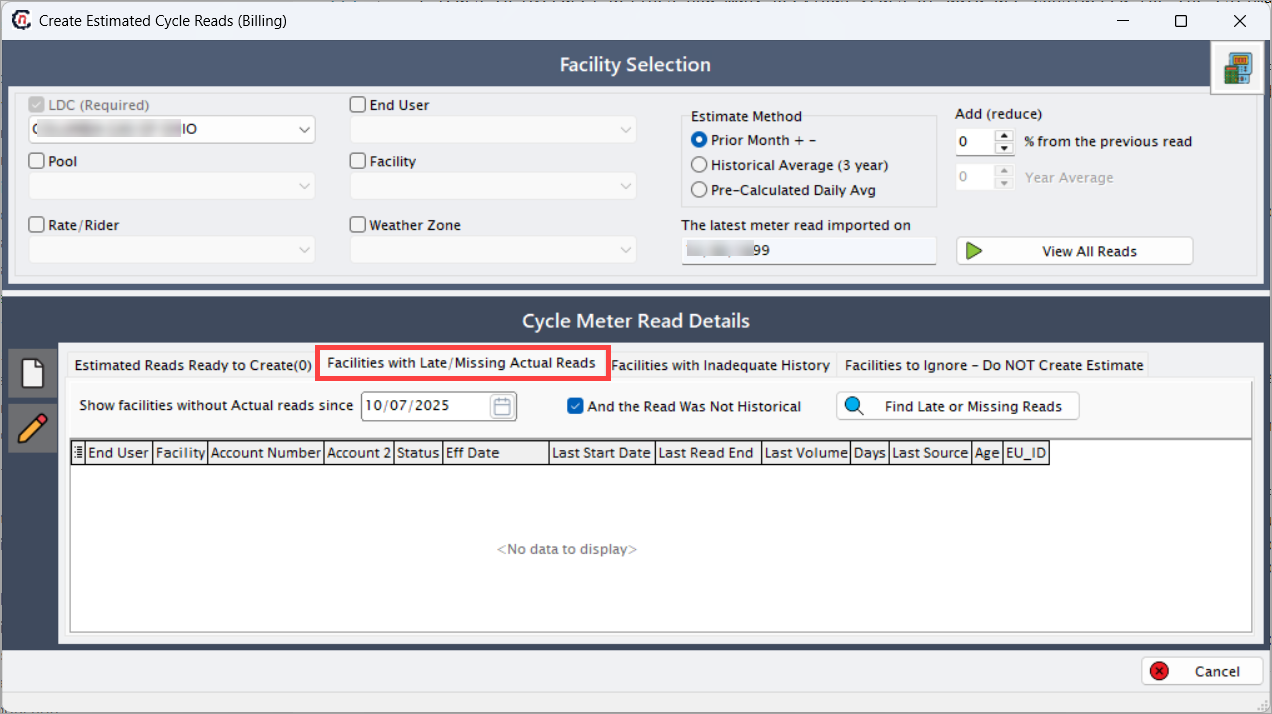
Functionally, this section assists billing analysts and operations teams in identifying facilities that have either never had an actual meter read or have data gaps that disrupt the continuity of read cycles. Without at least one valid prior read, the system cannot apply historical averaging or any estimation formula to forecast consumption. By reviewing this list, users can take corrective actions such as importing missing reads, verifying meter installations, or requesting field reads before proceeding to the next billing step.
When a user specifies a cutoff date using the Show facilities without actual reads since field, the system filters and displays all facilities that have not had a valid actual read from that date onward. The optional checkbox And the Read Was Not Historical further refines this list by excluding historical (manually entered or imported) reads, allowing users to focus only on live meter data gaps. The grid at the bottom displays detailed facility and account-level information such as facility name, account number, read start and end dates, last recorded volume, and data source. This enables both functional and technical users to cross-reference missing data points effectively.
Fields Description End User Displays the end user associated with the facility. Functionally, this identifies the customer linked to the missing read record. Technically, it is fetched from the customer master table based on facility mapping. Facility Displays the facility name or ID where the prior read is missing. Functionally, it identifies the specific site or meter point under review. Technically, it comes from the facility master table filtered by the LDC and selected date. Account Number Displays the primary account number linked to the facility. Functionally, it allows billing teams to trace missing reads to the correct customer account. Technically, it is pulled from the account linkage table. Account 2 Displays the secondary or sub-account reference, if applicable. Functionally, it helps in identifying grouped or multi-meter accounts. Technically, it is fetched from the account association table. Status Indicates the current status of the facility or meter (for example, Active, Inactive, Pending). Functionally, it informs users if the facility is still billable. Technically, it is sourced from the facility status field in the database. Eff Date Displays the effective date of the facility’s active status or configuration. Functionally, it defines the point from which the facility is valid for billing or reads. Technically, it is derived from the effective date field in the facility configuration table. Last Start Date Shows the start date of the last valid read period (if any). Functionally, it provides reference for the last time the facility had read data. Technically, it is derived from the most recent record in the meter read table. Last Read End Displays the end date of the last valid meter read, if available. Functionally, this helps users determine the data gap length. Technically, it comes from the latest read entry in the database. Last Volume Displays the volume recorded in the last actual read. Functionally, it shows the last known usage before data stopped updating. Technically, it is fetched from the last read record in the read history table. Days Indicates the number of days since the last valid meter read. Functionally, it helps users identify how long the facility has gone without data. Technically, it is system-calculated based on current date and last read date difference. Last Source Displays the data source of the last read (for example, Manual Entry, System Import, Field Device). Functionally, it identifies where the previous read originated. Technically, it is retrieved from the read import log or system source field. Age Shows how old the last read data is. Functionally, it provides a quick indication of the data’s relevance and timeliness. Technically, it is calculated in days based on the difference between the last read end date and today’s date. EU_ID Displays the internal system identifier for the end user. Functionally, this helps trace data records at a technical level. Technically, it is a unique key field in the end user master table used for database linking. Show facilities without actual reads since Enables the user to specify a cutoff date for identifying missing reads. Functionally, it defines the point from which facilities without data should be listed. Technically, it filters the meter read dataset by the entered date. And the Read Was Not Historical A checkbox that, when selected, excludes historical or manually entered reads from the results. Functionally, it helps users focus on facilities missing actual field reads. Technically, it acts as a boolean parameter in the SQL query used for fetching results. Find Late or Missing Reads A search button used to trigger the data retrieval process. Functionally, it executes the filter criteria and displays all matching facilities in the grid below. Technically, it initiates a stored procedure that queries the read history table for missing entries.
Facilities with Inadequate History tabThe Facilities with Inadequate History tab identifies facilities that have an insufficient number of prior meter reads to accurately calculate estimated usage. Estimation in billing relies heavily on historical consumption data. When that data is incomplete or limited—such as fewer than the required number of prior reads—the system flags the facility in this tab. Functionally, this helps ensure that estimated bills are generated only for accounts with reliable consumption patterns based on actual historical reads.
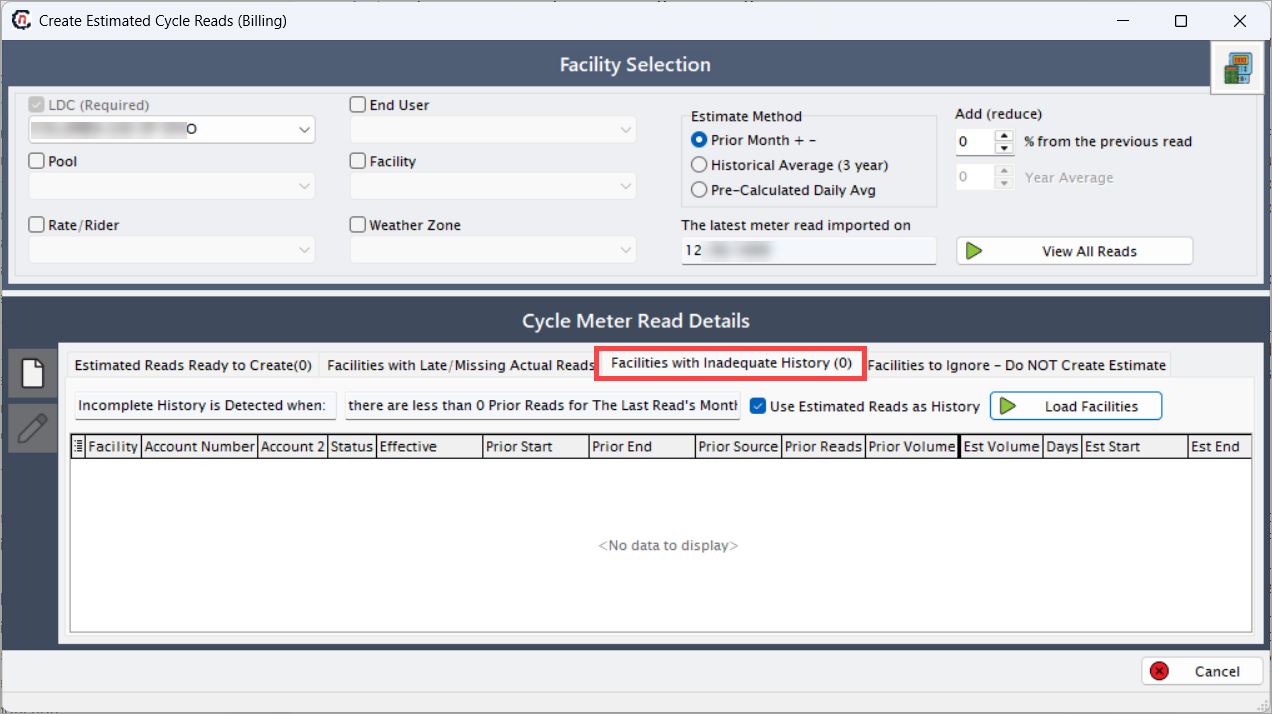
Before estimation runs, users can view all facilities that lack adequate historical data, allowing them to take corrective actions such as importing missing reads, adjusting configuration parameters, or manually estimating usage. By addressing inadequate history, users prevent incorrect or inconsistent billing results that might arise from incomplete consumption trends.
The checkbox Use Estimated Reads as History allows users to include estimated reads from previous cycles as valid history when calculating the next estimation. This flexibility ensures that the system can still generate estimates even if actual reads are not available, though it may reduce accuracy. The Load Facilities button triggers a query that populates the data grid with all facilities that meet the “inadequate history” criteria. Each row provides details such as facility identifiers, account references, prior and estimated read data, and historical sources.
Overall, this section helps users maintain control and transparency over the estimation process by clearly indicating which facilities are at risk of inaccurate estimates. It bridges the gap between data validation and billing accuracy, ensuring that only facilities with sufficient, trustworthy history are included in automated estimation runs.
Fields Description Facility Displays the facility name or ID that has inadequate historical reads. Functionally, this identifies the specific location affected by missing or limited data. Technically, it is fetched from the facility master table filtered by the inadequate history query. Account Number Shows the primary account associated with the facility. Functionally, it helps users link the missing history issue to the correct customer account. Technically, it is retrieved from the customer-account linkage table. Account 2 Displays any secondary account reference, such as sub-account or related account. Functionally, it supports multi-account billing scenarios. Technically, it is derived from the account association records. Status Indicates whether the facility is active, inactive, or pending. Functionally, it helps users understand if the facility should be part of the estimation cycle. Technically, it is drawn from the facility’s current operational status field in the system. Effective Displays the effective date of the facility configuration. Functionally, this determines when the facility became valid for billing and estimation. Technically, it is read from the facility effective date attribute. Prior Start Indicates the start date of the previous actual or estimated read period. Functionally, it marks the beginning of the last available usage record. Technically, it is fetched from the meter read table. Prior End Displays the end date of the prior read period. Functionally, it marks the last known read end date for that facility. Technically, it is pulled from the same record as Prior Start. Prior Source Displays the origin of the prior read data — for example, Actual Read, Estimated, or Imported. Functionally, this helps users determine the reliability of the historical data. Technically, it is captured in the read source field. Prior Reads Displays the total number of valid prior reads available for the facility. Functionally, this is used to check whether a facility qualifies for estimation. Technically, it is calculated dynamically based on read history count. Prior Volume Displays the gas volume from the most recent valid prior read. Functionally, it represents the last known consumption. Technically, it is retrieved from the read record’s volume field. Est Volume Displays the estimated volume calculated or projected for the current cycle. Functionally, it provides a potential estimation reference for review. Technically, it is system-calculated based on chosen estimation logic. Days Indicates the number of days in the prior read period. Functionally, it helps normalize usage patterns. Technically, it is computed as the difference between prior start and prior end dates. Est Start Displays the start date of the estimated read period. Functionally, it represents the beginning of the cycle for which estimation will be applied. Technically, it is system-derived from the cycle configuration. Est End Displays the end date of the estimated read period. Functionally, it marks the end of the estimation cycle. Technically, it is determined by the cycle configuration or user input. FACILITY_ID Displays the internal unique identifier for the facility. Functionally, it supports backend tracking and reference. Technically, it is a database key used in linking read and account records. PERIOD Displays the billing or read period under consideration. Functionally, it helps users identify which cycle’s history is inadequate. Technically, it is sourced from the meter read table based on configuration. Incomplete history is detected when A condition selector that determines the threshold for inadequate history. Functionally, users define how many prior reads are required. Technically, it sets a parameter used in the validation query. Use Estimated Reads as History A checkbox that allows inclusion of estimated reads as part of historical data. Functionally, it provides flexibility when actual reads are missing. Technically, it modifies the query logic to include records marked as estimated. Load Facilities A button that retrieves and lists all facilities meeting the inadequate history condition. Functionally, it triggers the population of the data grid. Technically, it executes a stored procedure or SQL query that filters facilities lacking sufficient reads.
Facilities To Ignore (X) Will not create Estimate tabThe Facilities To Ignore (X) Will not create Estimate tab displays the list of facilities that will be intentionally excluded from the estimation process. These facilities are not eligible for generating estimated meter reads due to missing data, configuration issues, or exceptions defined by business rules. This section helps users understand which facilities the system has identified as invalid for estimation and ensures transparency in the overall estimation process.
When the estimation is initiated, the system performs several validation checks to ensure all required inputs and parameters are available for each facility. If any of these conditions fail, the corresponding facility is moved into the Facilities To Ignore (X) Will not create Estimate list. The total count of such facilities is displayed in parentheses beside the tab title. For instance, “Facilities To Ignore (3)” means that three facilities have been excluded from estimation.
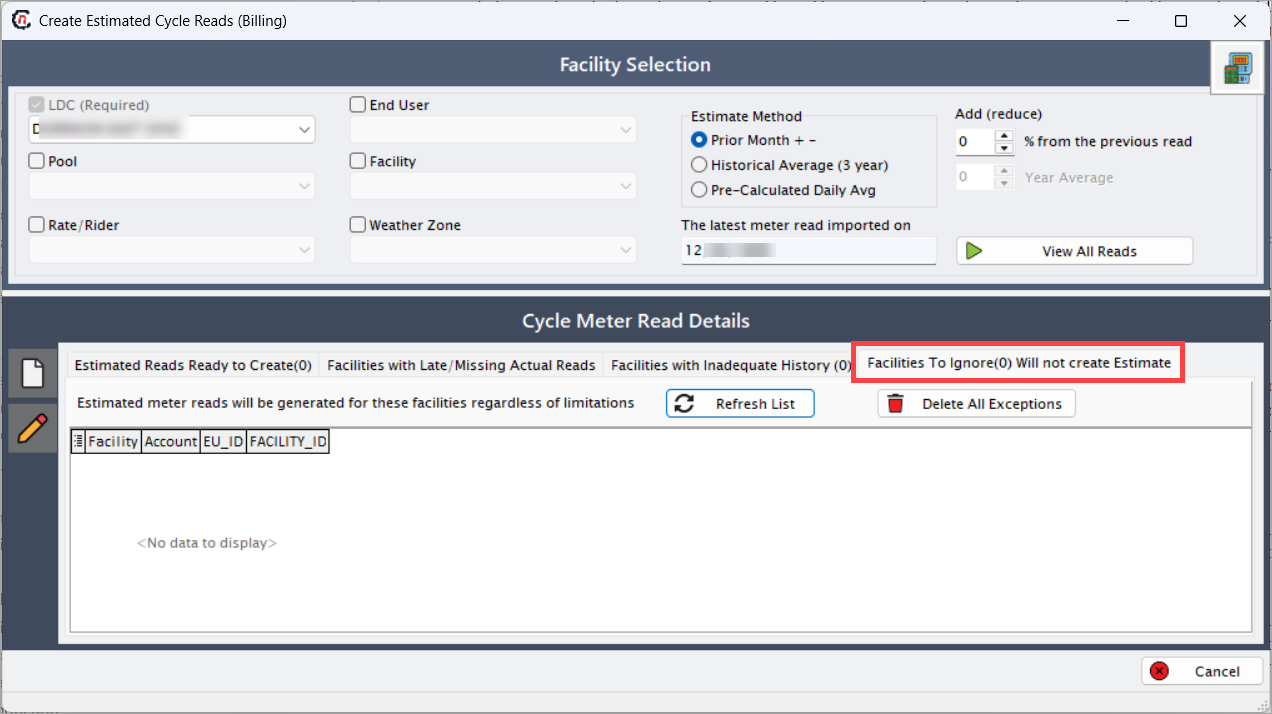
The Estimated meter reads will be generated for these facilities regardless of limitations option lists facilities that have been explicitly marked to generate estimated reads even if they do not meet the usual prerequisites or validation rules required for estimation. In other words, it allows users to bypass certain restrictions, ensuring that meter reads are still generated for these specific facilities.
Typically, the estimation process enforces several conditions, such as requiring a minimum number of prior reads, valid meter data, or proper facility configuration. However, in some cases, certain facilities may need estimated reads to be generated despite missing or incomplete information. These exceptions are handled here. Facilities displayed in this list are included in the estimation process based on administrative discretion or special business requirements.
Users can manually refresh this list using the Refresh List button to ensure that the display reflects the most current state of facilities. Additionally, if any facility no longer requires exception handling, it can be removed by selecting the Delete All Exceptions button. This ensures flexibility in managing which facilities are treated as estimation exceptions.
Fields Description Facility Displays the name or identifier of the facility that is excluded from the estimation process. It helps users identify which facility requires attention before re-running estimation. Account Shows the account number associated with the facility. This allows users to trace the ignored facility back to its customer account for verification or correction. EU_ID Represents the End User ID linked to the excluded facility. It helps in identifying which customer or contract the facility belongs to. FACILITY_ID Displays the unique facility identifier in the system database. This ID is used internally to reference the facility in estimation and billing processes.
Step 2: Adding meter read manually
The Add Cycle Meter Read icon in the Create Estimated Cycle Reads (Billing) screen allows users to manually input or modify meter read data for a specific facility. This functionality is essential when the system is unable to automatically import actual or estimated reads due to data unavailability, file upload errors, or configuration discrepancies.
By manually entering the meter read information, billing teams can ensure that all customer accounts remain up to date and that billing processes continue without interruption.
Note
- Manually adding a meter read is typically done for exceptions — for example, when a facility’s actual reads are missing from the automated import or when adjustments are needed due to corrected volume data.
- The manual entry provides full control over read details such as dates, volumes, conversions, and billing codes, ensuring that the read aligns with LDC (Local Distribution Company) and system requirements.
-
In the Cycle Meter Read Details section, click the Manually Add New Read (
 ) icon on the left panel.
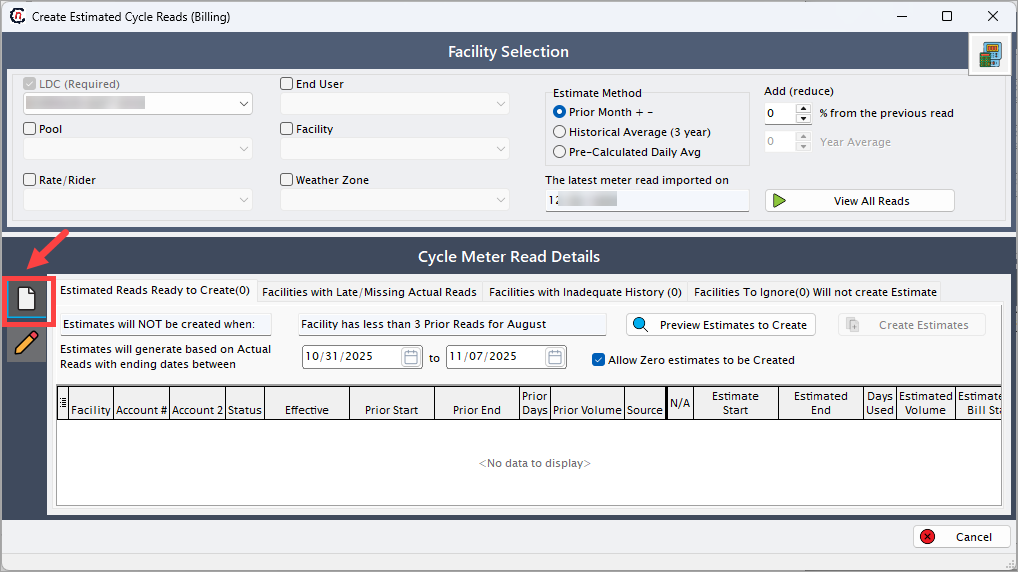
-
The Add or Edit Cycle Meter Read popup window appears.
-
Enter the relevant details as shown in the table below in the Meter Read Record section:
Fields Description ID Displays the unique system-generated identifier for the meter read entry. This ID is automatically created upon saving and is used for internal tracking and reporting. Date Created/Imported Shows the date and timestamp when the meter read was manually created or imported. This field helps trace when the read was entered. Import Session Indicates the import batch or session number. For manually entered reads, this typically defaults to session “1” unless linked to a specific import batch. Invoice # Displays the invoice number linked to the meter read, if available. If the read has not yet been invoiced, this field remains blank. Actualized Read (if set) Used to mark whether the entered read is an actual measured read (from the LDC or meter) or an estimated value. If checked or populated, it designates that the read was verified or actualized. Facility Displays the facility name and ID to which this meter read belongs. The facility represents the physical location where the gas consumption is measured. Account - LDC Shows the customer’s account number associated with the LDC. This field identifies the billing relationship between the customer and the LDC. Wacog Price Indicates the Weighted Average Cost of Gas (WACOG) for the read period. This value is used for cost and rate calculations. Start Date The date from which the meter read period begins. This defines the start of the consumption cycle for the facility. End Date The date marking the end of the meter read period. This, together with the start date, defines the billing duration for consumption calculation. Volume Represents the total measured or estimated volume of gas consumed during the read period. The volume is entered manually in standard units such as Dth, MCF, or CCF. Conversion Displays the conversion factor used to convert the measured volume into standardized billing units (for example, converting MCF to Dth). Converted Volume Auto-calculated based on the entered Volume and Conversion factor. This value is used for billing and reporting. Source Allows selection of the data source for the meter read. Common options include: Billing System, Manual Entry, LDC Import, or System Estimate. This helps track where the read originated from. Billing Status Indicates the current status of the meter read in the billing cycle (e.g., Pending, Processed, or Reversed). This status ensures correct sequencing during billing. LDC Code Refers to the unique code assigned to the LDC for mapping the meter read within LDC-specific rate and billing structures. LDC Bill Date Represents the date when the LDC generated or billed the read. This field ensures synchronization with external billing records. GL Month Year Commission Has Been Paid A checkbox that indicates whether commissions related to this meter read have been paid. Useful for financial reconciliation and reporting. 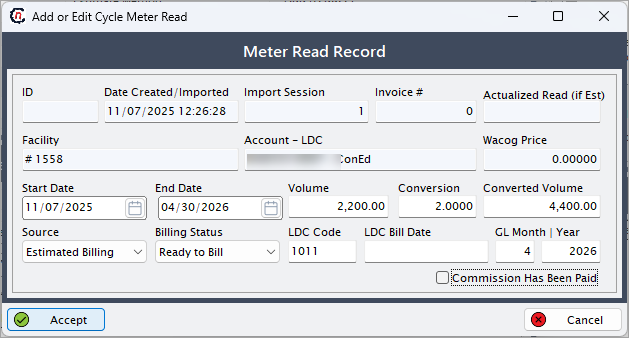
-
Click Accept to save the meter read record. Once saved, the details are stored in the system and can be used in estimation and billing runs.
What’s next
After generating estimated reads:
- Review the generated estimates in the Review Invoice Item Batch Details screen.
- Make necessary corrections if anomalies are detected.
- Proceed to generate invoices using the Generate Invoice screen.
Example scenario
An LDC named Amaston has not submitted meter reads for multiple facilities for the current month. The billing team opens the Create Estimated Cycle Reads screen, selects Amaston under the LDC filter, and chooses Pre-Calculated Daily Avg as the estimation method. After previewing the estimates, they click Create Estimates, and the system generates the missing reads automatically for billing continuity.
Summary
The configuration of Create Estimated Cycle Reads (Billing) allows billing teams to automatically generate meter reads for facilities with incomplete data. By using various estimation methods and filters, users can ensure accurate billing continuity while maintaining transparency and data integrity across billing cycles.