Reviewing price exposure
The Price exposure screen provides an analytical interface to identify and quantify volumes exposed to price fluctuations in the market. It consolidates exposure data from physical and financial deals, helps to assess how sensitive a portfolio or position is to changes in commodity prices.
Monitoring price exposure is crucial for managing financial risk, ensuring hedge effectiveness, and evaluating the market impact on realized and unrealized margins. This outlines the process to filter, analyze the exposure report by instrument, location, counterparty, and other business dimensions.
Prerequisites
Before working on the Price exposure screen, ensure the following prerequisites are met:
- Ensure the nGenue application is installed and use valid login credentials to log into the application.
- User permissions: Configure the user permissions including User type, Security user, Security group, Security assign user, and Security assign permissions in their respective screens to enable access to the Price exposure screen.
- Ensure the LDC, End user, Counterparty, Deal management, Index curve definition, PZL and Price agreement are properly configured.
- Ensure the Legal entity, Business unit, Portfolio, Strategy are fully configured in the Internal book structure.
Procedure to review price exposure
Step 1: Navigate to Price exposure screen
- Log in to the nGenue application.
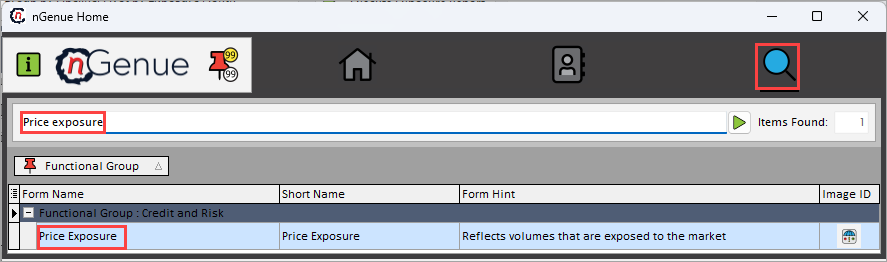
- Click the Search icon and enter Price exposure in the search bar.
-
Double-click Price exposure to open the respective screen.
-
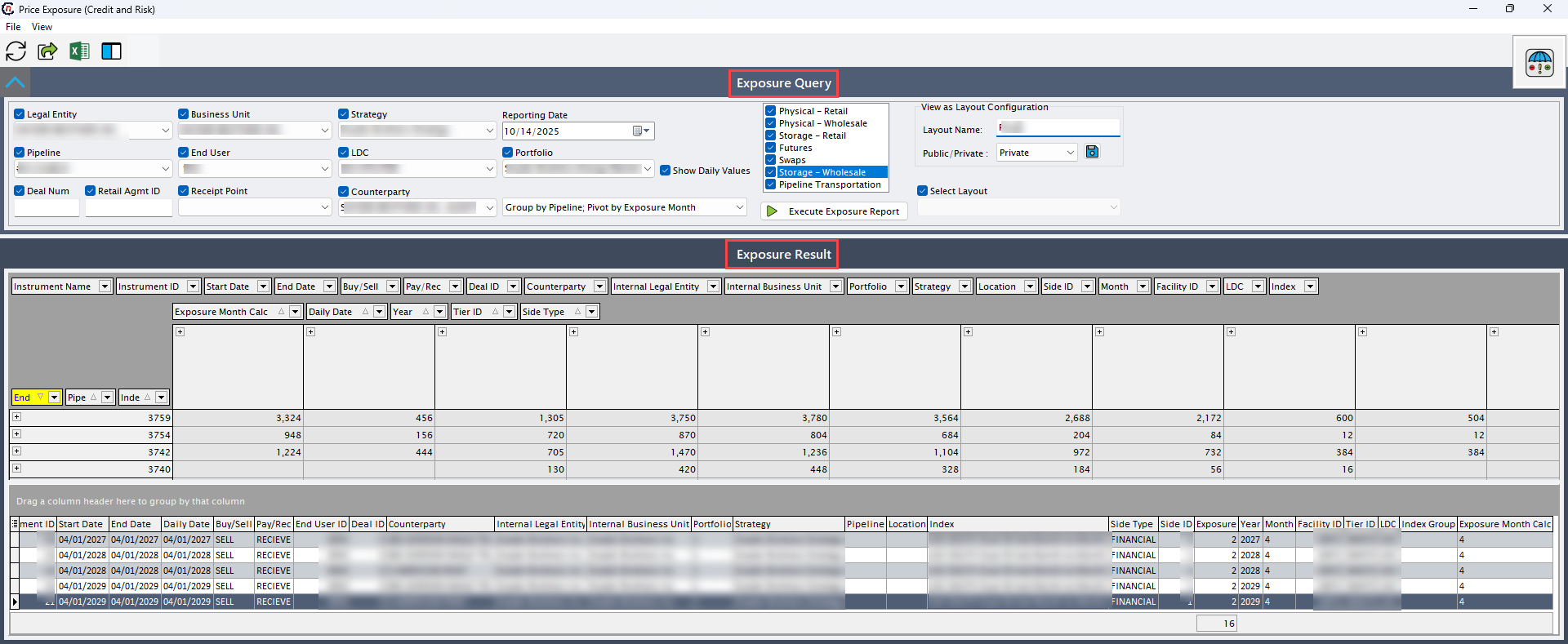
In the Price exposure (credit and risk) screen, there are two sections:
- Exposure query: This section provides filters that defines the parameter to run the query.
-
Exposure result: This section displays the calculated exposure data based on query criteria.
Step 2: Execute exposure report query
-
Complete the following required fields available in the Exposure query section to define the scope and parameters of the price exposure report. Each field helps filter or control how exposure data is retrieved or displayed. Atleast one of the key instruments must be selected to display the data.
Fields Description Legal entity Select the legal entity for which the exposure is being calculated, to display the record specific to the chosen entity while ensuring entity-level exposure visibility. Pipeline Select the pipeline associated with exposure to analyze transportation-related exposure specific to delivery routes. Deal num Provide the deal number assigned to a specific deal to retrieve exposure data linked to that deal. Retail agreement ID Provide reference number assigned to a specific retail price agreement to limit the results to exposures tied to that particular price agreement. Business unit Select the business unit to analyze exposure performance across different operational units. End user Select the end user to filter the exposures tied to that specific end user. Receipt point Select the receipt point to identify location-specific exposure. Strategy Select the strategy to review risk positions or performance under specific strategies. LDC Select the LDC to display the exposures associated with the chosen LDC, helping to align exposure with distribution-level operations. Counterparty Select the counterparty to filter the exposure data tied to that specific counterparty which provides insight into collective market exposure. Reporting date Specify the as-of date for exposure calculation. Portfolio Select the portfolio to display the exposures tied to the specific portfolio, which helps analyze exposure aggregation or diversification across asset portfolios. Show daily values Select this option to display daily-level exposure values rather than aggregated totals, useful for detailed daily mark-to-market tracking. Group by Specify the grouping criteria to enable grouping of exposure data based on attributes such as pipeline, business unit, quarter, instrument, index group and pivot either by exposure month or location. Key instruments (Mandatory)
Fields Description Physical- retail Select this checkbox to include exposure from physical retail transactions. Physical-wholesale Select this checkbox to include exposure from wholesale physical trades, while enabling evaluation of supply side exposure. Storage-retail Select this checkbox to include exposure from storage capacity and withdrawal positions related to retail operations. Futures Select this checkbox to add future contract exposure, helps to assess hedging effectiveness and market coverage. Swaps Select this checkbox to include swap positions in exposure results, additionally captures financial exposure from derivative instruments. Storage-wholesale Select this checkbox to add wholesale storage deals to the exposure report for complete view of wholesale storage exposure. Pipeline transportation Select this checkbox to include exposure related to pipeline capacity or transport agreements. Pipeline imbalances Select this checkbox to include imbalances in pipeline operations and related transactions. Retail demand Select this checkbox to include the volume of gas bought at a specific price and time by the end user. View as layout configuration
Fields Description Layout name Select the name of saved report layout to display specific configuration for exposure data. Public/Private Select the visibility of the layout configuration either as public or private. Public layouts are accessible to all the users, while private layouts have a restricted access. Select layout Select the existing saved layout. When a layout is selected, the system automatically applies predefined filters, groupings, and column arrangements. -
Click Execute exposure report to display the nomination detail records.

Step 3: Review price exposure
-
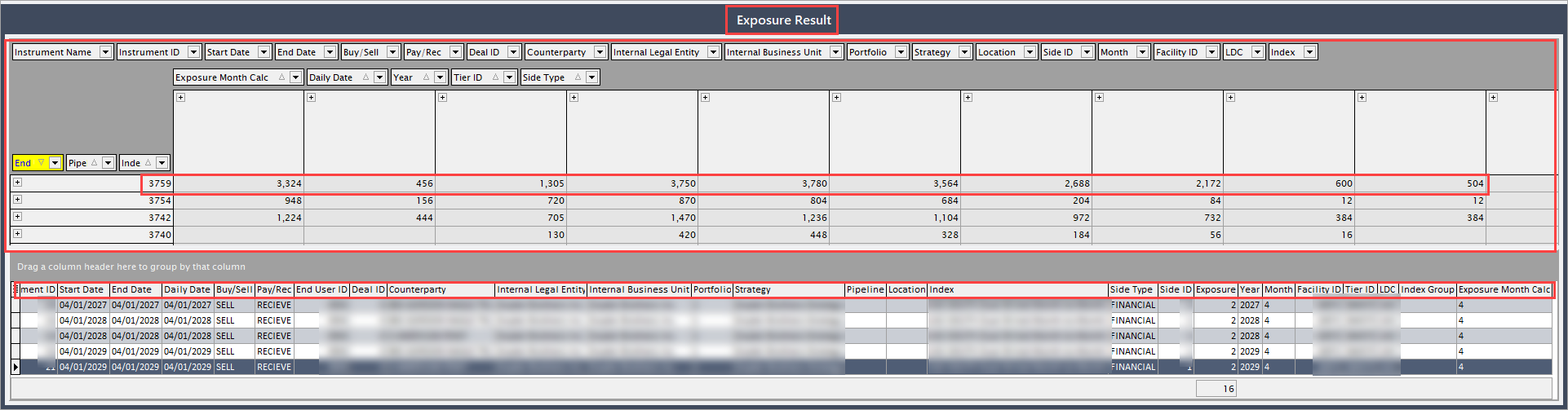
Upon executing the query, the price exposure records will be displayed in the Exposure result section based on the defined filters. Data fields provided in the following table can be rearranged dynamically using drag-and-drop functionality to organize the view.
Fields Description Instrument name Specifies the name of the associated instrument. Instrument ID Specifies the reference ID of the instrument linked to the deal. Start date Specifies the start date of contract period defined in the associated deal. End date Specifies the end date of contract period defined in the associated deal. Buy/sell Indicates whether the deal is a purchase or sale deal. Pay/receive Indicates whether the transaction is a pay or receive. End user ID Specifies the reference ID assigned to the end user tied to the exposure report. Deal ID Specifies the reference ID used to identify a specific deal associated with the exposure. LDC Specifies the LDC related to the deal. Counterparty Specifies the counterparty associated with the deal. Internal legal entity Specifies the legal entity associated with the deal. Internal business unit Specifies the internal business unit responsible for the deal. Portfolio Specifies the portfolio tied to that particular deal. Strategy Specifies the strategies under the associated deal. Location Specifies the geographical location that marks the gas supply defined in the associated deal. Side type Indicates the transaction side type either buy or sell. Side ID Indicates the identifier for the transaction type. Month Specifies the month of the transaction occurred. Facility ID Specifies the identifier of the facility tied to the associated deal. Tier ID Indicates the identifier of the pricing tier linked to the deal. Index group Specifies the name of the end user associated with the activity record. Index Defines the pricing index used for the deal. Daily date It is a specific daily date for transaction details. Exposure month cal Specifies the month for which the exposure is calculated. Year Specifies the year of the transaction occurred. Pipeline Specifies the pipeline associated with the deal. -
Select a record to view its corresponding details. You can also adjust column configurations to refine or expand the displayed data in the data grid.
Summary
The Price exposure screen provides a consolidated view of all market-exposed volumes across different deal types and portfolios. By executing the exposure report, users can analyze positions, assess risk, and identify exposure levels tied to physical, financial, and derivative instruments. This process ensures accurate monitoring of exposure data and supports proactive credit and risk management by giving visibility into how market movements impact portfolio performance.