Print supply WACOG pool summary
A Supply WACOG (Weighted Average Cost of Gas) pool summary report provides a consolidated view of the average gas supply cost for a specific supply pool over a defined period. It calculates the weighted average cost by incorporating all purchase transactions, transportation charges, adjustments, and other cost components associated with that pool.
This report is used to monitor and validate gas supply costs, support cost reconciliation and margin analysis, and ensure accurate allocation of costs within pricing, settlement, and financial reporting activities. It includes supply pool identifiers, total purchase quantities, weighted cost values, average prices per unit, and calculated WACOG for the selected period.
Prerequisites
Before working on the Print supply WACOG pool summary (Reports) screen, ensure the following prerequisites are met:
- Ensure the nGenue application is installed and use valid login credentials to log into the application.
- Configure the user permissions including User type, Security user, Security group, Security assign user, and Security assign permissions in their respective screens to enable access to the Print supply WACOG pool summary (Reports) screen.
- Ensure the WACOG pool and corresponding cost data must be configured and finalized for the selected month.
Procedure to print supply WACOG pool summary report
- Log in to the nGenue application.
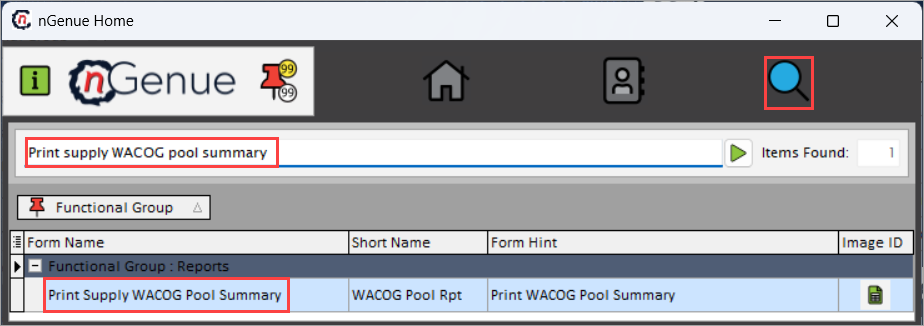
- Click the Search icon and enter Print supply WACOG pool summary in the search bar.
-
Double-click the Print supply WACOG pool summary from the search results to open respective screen.
-
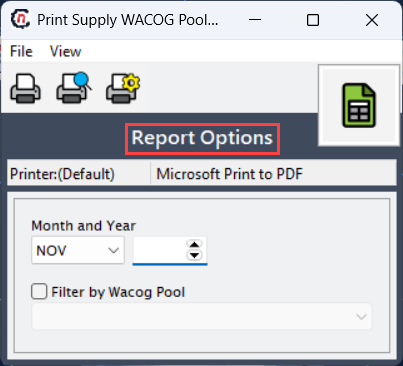
In Print supply WACOG pool summary (Reports), Report options section allows to specify the month and year and filter by WACOG pool to filter reports based on specified timing and to specific WACOG pool.
-
Select Month and Year to fetch the summary report of selected supply WACOG pool.
-
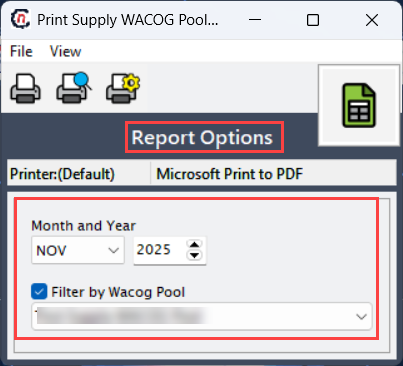
To generate a report for specific pool, enable Filter by WACOG pool checkbox and select the WACOG pool from the dropdown.
-
Select any of the printing options in the top header to configure printing, preview, print, as described in the table below:
Icons Icon name Description 
Print Click Print icon to print the aging detail report. 
Print preview Click Print preview icon to view the aging detail report. 
Printer setup Click Printer setup icon to configure printing settings. -
Click Printer setup to configure print settings, specify the name, size, orientation, properties and network.
- Click Ok to save the configuration.
- Click Cancel to discard changes.
-
Click Print preview to view the report before printing to make any required adjustments or changes.
- Click Print to generate the supply WACOG pool summary report for the selected month, year, and pool.
Summary
The supply WACOG pool summary report provides critical insight into overall supply cost performance. It enables transparent tracking of average gas costs, supports margin management and reconciliation, and ensures consistency between supply expenses and pricing outcomes.