Creating a storage target category
The Storage target category screen within the nGenue application enables you to define and manage different status categories for storage configurations. This guide provides comprehensive instructions for creating and managing storage target categories, ensuring proper configuration for your storage management needs.
The Storage target category screen allows you to define the status category of storage within the nGenue application. Any category description created in this screen will reflect in the Storage rate target configuration. This article provides the complete procedure for creating and managing storage target categories.
The table below describes the available icons and their functions:
| Icons | Icons name |
|---|---|
 |
Add a storage target category record |
 |
Edit current storage target category |
 |
Save changes to current storage target category |
 |
Cancel changes to storage target category record |
 |
Delete current storage target category record |
Prerequisites
Before configuring a Storage target category, ensure the following prerequisites are met:
- You must configure the security settings including User type, Security user, Security group, Security assign user, and Security assign permissions in their respective screens to ensure you have the required access and permissions for Creating a storage target category screen actions.
- LDC: The relevant LDC must exist in the application.
Procedure to configure storage target category
Step 1: Navigate to the Storage target category screen
- Log in to the nGenue application.
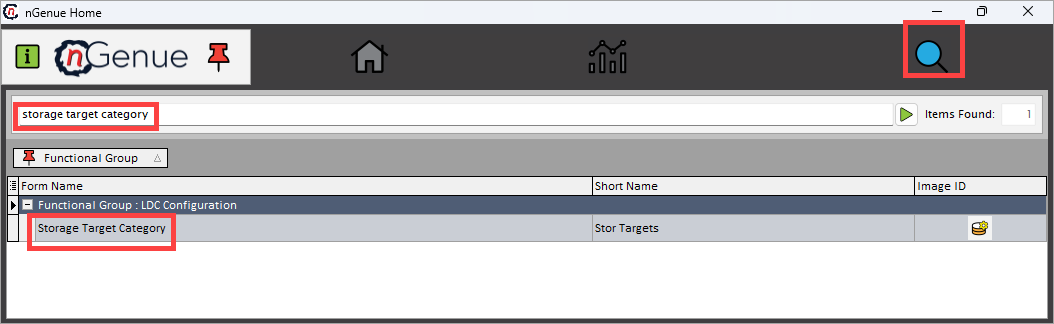
- Click the Search icon and enter storage target category in the search bar.
-
Double-click the Storage target category from the search results to open the screen.
-
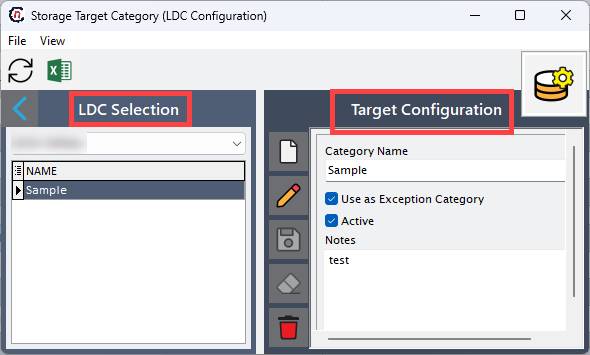
The Storage target category screen contains two main sections:
- LDC selection: Displays existing storage target category records.
-
Target configuration: Allows you to create, edit, or delete storage target category records.
Step 2: Create a new storage target category
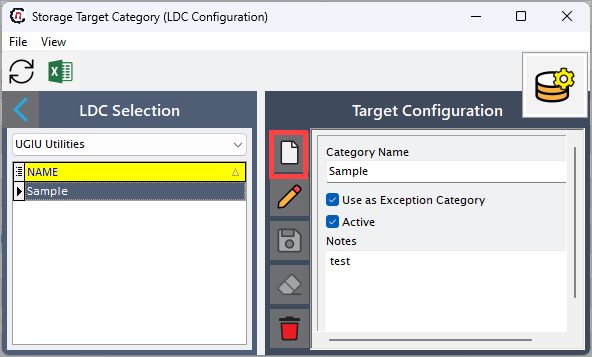
- In the Storage target category screen, click the Add a storage target category record icon.
- Enter the name for target category in the Category name field.
-
Configure the default behavior by selecting the applicable options:
- Use a exception category: Enables special handling or exclusion rules for storage targets.
-
Actives: Marks the category as active and available for use in storage rate targets.
-
Enter any relevant information or notes in the Notes field.
- Click the Save changes to storage target category icon to save and update the new record.
Note
The storage target category created in this screen will appear automatically in the Storage rate target screen.
Summary
The Storage target category configuration enables users to create and manage storage target classifications that directly impact how storage rates are defined and applied. Proper configuration ensures accurate categorization, visibility, and control over storage-related parameters within the nGenue application.
By following the above procedure, you can efficiently add, edit, and maintain storage target categories to support operational and business needs.