Viewing Used Commodity Prices
The View Used Commodity Prices (Billing) screen provides users with a consolidated view of all the commodity prices and Price Management Adjustment (PMA) billing items that have been used during a billing cycle for a selected Local Distribution Company (LDC). This screen helps billing administrators, pricing analysts, and operations teams verify which prices were applied to customer accounts during the billing process.
This functionality is critical in ensuring pricing accuracy, compliance, and transparency across invoices generated for customers. It allows users to:
- Verify the prices applied for each customer or account during billing.
- Identify discrepancies such as missing or incorrect prices before invoices are finalized.
- Review billing data filtered by month, LDC, pool, or rate/rider.
- Exclude already invoiced items to focus only on pending or unbilled data.
- Export the data for auditing or reconciliation purposes.
By using this screen, organizations can perform pre-invoice validation to ensure that every end user under the LDC is billed at the correct price based on contractual agreements, rates, and market indexes.
Prerequisites
Before working with the View Used Commodity Prices (Billing) screen, ensure that the following prerequisites are met:
- The user have the add or modify permissions for the View Used Commodity Prices screen.
- The LDC setup is complete and active in the system.
- The relevant billing cycle for the invoice month is open.
- All Rate/Rider configurations and Contract pricing details are defined and approved.
- All dependent billing data (meter reads, end user data, and PMA records) is validated to ensure data consistency.
- If using pools or multiple LDCs, ensure they are correctly mapped to end users.
Procedure to view used commodity prices
Step 1: Navigate to the View Used Commodity Prices screen
- Log in to the nGenue application.
-
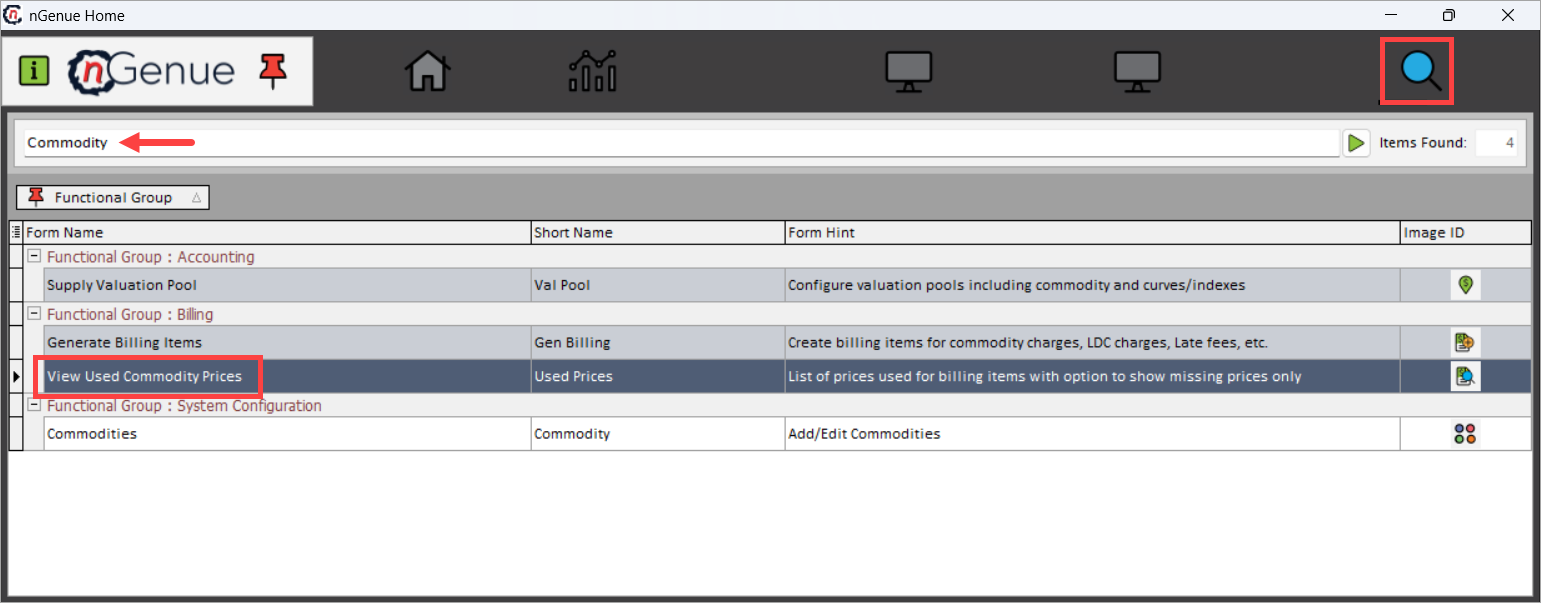
Click Search and enter Commodity in the search bar.
-
Double-click View Used Commodity Prices to open the View Used Commodity Prices (Billing) screen.
-
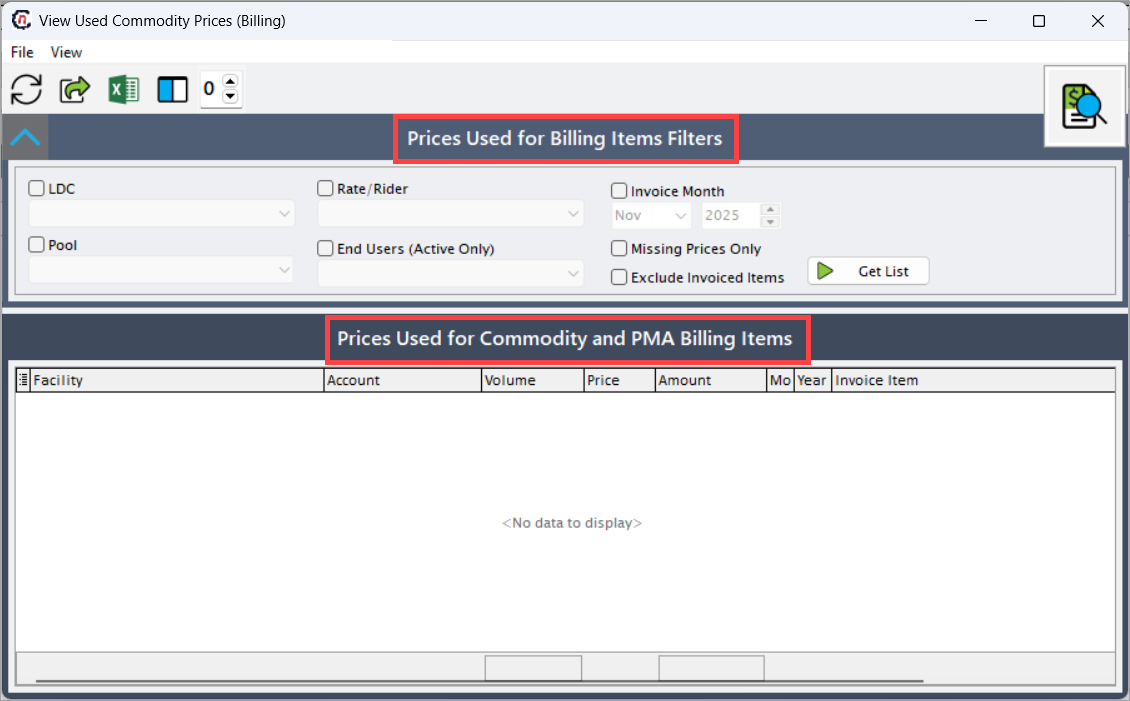
The screen is divided into two main sections:
- Prices Used for Billing Items Filters section
- Prices Used for Commodity and PMA Billing Items section
Prices Used for Billing Items Filters section
The Prices Used for Billing Items Filters section allows users to configure the search criteria to retrieve specific sets of billing data.
Filters Description LDC Dropdown used to select the Local Distribution Company for which billing prices need to be viewed. This is a mandatory field. Selecting an LDC determines the dataset from which billing prices are retrieved. Rate/Rider Optional dropdown that filters the displayed results by a specific rate or rider plan. When a rate/rider is selected, only billing items tied to that rate plan appear in the list. Leaving it blank displays all rate/riders for the selected LDC. Invoice Month Checkbox and dropdown combination used to narrow results by a specific billing month and year.
• If selected – Activates the month and year selectors, limiting the displayed data to items billed within that period.
• If unselected – The system retrieves billing data for all available months and years.Pool Dropdown used to filter data by a particular pool. If no pool is selected, the system lists data for all pools associated with the chosen LDC. Selecting a specific pool helps isolate prices used for that pool’s accounts. End Users (Active Only) Checkbox that filters data to include only active end users.
• If selected – Displays billing records for accounts currently active in the system.
• If unselected – Includes both active and inactive end users, allowing users to view historical data or accounts no longer active.Missing Prices Only Checkbox filter used to detect any billing records that are missing price values.
• If selected – Displays only records where price data is absent, which helps identify accounts requiring price corrections before invoicing.
• If unselected – Displays all records, regardless of whether price values are missing.Exclude Invoiced Items Checkbox filter that determines whether invoiced items should be included in the displayed results.
• If selected – Removes invoiced billing items from the result set, showing only pending or unbilled items.
• If unselected – Displays both invoiced and unbilled items for complete visibility.Get List Action button used to retrieve the list of billing items and their associated commodity prices based on the configured filters. Once clicked, the table below populates with matching data from the billing system. 
Prices Used for Commodity and PMA Billing Items section
The Prices Used for Commodity and PMA Billing Items grid displays the corresponding results.
Filters Description Facility Displays the customer facility name or service address tied to the billing account. This helps users identify the physical location associated with the billing record. Account Represents the unique account number assigned to the facility or customer. Each account is used to track consumption, pricing, and billing history. Volume Shows the quantity of commodity consumed during the billing period, typically measured in Dth (Dekatherms) or MCF. This field is critical for calculating the billed amount. Price Indicates the price per unit applied to the billing item. The price is determined by the rate plan, market price, or fixed contract associated with the account. Amount Displays the total amount billed, calculated as Volume × Price. It represents the total charge applied to the account for the billing period.Month Displays the billing month corresponding to the listed price. Useful for verifying if the correct month’s price has been applied. Year Indicates the billing year associated with the listed item. It helps distinguish between data from different fiscal or billing years. Invoice Item Lists the description of the pricing component or contract name applied to the billing item, such as a fixed price agreement or indexed rate. Item Type Identifies the type of billing item, such as Current Delivery, Prior Adjustment, or Future Delivery. Typically, this screen displays Current Delivery items to show the active billing data. 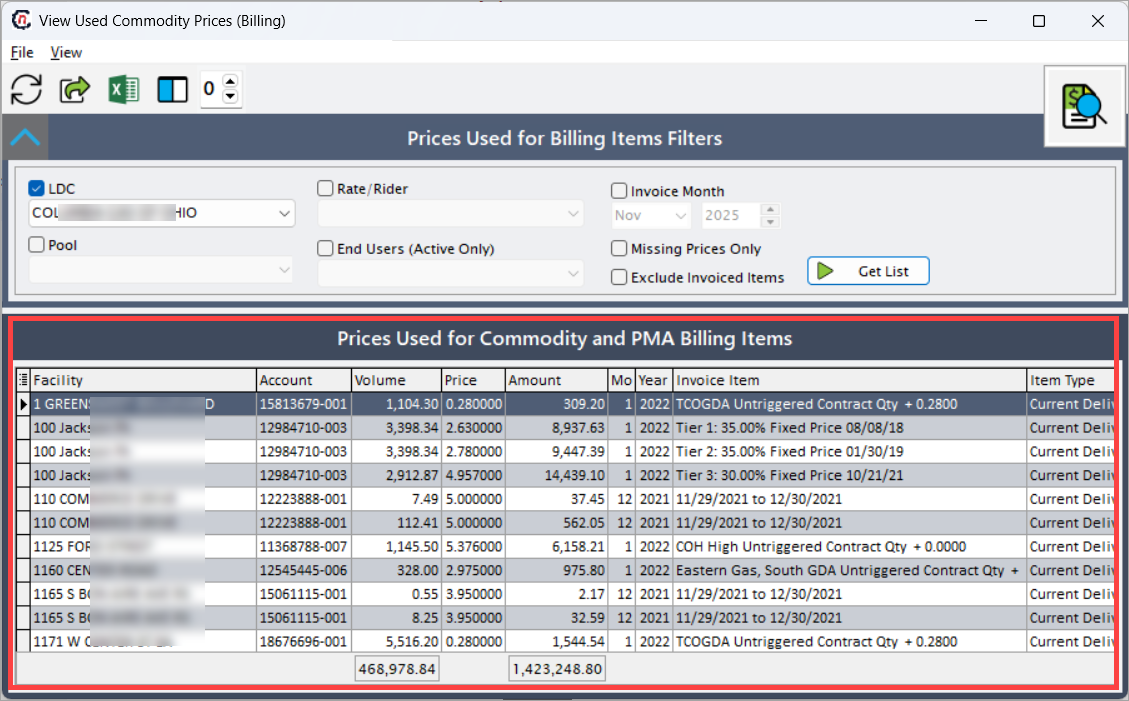
Important notes
- The Get List action retrieves data only after all required filters (such as LDC) are defined.
- The Missing Prices Only checkbox selection is particularly useful during pre-invoicing review to catch unpriced records.
- The Exclude Invoiced Items checkbox selection ensures the user reviews only pending transactions for the selected period.
- Export options are available through the toolbar for data validation and audit purposes.
Example Scenario
Example: A billing analyst needs to verify that the ABC GAS LDC has correct prices applied for November 2025 before generating invoices.
- The analyst selects LDC as ABC GAS.
- Checks the Invoice Month checkbox and selects Nov 2025.
- Selects the Missing Prices Only checkbox to review records where price data might be missing.
- Clicks Get List.
The system displays all records meeting those filters. The analyst can then review the Price and Invoice Item columns to identify whether contract prices or fixed prices were properly assigned. If missing or incorrect, the analyst can update the price definitions before invoices are finalized.
What’s Next
After verifying the used commodity prices:
- If discrepancies are found, update or correct the Rate/Rider configurations or Contract prices.
- Proceed to the Generate Bills screen to perform billing calculations based on validated prices.
- Use the Miscellaneous Daily Charges screen if additional manual billing adjustments are needed.
- Re-run this report to confirm all issues are resolved before releasing invoices for the billing cycle.
Summary
The View Used Commodity Prices (Billing) screen ensure that billing data is accurate, complete, and aligned with current pricing definitions. By filtering, reviewing, and validating prices before invoicing, users can prevent costly billing discrepancies, streamline financial reporting, and maintain compliance with contractual pricing terms.
This feature ensures billing transparency and consistency across all customer accounts, supporting a reliable and auditable billing process.