Alternate billing entity
An Alternate Billing Entity in nGenue allows organizations to bill customers using a different company name, address, or legal entity than the primary legal entity associated with the end user or contract. Alternate billing entities ensure that invoices are sent from the correct organization, with appropriate legal and regulatory details, without altering the customer’s core account setup.
The Alternate billing entity screen provides the following action icons for managing Alternate billing entity records:
| Icons | Description |
|---|---|
 |
Add a alternate billing entity record. |
 |
Edit current alternate billing entity. |
 |
Save changes to current alternate billing entity. |
 |
Cancel changes to alternate billing entity record. |
 |
Delete current alternate billing entity record. |
Prerequisites
Before working on the Alternate billing entity screen, ensure the following prerequisites are met:
- Ensure the nGenue application is installed and use valid login credentials to log into the application.
- User permissions: Must configure the security settings including User type, Security user, Security group, Security assign user, and Security assign permissions in their respective screens to ensure the required access and permissions for Alternate billing entity screen actions.
Procedure to Alternate billing entity
Step 1: Navigate to Alternate billing entity screen
- Log in to the nGenue application.
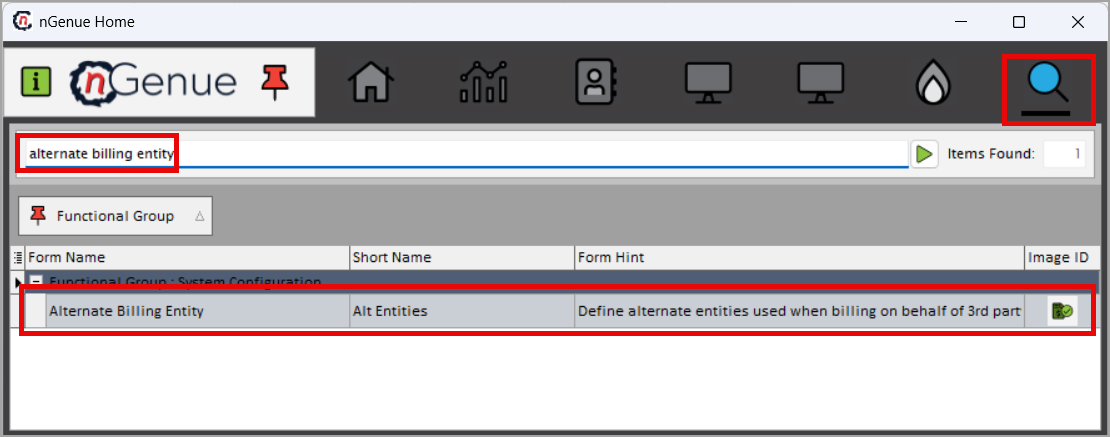
- Click the Search icon and enter alternate billing entity in the search bar.
-
Double-click the Alternate billing entity from the search results to open respective screen.
-
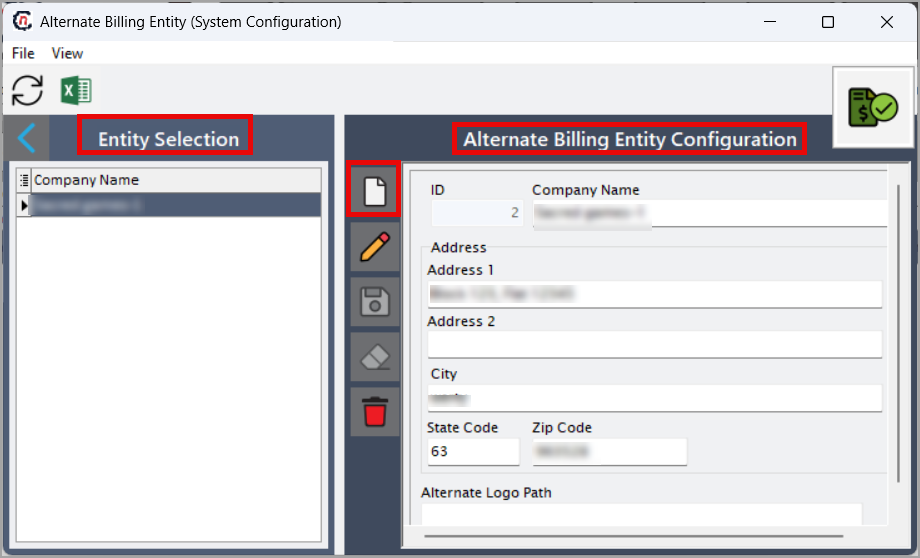
Alternate billing entity screen has two sections:
- Entity selction: Displays list of altenate billing entity.
- Alternate billing entity configuration: Can create, edit, save, and delete the altenate billing entity.
Step 2: create alternate billing entity
-
In the Alternate billing entity section, click Add a alternate billing entity icon.
-
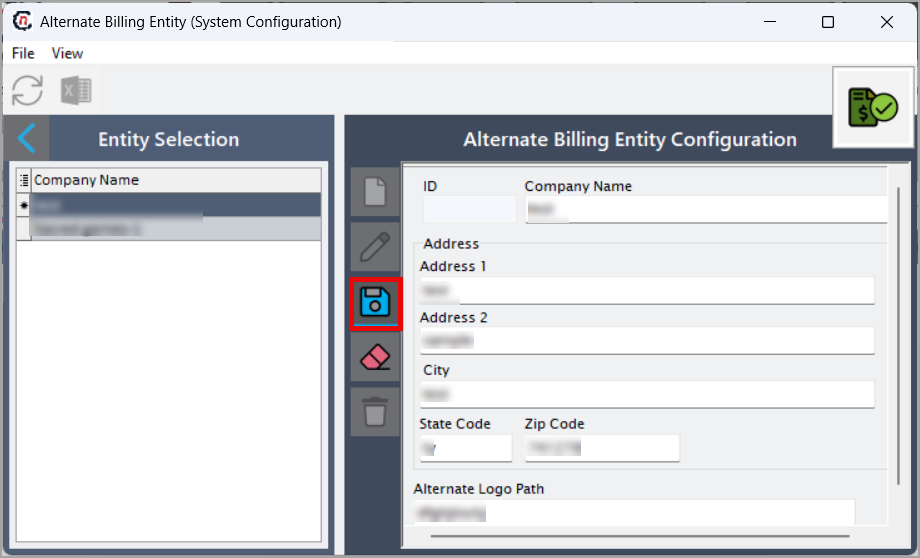
Enter the required details:
Fields Description ID Auto-generated system identifier Company name Enter the alternate billing company's legal or operating name Address 1/Address 2 Enter the primary and secondary address lines City Enter the city name State code Enter the standard state abbreviation Zip code Enter the postal code for the billing address Alternate log path Enter the directory path used for storing logs or invoice files for this billing entity -
Click Save to store the new alternate billing entity record.
Summary
The Alternate billing entity functionality in nGenue allows organizations to define and manage multiple billing identities. By configuring alternate company names and addresses, businesses can maintain billing accuracy, comply with legal requirements, and support multi-entity operations without modifying core customer or contract setups. This feature plays a key role in ensuring invoices display correct corporate information, improving customer trust and regulatory alignment.