Print retail price confirmation (Multi-month)
A Retail price confirmation (Multi-month) report provides a summarized view of retail pricing across multiple months for selected Local Distribution Companies (LDCs), rates, or pools. It consolidates both fixed and index-based pricing tiers, along with effective date ranges and rate details used in retail gas pricing.
This report is needed to verify pricing accuracy over an extended period, confirm alignment with approved rate schedules, and identify any discrepancies or rate changes before billing or contract renewal. It supports regulatory reporting, auditing, and management review by ensuring that pricing applied in deals and billing processes is consistent and accurate.
The report includes LDC, pool, and rate level pricing details, monthly rate summaries, effective date ranges, and volume information that support billing validation and reconciliation. The report can be printed or exported in nGenue or GISB format for internal validation, compliance reporting, or customer communication.
Prerequisites
Before working on the Print retail price confirmation - Multi-month (Reports) screen, ensure the following prerequisites are met:
- Ensure the nGenue application is installed and use valid login credentials to log into the application.
- Configure the user permissions including User type, Security user, Security group, Security assign user, and Security assign permissions in their respective screens to enable access to the Print retail price confirmation - Multi-month (Reports) screen.
- Ensure the retail Price agreements, Local Distribution Company (LDC), Pool and End user are properly configured.
Procedure to print retail price confirmation (Multi-month) report
- Log in to the nGenue application.
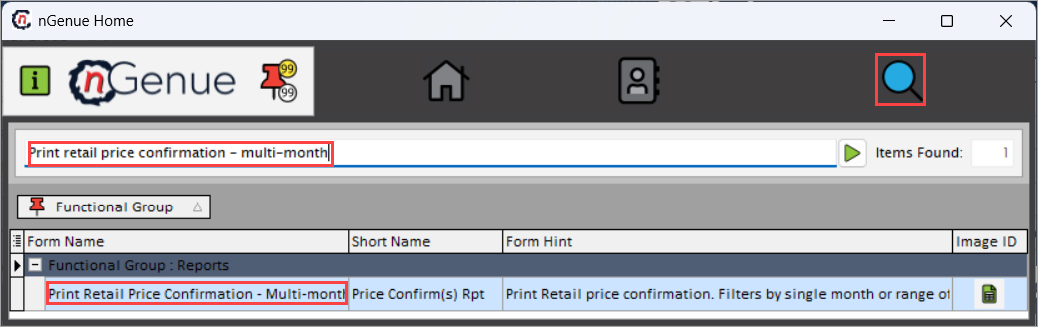
- Click the Search icon and enter Print retail price confirmation - Multi-month in the search bar.
-
Double-click the Print retail price confirmation - Multi-month from the search results to open respective screen.
-
In Print retail price confirmation - Multi-month (Reports), under Report options section select the report format either nGenue report or GISB format.
-
Complete the required fields available in the Report options section as listed in the table below.
Fields Description LDC Select the LDC whose pricing information will be used to generate the multi-month report. The report will retrieve data only for the selected LDC. Rate/rider Select the rate or rider that applies to the end user will be included in the report. The selected rate determines which price tiers, charges, or schedules are evaluated in the generated output. Pool Select the pool that should be included in the report to filter all related volumes, and pricing tiers. End users (Active only) Select this option to limit the report to end users who are active during the reporting period. Date range filter Select the date filter that defines the reporting scope. Options determine how the system retrieves pricing agreements:
• No date filter – includes all data regardless of dates.
• Price agreement – filters results based on agreement effective dates.
• Date of price lock-in – includes only pricing dates that fall within the selected lock-in period.Print letterhead logo Select this checkbox to include the organization’s letterhead logo on the printed or PDF version of the report. List fixed tiers Select this checkbox report to display fixed-rate pricing tiers and ensures all fixed tier pricing components appear in the output. List index tiers Select this checkbox to include index-based pricing tiers in the report to display all index tier structures associated with the selected rate. Who is the signor on the contract Enter the name of the authorized signatory that should appear on the retail price confirmation document. This name will be displayed in the signature section of the printed report. Signature date Specify the date that should be printed next to the contract signatory’s name. Additional delivery points (other than LDC) Select any supplementary delivery points that must be included in the report. These locations will be added to the report along with the primary LDC delivery point. Optional footer message Enter a custom message to be displayed in the footer of the printed report or PDF. 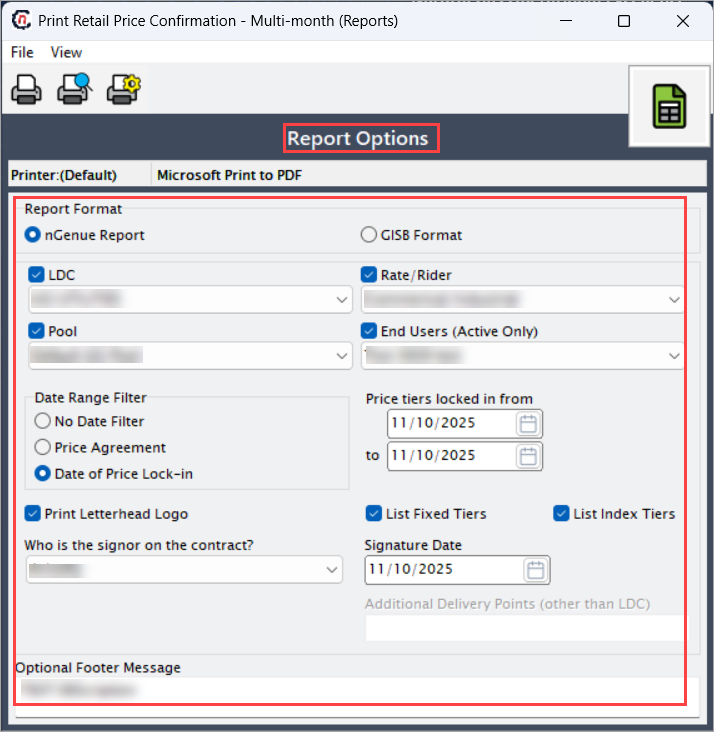
-
Select any of the printing options in the top header to configure printing, preview, print, as described in the table below:
Icons Icon name Description 
Print Click Print icon to generate and print the retail price confirmation (multi-month) report. 
Print preview Click Print preview icon to view the report before printing. 
Printer setup Click Printer setup icon to configure printing settings. -
Click Printer setup to configure print settings, specify the name, size, orientation, properties and network.
- Click Ok to save the configuration.
- Click Cancel to discard changes.
-
Click Print preview to view the report before printing to make any required adjustments or changes.
- Click Print to generate the retail price confirmation report for the selected period based on your configuration.
Summary
The retail price confirmation (multi-month) report provides a consolidated, time-based summary of retail pricing across multiple months. It enables clear rate validation, simplifies verification of multi-period billing, and ensures accurate and auditable pricing records for internal analysis, regulatory compliance, and external reporting.