Configure wholesale brokers
Wholesale brokers are third-party entities that facilitate wholesale gas transactions and financial deals. They support tracking of these transactions and enable automatic calculation and posting of broker fees. Setting up wholesale brokers ensures accurate commercial settlement, proper financial posting, and streamlined automated fee processing.
Prerequisites
Before working on the Wholesale brokers screen, ensure the following prerequisites are met:
- Ensure the nGenue application is installed and use valid login credentials to log into the application.
- Configure the user permissions including User type, Security user, Security group, Security assign user, and Security assign permissions in their respective screens to enable access to the Wholesale brokers screen.
- Ensure that GL accounts are configured in the Chart of accounts.
- Ensure that broker fee handling must be enabled in the wholesale or financial deal workflow.
Procedure to configure wholesale brokers
Step 1: Navigate to Wholesale brokers screen
- Log in to the nGenue application.
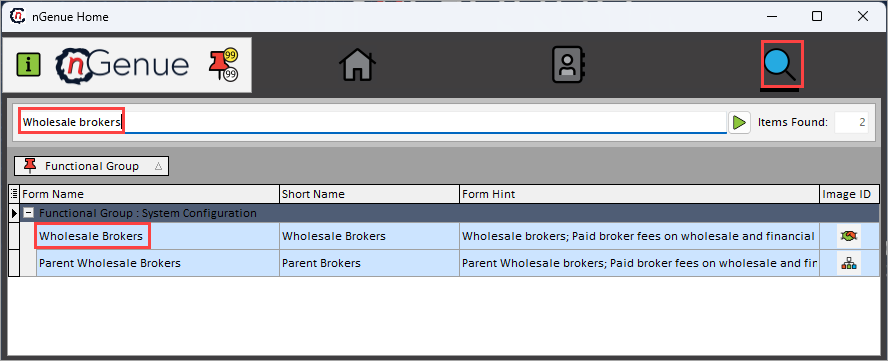
- Click the Search icon and enter Wholesale brokers in the search bar.
-
Double-click the Wholesale brokers from the search results to open respective screen.
-
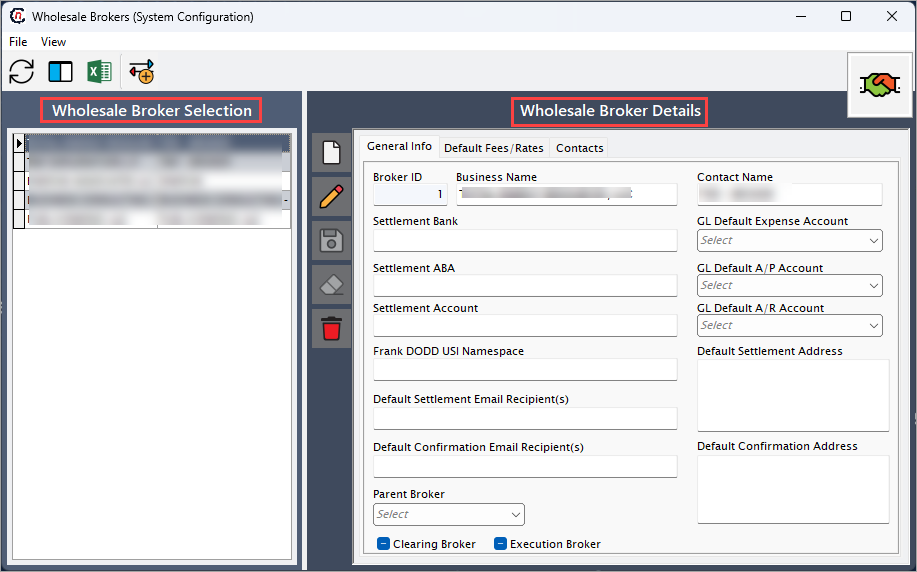
Wholesale brokers (System configuration) screen has two sections:
- Wholesale broker selection: This section provides the list of wholesale broker configured to select and modify or remove if required.
-
Wholesale broker details: This section This section allows to define the general information, default rate and contacts related to wholesale brokers.
- General info: This tab allows to define parameters to configure a wholesale broker record.
- Default fees/rates: This allows you to add and delete default fee or rate for the selected broker record.
-
Contacts: This allows you to add contact add/edit contact screen and to configure contact role for the selected broker record.
Step 2: Configure wholesale brokers
The following table lists the icons available on the Wholesale broker details section and their respective functions:
| Icons | Icon name | Description |
|---|---|---|
 |
Add a parent broker record | Opens a new record form to create a parent broker entry. |
 |
Edit current parent broker | Opens the selected record for editing. |
 |
Save changes to current parent broker | Saves the modifications made to the current record. |
 |
Cancel changes to current parent broker record | Discards unsaved changes made to the record. |
 |
Delete current parent broker record | Permanently removes the selected parent broker record. |
Step 2.1 : Add a wholesale brokers
- In the Wholesale broker details, click the Add a wholesale broker record icon to create a new contract language record.
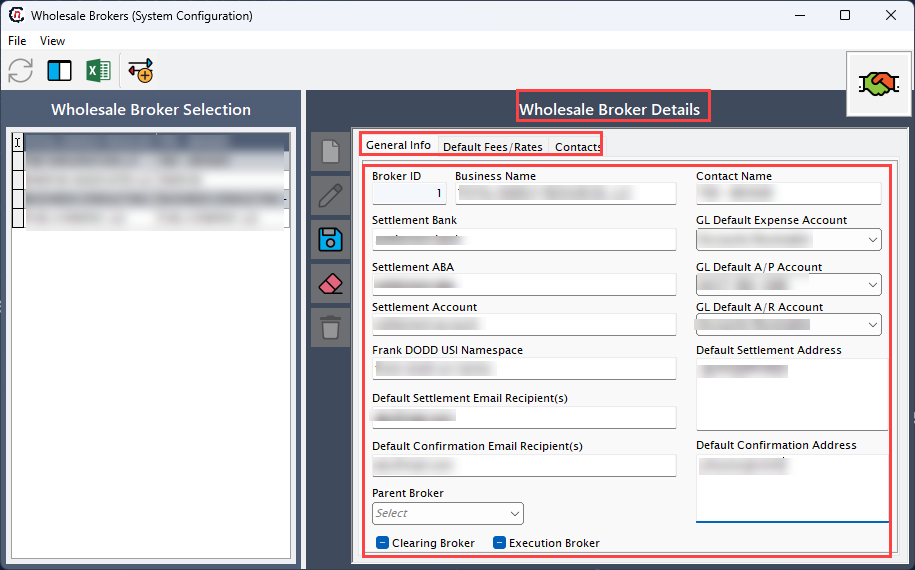
- Complete required fields available in the Wholesale broker details section that are listed in the table below:
General Info
| Fields | Description |
|------------|------------|
| Broker ID | Specifies the official name or description of the facility.  |
| Business name | Specifies the date and timestamp when the activity logged. |
| Settlement bank | Describes the action or event. |
| Settlement ABA | Specifies the name of the user who logged the activity. |
| Settlement account | Specifies the source where the activity logged from.  |
| Frank DODD USI namespace | It is a unique identifier for the activity record. |
| Contact name | Specifies the official name or description of the facility.  |
| GL default A/R account  | Specifies the official name or description of the facility.  |
| GL default A/P account | Specifies the official name or description of the facility.  |
| GL default expense account | Specifies the official name or description of the facility.  |
| Default settlement address | Specifies the address used for settlement statements.  |
| Default confirmation address | Specifies the address used for confirmation notices.  |
| Default settlement recipient email | Specifies the the email for receiving settlement communications. |
| Default confirmation recipient email | Specifies the email receiving confirmation letters. |
| Parent broker | Specifies the identifier for contact associated with the selected broker.   |
| Clearing broker | Specifies the short code for the contact. |
| Execution broker | Specifies the name associated with the contact. |

*Default fees/rates*

| Fields | Description |
|------------|------------|
| Instrument | Specifies the official name or description of the facility.  |
| Broker | Specifies the date and timestamp when the activity logged. |
| Counterparty | Describes the action or event. |
| Start date | Specifies the name of the user who logged the activity. |
| End date | Specifies the source where the activity logged from.  |
| Use aggreg | It is a unique identifier for the activity record. |
| Flat fee | Specifies the official name or description of the facility.  |
| Rte per unit | Specifies the official name or description of the facility.  |
| Adder type | Specifies the official name or description of the facility.  |
| EFT acc | Specifies the official name or description of the facility.  |
| Tiered | Specifies the payment term type used for fee settlement.  |
| Tier 1 high | Specifies the term duration to be applied when calculating payment due dates.  |
| Settlement address | Specifies the address used for settlement statements.  |
| Confirmation address | Specifies the address used for confirmation notices.  |
| Default settlement recipient email | Specifies the the email for receiving settlement communications. |
| Default confirmation recipient email | Specifies the email receiving confirmation letters. |

*Contacts*

| Fields | Description |
|------------|------------|
| Full name | Specifies the identifier for contact associated with the selected broker.   |
| Voice phone | Specifies the short code for the contact. |
| Cell phone | Specifies the name associated with the contact. |
| Fax phone |Specify the street address for the broker’s primary location. |
| E-mail | Specify the city of the broker's address. |
| Contact ID | Specify the state of the address. |
| Owner ID | Specify the postal code for mailing and settlement documentation. |
-
Click Save changes to current broker to store the configuration.
Step 2.2 : Edit a brokers record
- Click the Edit a broker record icon to modify the selected broker.
- Update necessary details and click Save changes to current broker to apply changes.
Step 2.3 : Delete a brokers record
Click the Delete current parent broker record icon to permanently remove the broker record
Summary
Configuring wholesale brokers in nGenue defines how broker fees are applied, how settlements and confirmations are routed, and how the corresponding financial postings are generated. It ensures that all wholesale transactions follow consistent, automated, and auditable broker-handling processes.