Generate LDC pool forecasts
LDC pool forecasts represent projected gas demand for a specific Local Distribution Company (LDC) pool over a defined future period. These forecasts are used within supply and risk management workflows to estimate expected consumption before actual usage data is available.
In nGenue, LDC pool forecasts support operational planning, supply balancing, nomination preparation, and downstream exposure and settlement processes. Forecasts are typically generated using historical consumption patterns and optional weather variables, allowing supply managers to anticipate demand, align purchases, and manage risk before actual volumes are finalized.
Prerequisites
Before working on the Print statement (Reports) screen, ensure the following prerequisites are met:
- Ensure the nGenue application is installed and use valid login credentials to log into the application.
- Configure the user permissions including User type, Security user, Security group, Security assign user, and Security assign permissions in their respective screens to enable access to the Print statement (Reports) screen.
- Ensure the retail rate schedules, Local Distribution Company (LDC), pools must be configured properly.
Procedure to generate LDC pool forecasts
Step 1: Navigate to Generate LDC pool forecasts screen
- Log in to the nGenue application.
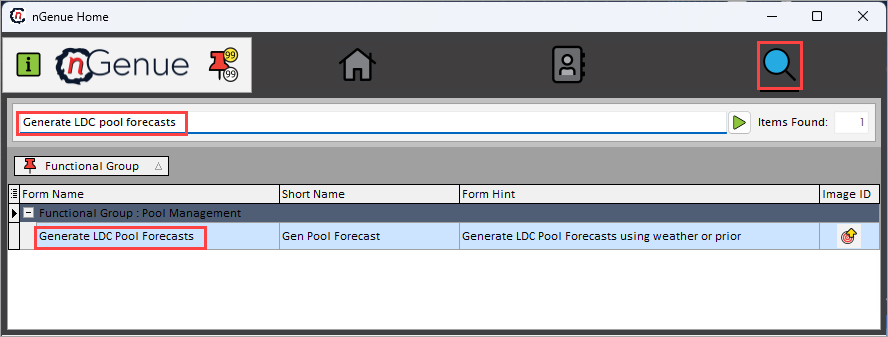
- Click the Search icon and enter Generate LDC pool forecasts in the search bar.
-
Double-click Generate LDC pool forecasts to open the respective screen.
-
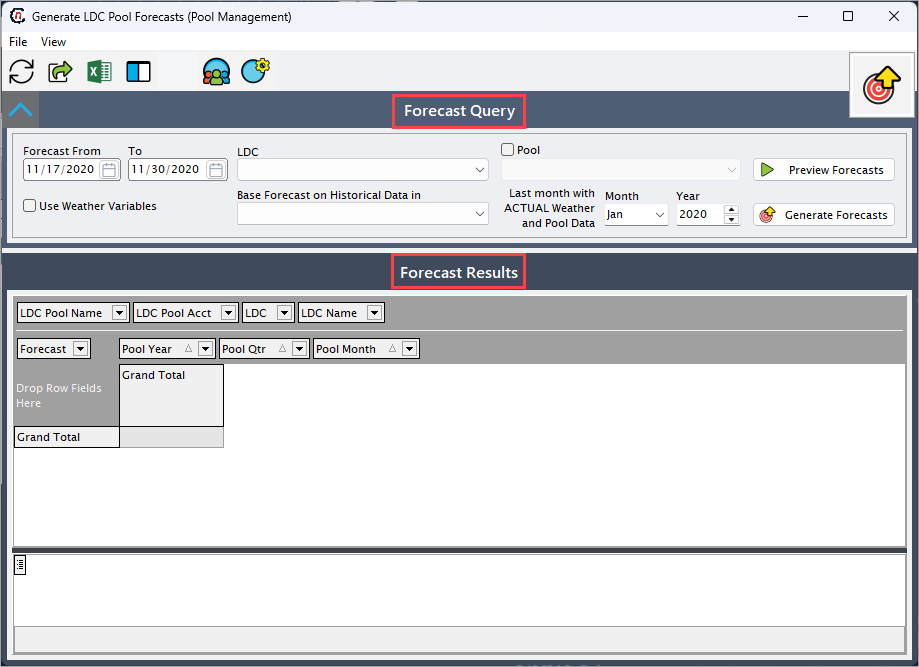
In the Generate LDC pool forecasts (Pool management) screen, there are two sections:
- Forecast query: This section defines the forecasting parameters, such as time range, LDC, pool, and forecasting logic. The selections made here control how forecast values are calculated.
-
Forecast results: This section displays the forecasted pool volumes generated based on the query criteria.
Step 2: Generate forecasts
-
Complete the following required fields available in the Forecast query section to define the scope and parameters of the price exposure report. define the scope and parameters of the forecast. Each field determines how the system calculates projected pool demand. Atleast one key selection must be provided to generate results.
Fields Description Forecast from (to) Specify the date range for which pool demand should be forecasted. The system generates forecast values for each period within this range. LDC Select the LDC to limit the calculations related to pools associated with chosen LDC. Pool Select the pool for which demand forecasts are required. Only results for the selected pool will be included. Use weather variables Select this checkbox to include weather-based adjustments when calculating forecast demand. Base forecast on historical data in Specify the historical time window the system should reference when calculating forecast trends to determine the baseline consumption pattern. Last month with actual weather and pool data Specify the month and year to identify the finalized actual data and to transition from actuals to forecasted values. -
Click Preview forecasts to review the calculated forecast values before final generation.
- Click Generate forecasts to create and store the forecast values based on the selected parameters.
Step 3: Review forecasts
-
Once the forecast is generated, results are displayed in the Forecast results section. This grid presents forecasted pool volumes broken down by LDC, pool, and time period. Data fields provided in the following table can be rearranged dynamically using drag-and-drop functionality to organize the view.
Fields Description LDC pool name Displays the name of the LDC pool for which the forecast has been generated. LDC pool account Displays the account identifier associated with the LDC pool. LDC Displays the short code of the LDC. LDC name Displays the full name of the LDC. Forecast Displays the calculated forecasted volume for the selected pool and time period. Pool year Indicates the year to which the forecasted pool volume applies. Pool qtr Indicates the quarter associated with the forecasted value. Pool month Indicates the specific month for the forecasted demand. Grand total Displays the aggregated forecasted volume across the selected period. -
Select a record to view its corresponding details. You can also adjust column configurations to refine or expand the displayed forecast data in the data grid.
Summary
Generating LDC pool forecasts in nGenue allows supply and operations teams to project future gas demand using historical data and optional weather adjustments. These forecasts play a critical role in supply planning, nomination preparation, exposure analysis, and overall demand management. By defining accurate forecasting parameters and reviewing forecast results, users can proactively align supply strategies with expected consumption before actual usage is finalized.