Add price agreement
A price agreement in nGenue defines how the price of natural gas is determined between two parties, typically a seller and a buyer. It serves as the foundation for billing, forecasting, deal execution, and reporting. Price agreements can be fixed, index-based, or a combination of both.
They automate pricing calculations for different contracts and delivery scenarios while ensuring accuracy and consistency across transactions.
This document outlines the process to create and configure price agreements in nGenue, define pricing methodologies, manage contractual terms, and set up volume-based or tiered pricing structures.
Prerequisites
Before working on the Price agreement screen, ensure the following prerequisites are met:
- Ensure the nGenue application is installed and use valid login credentials to log into the application.
- User permissions: Must configure the security settings including User type, Security user, Security group, Security assign user, and Security assign permissions in their respective screens to ensure the required access and permissions for Price agreement screen actions.
- LDC: Configure the Local Distribution Company associated with the agreement.
- End user: Create and configure the end user linked to the agreement.
- Facility: Add and associate the facility with the correct end user for billing accuracy.
Procedure to configure price agreement
Step 1: Navigate to the Price agreement screen
-
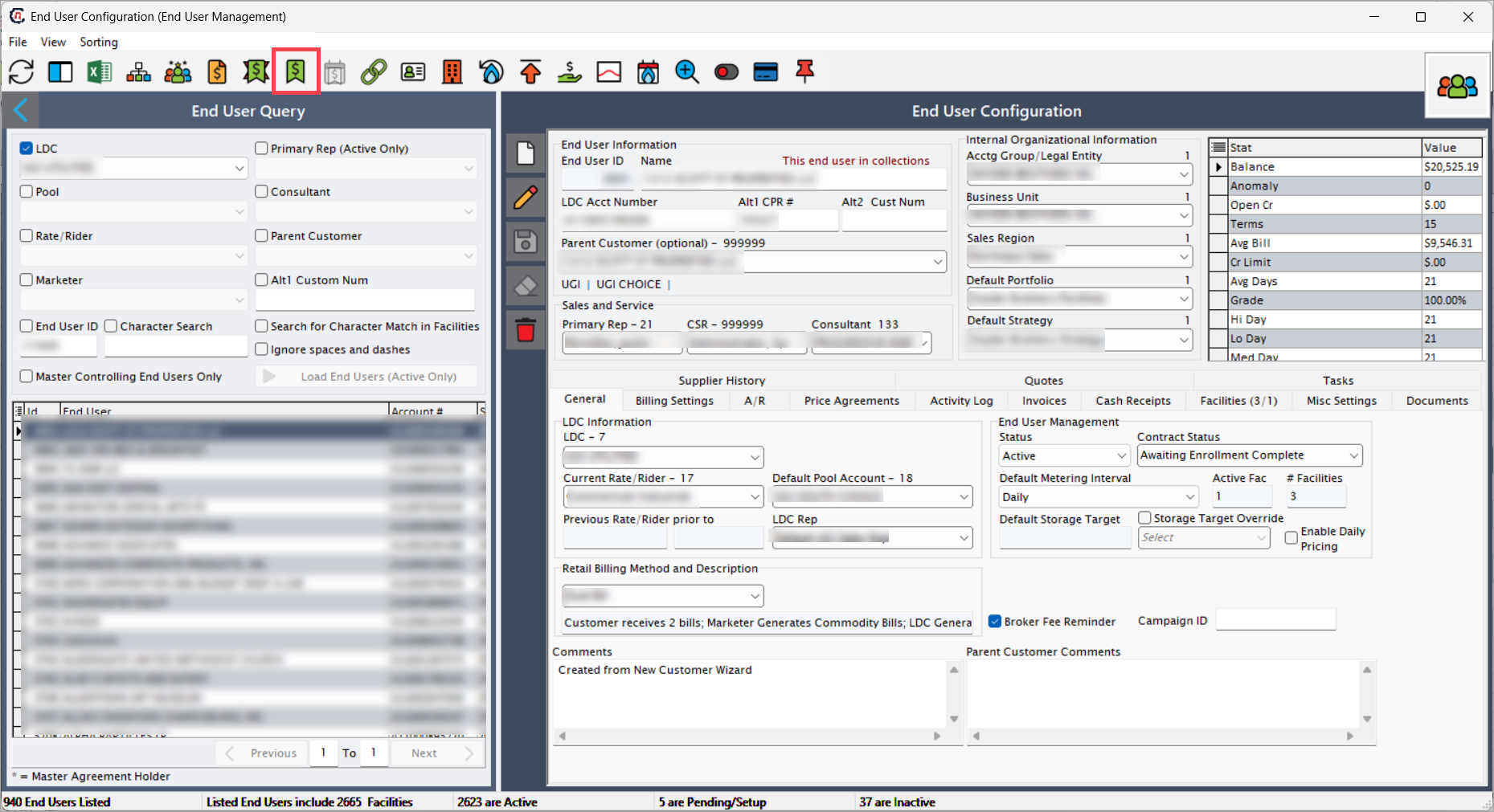
Navigate to the End user screen and select the end user.
-
Click the Price agreement icon in the header toolbar.
-
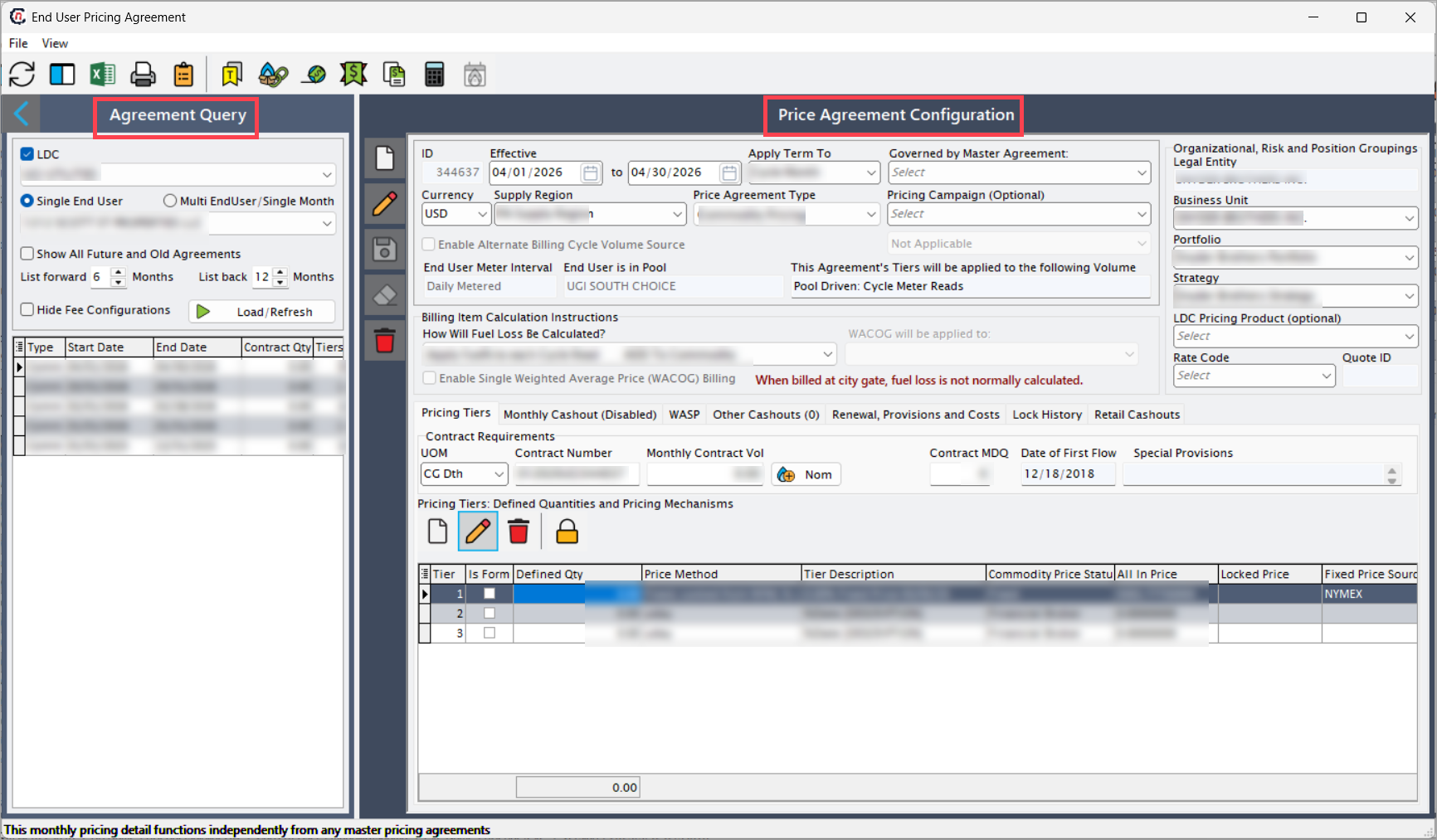
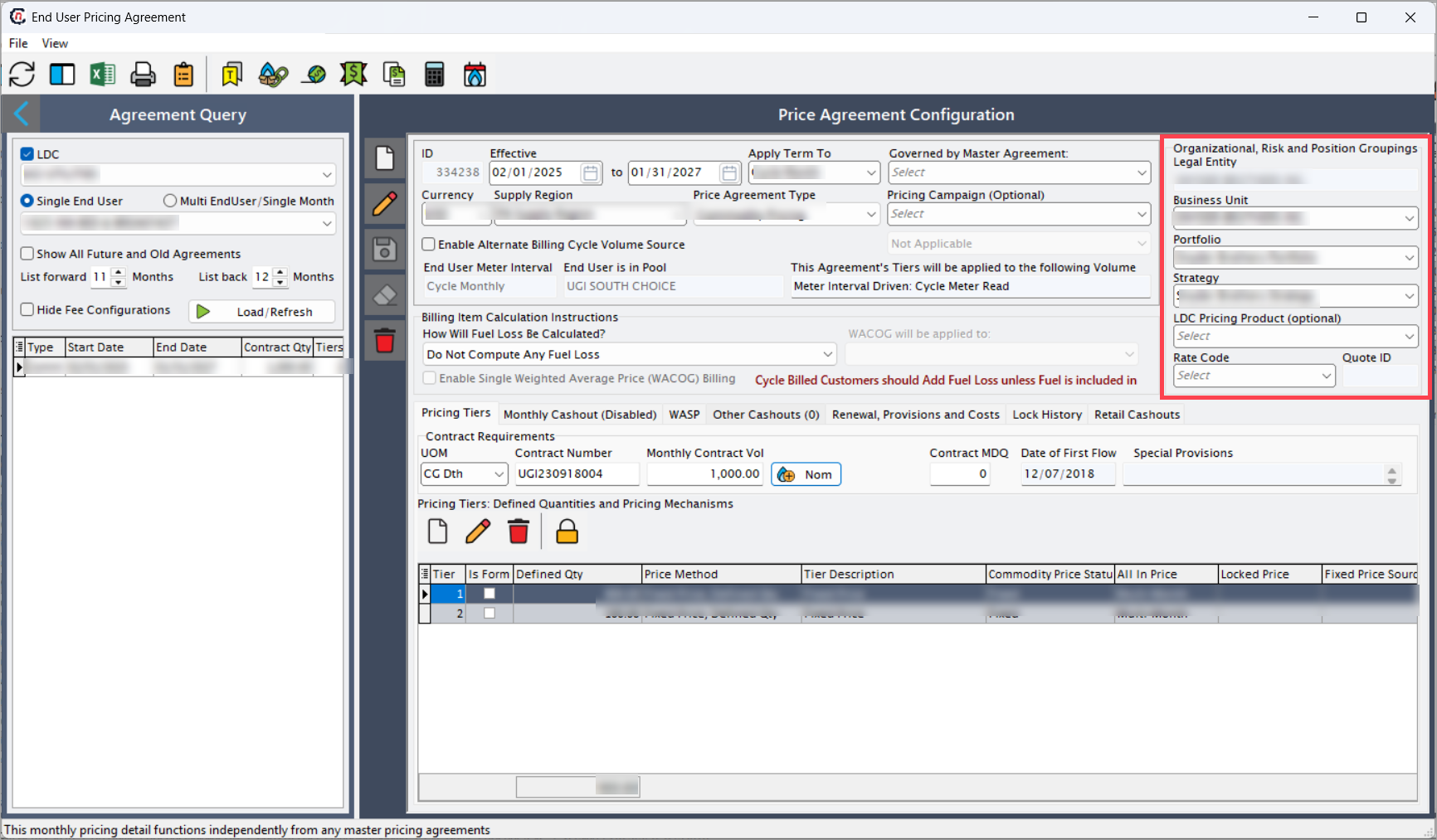
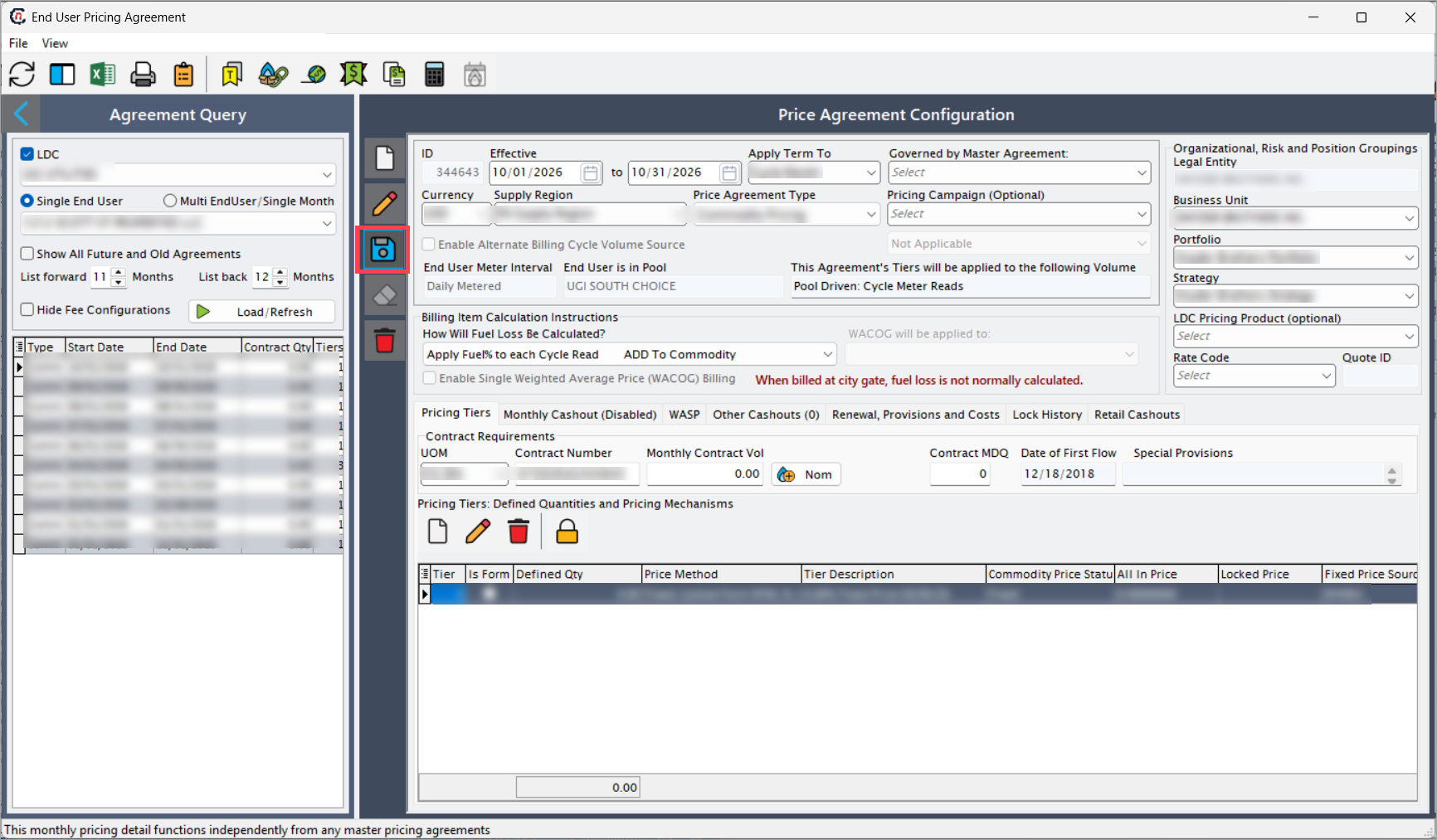
The End user pricing agreement screen consists of two sections:
- Agreement query: Search, filter, and manage existing price agreements by LDC, end-user type, and agreement status.
-
Price agreement configuration: Define the terms, conditions, and pricing structure for the selected end user.
-
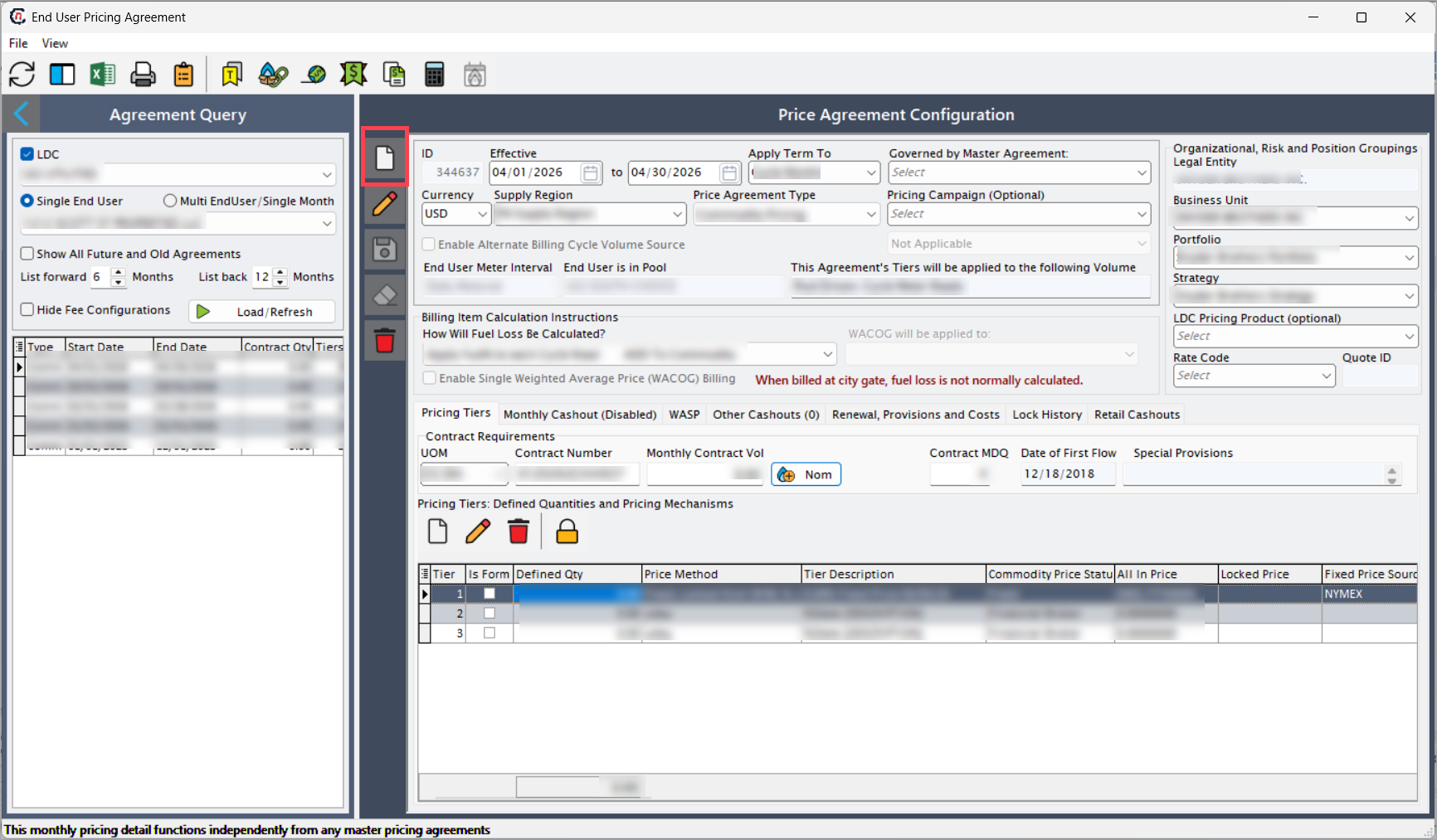
Click the Add price agreement record icon to create a new record.
Step 2: Configure price agreement details
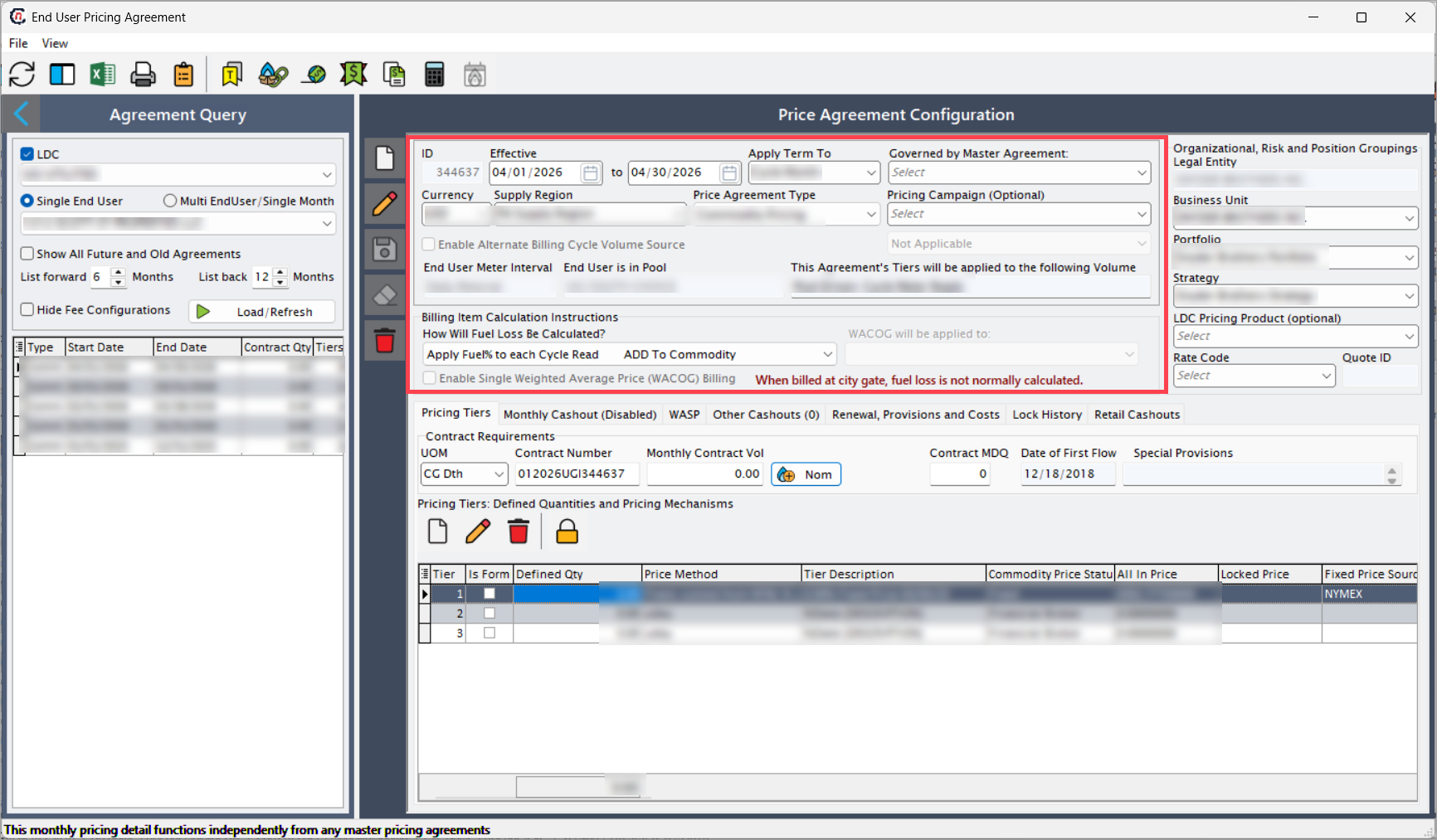
Enter the following general details to configure the price agreement:
General details
| Fields | Description |
|---|---|
| ID (auto-generated) | System-generated unique identifier for tracking, billing, and audit reference. |
| Effective date | Start date when the price agreement becomes active. Billing and forecasting begin from this date; changing it recalculates billing cycles. |
| Apply term to | Defines how duration applies: Billing cycle, delivery month, or contract term. The selected option changes how invoices and forecasts are scheduled. |
| Governed by master agreement | Indicates linkage to a master agreement. When checked, inherited fields become read-only and follow the master contract terms. |
| Currency | Transaction currency (USD, CAD, etc.). Changing the currency updates WACOG and invoice templates automatically. |
| Supply region | This field filters available LDCs and facility lists accordingly. |
| Price agreement type | Pricing structure: Fixed, index, or Tiered. The selected type reveals matching fields in pricing tabs. |
| Pricing campaign | Optional link to a campaign or promotion. This associates the agreement with marketing analytics reports. |
| Enable alternate billing cycle volume source | Allows alternate data sources for billed volume. When enabled, an additional field appears to choose that source, such as a manual file or facility-level data. |
| End user meter interval | Defines daily metered status. This determines whether billing uses daily or aggregated volumes. |
| This agreement’s tiers will be applied to the following volume | Selects the volume basis that tiered pricing will apply to. |
| How will fuel loss be calculated? | Selects calculation type: Percentage, fixed, or index-based. The selection activates the relevant entry fields and changes billing formulas. |
| WACOG will be applied to | Defines which cost components receive Weighted Average Cost of Gas and how WACOG aggregates component prices. |
| Enable single weighted average price (WACOG) billing | Consolidates multiple cost elements into one weighted average price. This simplifies invoice format and locks component edits. |
Enter the following organizational, risk, and positional details:
Organizational, risk, and positional grouping
| Fields | Description |
|---|---|
| Legal entity | Entity legally responsible for the contract. Selecting a legal entity filters available business units and portfolios. |
| Business unit | Internal division managing the agreement. This controls budgeting and margin reporting. |
| Portfolio | Groups related agreements for analysis. Revenue and volume roll up to portfolio dashboards. |
| Strategy | Corporate strategy tag such as Hedged or Market-indexed. Used for P&L segmentation. |
| LDC pricing product | Optionally links this agreement to an existing LDC Pricing Product. This imports compatible pricing components. |
| Rate code | Predefined rate structure that applies default tiers, surcharges, and delivery charges. |
| Quote ID | Links back to the originating quote and locks key rate fields to prevent post-quote deviation. |
The Price agreement screen is also divided into multiple tabs, each designed to capture specific details required for price agreement configuration. Below is a detailed explanation of each tab:
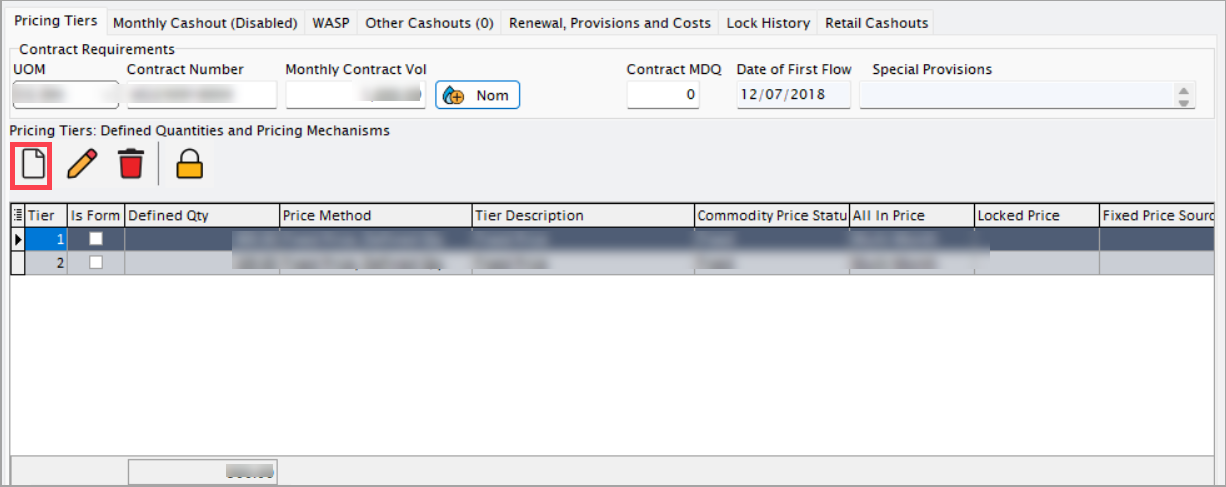
Pricing tiers tab
The Pricing tier tab defines how pricing based on the contracted quantity or usage volume.
| Icons | Icon names | Description |
|---|---|---|
 |
Add new tier | Opens a new record form to create a pricing tier or configuration entry. |
 |
Edit tier | Allows modification of an existing pricing tier. |
 |
Delete tier | Removes the selected pricing tier from the configuration. |
 |
Lock fixed price | Secures a tier with a fixed price configuration, preventing further edits or recalculations. This ensures pricing stability for finalized or approved agreements. |
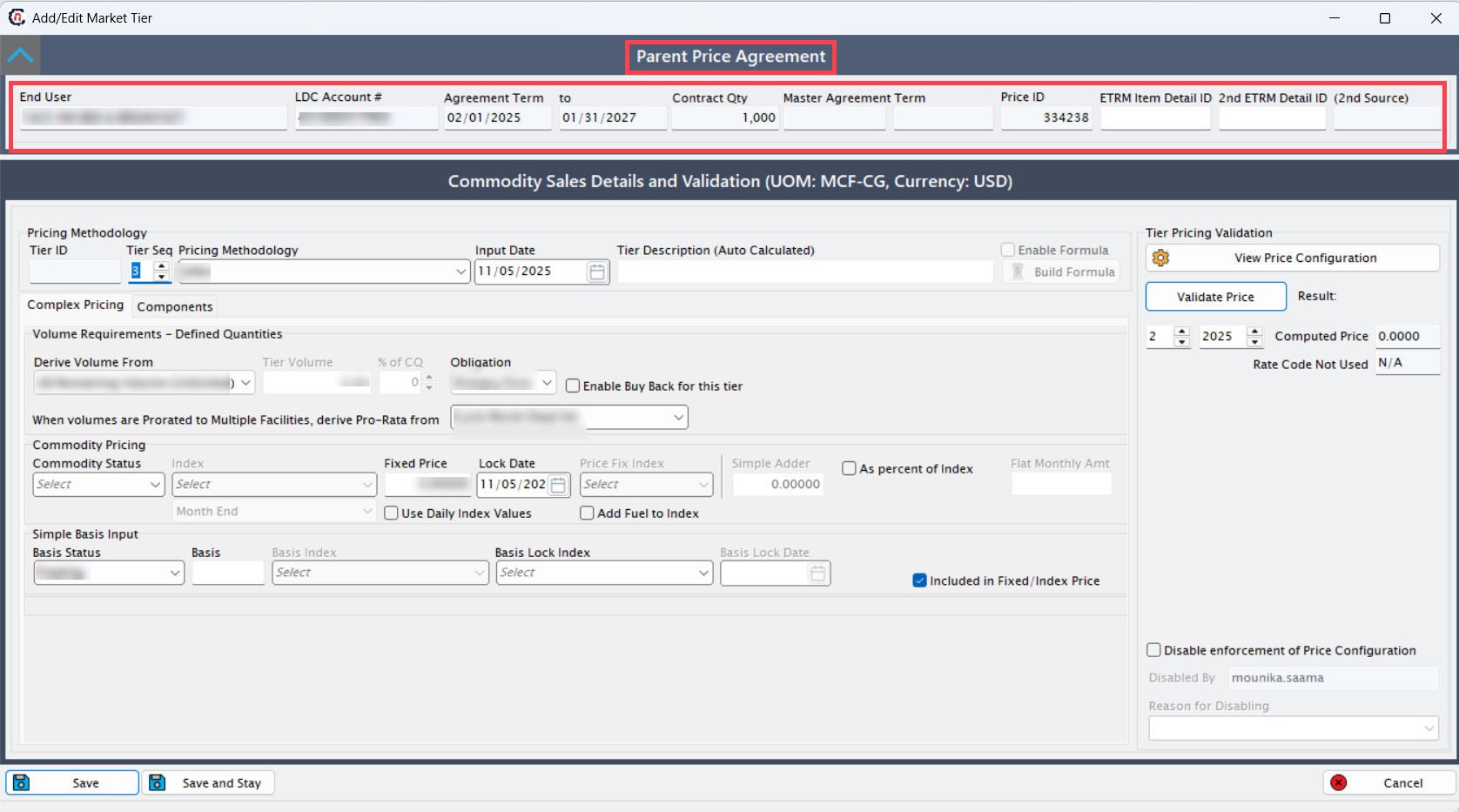
When you click the Add new tier icon, the Add/edit market tier screen opens. This screen consists of two sections: Parent price agreement and Commodity sales details and validation.
Parent price agreement section
| Fields | Description |
|---|---|
| End user/LDC account # | Auto-populated identifiers. Editing the LDC refreshes dependent fields such as region, rate code, and index. |
| Agreement term | Start and end dates. Changing these dates shifts billing and tier applicability windows. |
| Contract quantity (CQ) | Monthly or annual contracted gas volume. This value drives tier percentages and swing calculations. |
| Master agreement term | Displays the parent contract if linked. This is read-only when governed by a master agreement. |
| Price ID/ETRM IDs/Source | Cross-references to the ETRM module to keep price data and risk tracking aligned. |
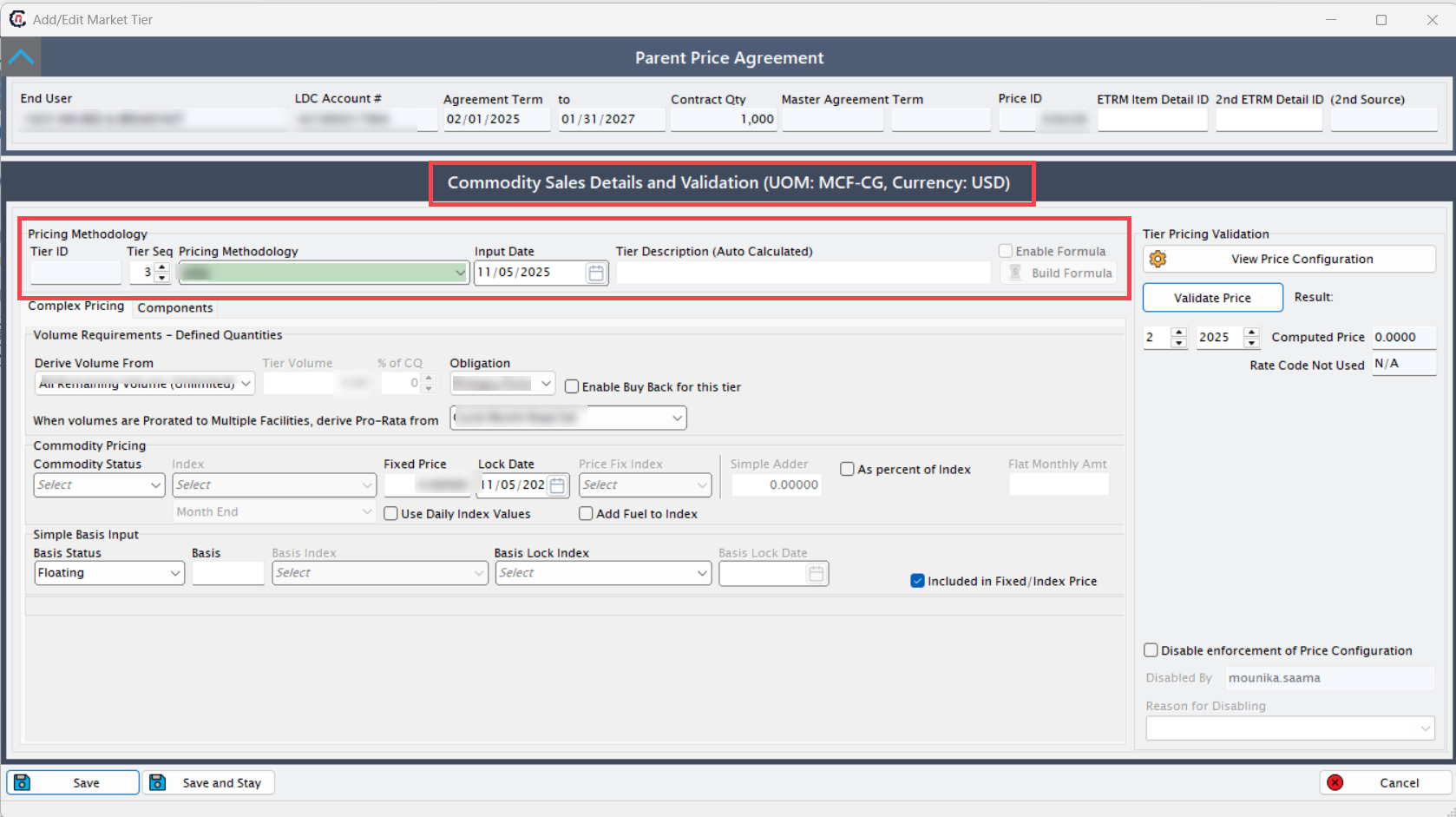
Commodity sales details and validation section.
This section includes two main sections: Pricing methodology and Tier pricing validation
Pricing methodology
| Fields | Description |
|---|---|
| Tier ID/Sequence | Unique identifiers that set the tier order. Changing the sequence affects evaluation priority. |
| Pricing methodology | Fixed price, index, and floating. The selection determines which pricing fields are visible and which validations apply. |
| Input date/Tier description | Timestamp and auto-generated summary of the tier. The description can be edited for clarity. |
| Enable formula | Allows user-defined pricing formulas and opens a formula builder for variable definitions. |
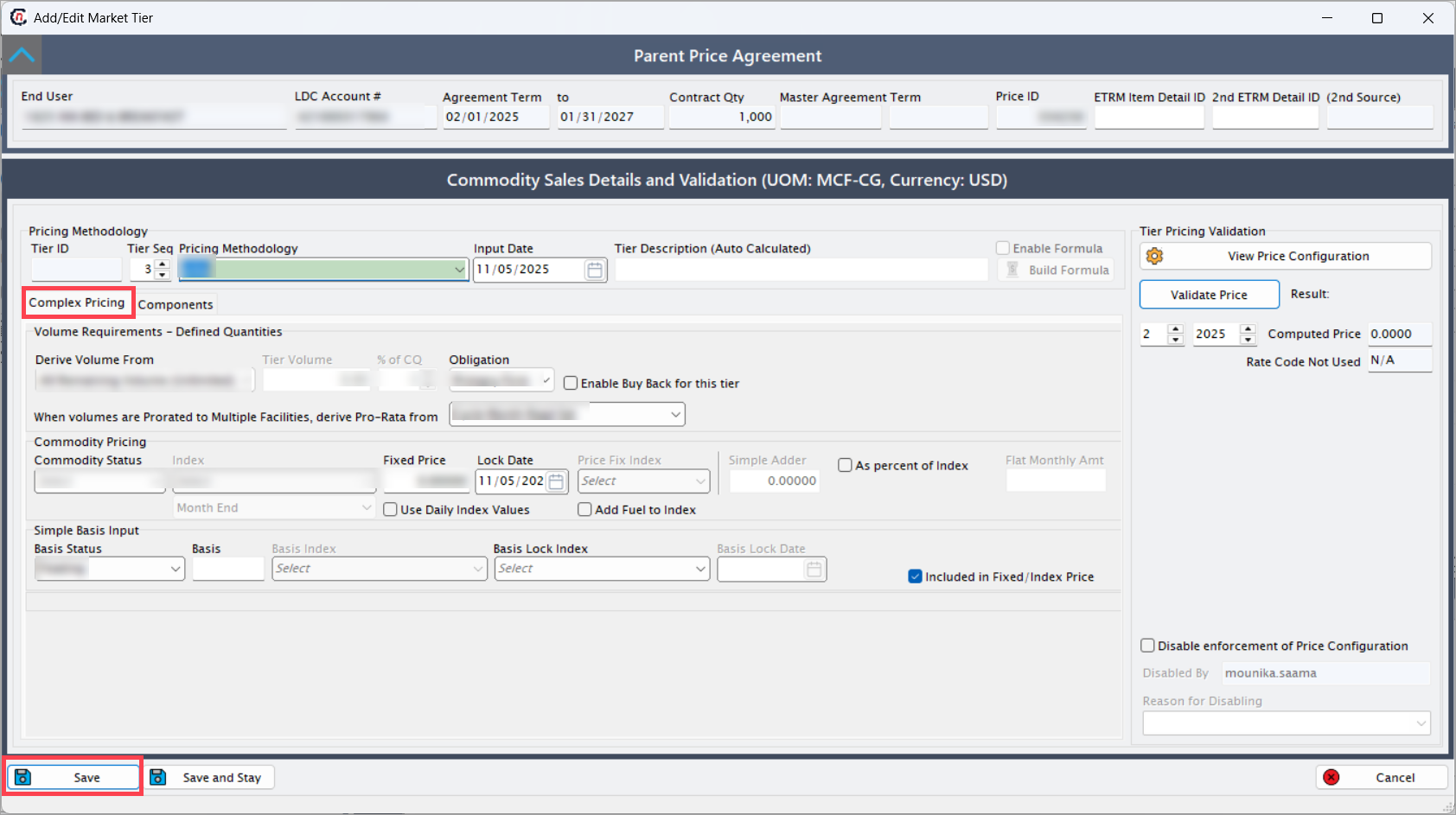
Pricing methodology contains two tabs: Complex pricing and Components.
Complex pricing tab
| Fields | Description |
|---|---|
| Derive volume from | Selects the source of volume such as Contract Quantity, Facility, or Forecast, which determines the tier allocation basis. |
| Tier volume/% of CQ | Sets a fixed volume or a percentage of CQ for the tier. These fields auto-calculate based on each other. |
| Enable buy back for this tier | Allows marketer buy-back of unused gas and activates buy-back price or index fields. |
| When volumes are prorated to multiple facilities… | Defines the pro-rata rule such as Actual Usage or Contracted Allocation and controls facility-level billing splits. |
| Commodity status | Selects Fixed, Floating, or Indexed, which determines the active price fields. |
| Index/Fixed price/Lock date/Price fix index | Specifies market rate inputs and allows locking the rate as of a given date. |
| Simple adder/% of index/Flat monthly amount | Applies adders or multipliers to adjust the index result. |
| Basis status/Basis/Basis index/Basis lock index/Basis lock date | Configures transportation differentials. Selecting Included in fixed/index price merges basis with the commodity rate. |
| Included in fixed/index price | Combines or separates basis charges. When checked, one consolidated price appears on the invoice. |
Click Save to create the tier. Once the tier is created, you can then add components.
Components tab
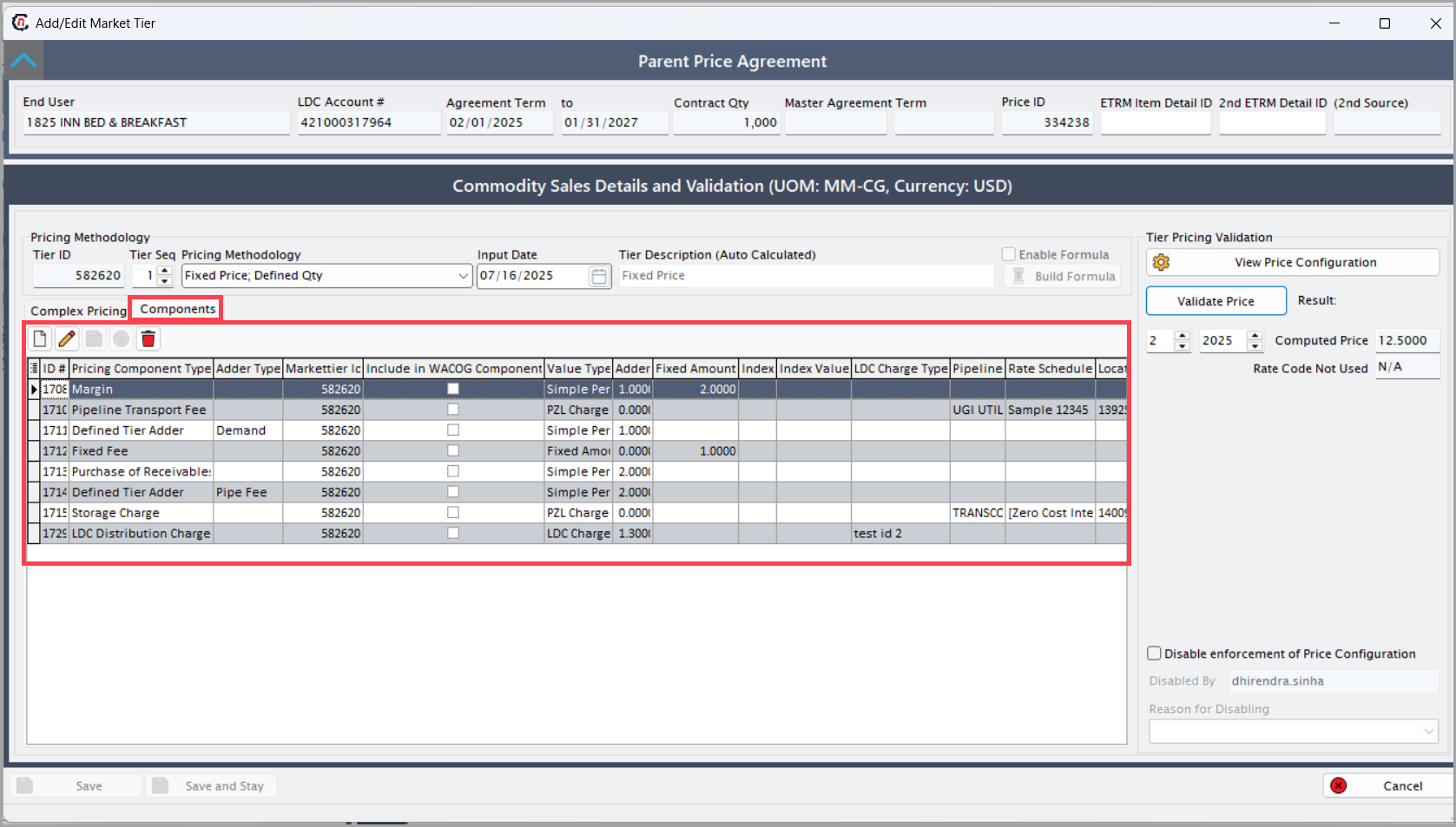
The Components tab displays all sub-components that contribute to the total price of a price agreement. These elements are defined in the LDC pricing component screen and typically include Fixed fee, Defined tier adder, LDC distribution charge, Margin, Pipeline transportation, Purchase of Receivables (POR), Storage charge, Tier-1/Contract volume basis, and Tier-1/Contract volume commodity.
From this tab, users can add, edit, delete, and view pricing components associated with a specific pricing tier. To create a new component, click Add a New Adder, enter the required information, and select Save. Once saved, the component is automatically linked to the active price tier and becomes part of the overall computed price structure.
Users can update or remove existing components as needed. However, if a component has already been billed or included in a finalized invoice, deletion is restricted. In such cases, nGenue logs the deletion attempt as an audit note to maintain data integrity and ensure historical pricing accuracy.
For additional details and configuration steps, refer to the LDC pricing component configuration article.
Note
Price agreements can differ significantly based on the selected pricing methodology. Ensure the chosen method aligns with business and regulatory requirements.
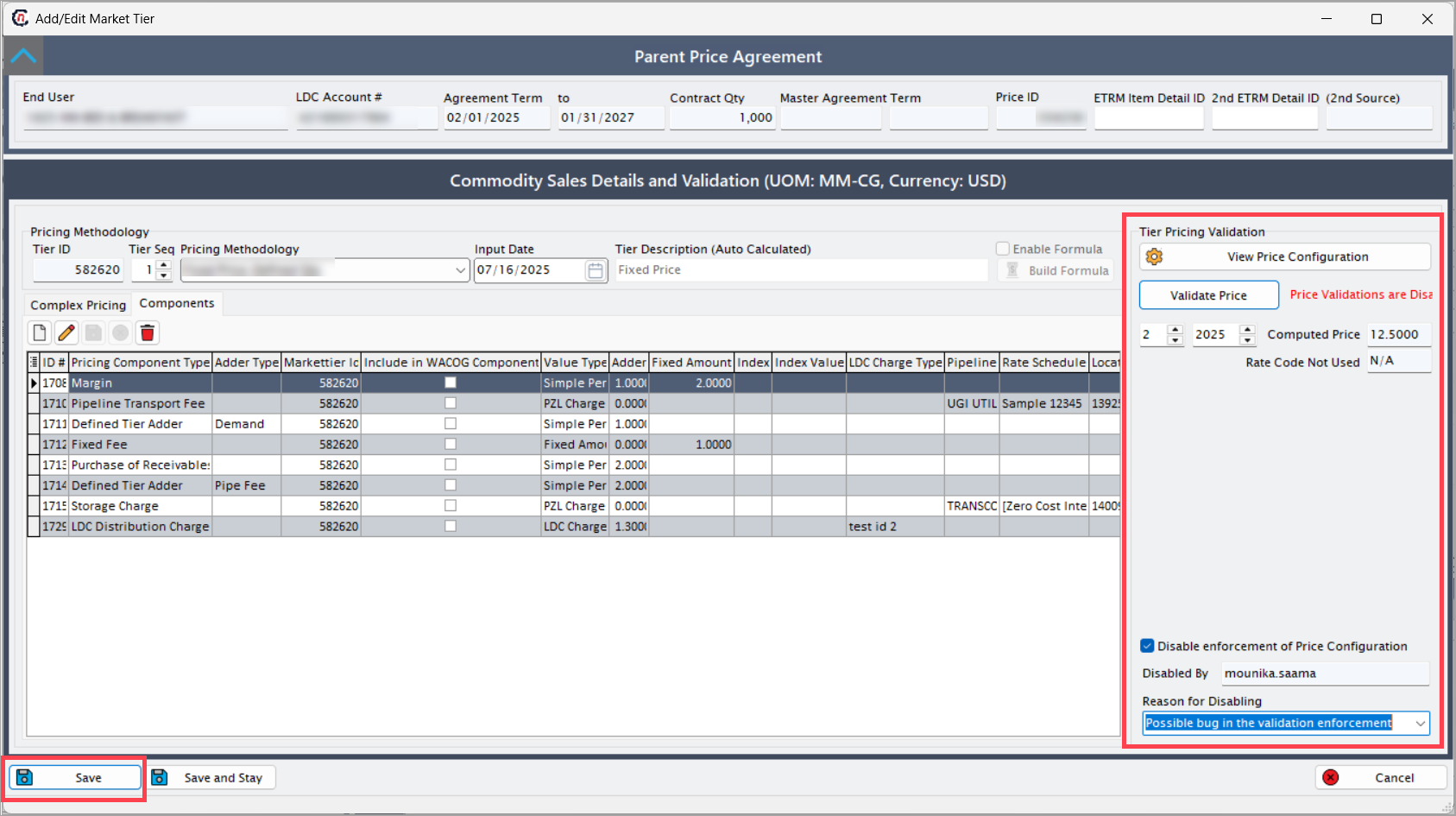
Tier pricing validation
| Fields | Description |
|---|---|
| View pricing configuration | Displays a read-only summary of the tier setup for review. |
| Validate price | Runs live validation and lists missing or inconsistent fields if errors exist. |
| Computed price | Shows the final rate combining WACOG and Components, updating automatically when inputs change. Computed Price = (WACOG price from Complex Pricing tab) + (Sum of non-WACOG components from Components tab) |
| Disable enforcement of price configuration | Allows saving without passing validation. This requires the Disabled by and Reason for disabling fields. |
| Disabled by/Reason for disabling | Captures the user name and justification, and logs the override in compliance records. |
Once all required fields and descriptions have been entered, click Save to complete the pricing tier configuration.
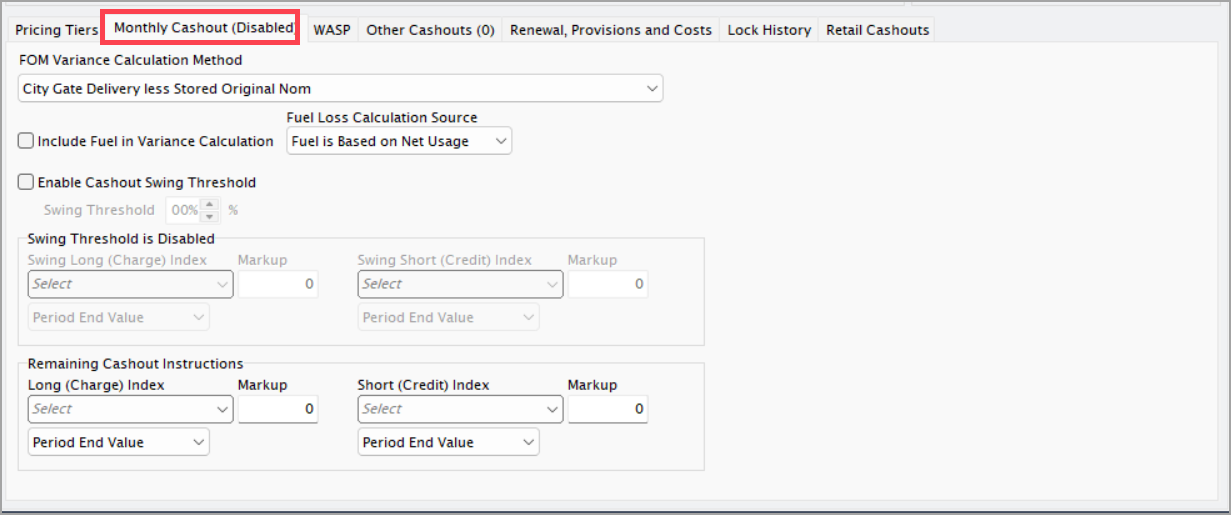
Monthly cashout (Disabled) tab
Configure how the system settles monthly nomination variances by completing these fields:
| Fields | Description |
|---|---|
| FOM variance calculation method | Select Percentage, Volume, or CQ Ratio to define the reconciliation formula for First-of-Month variance. |
| Include fuel in variance calculation | Includes or excludes fuel volumes in the variance calculation. When enabled, fuel is added to actuals. |
| Fuel loss calculation source | Selects System default, Facility, or Manual as the source for the fuel-loss factor. |
| Enable cashout swing threshold | Enables swing limits and reveals threshold and index fields. |
| Swing threshold % | Sets the allowed deviation before charges or credits apply. For example, 10 means a ±10% tolerance. |
| Swing long (charge) index/Markup/Period end value | Defines pricing inputs for over-consumption. Index and markup compose the charge rate. |
| Swing short (credit) index/Markup/Period end value | Defines pricing inputs for under-consumption. The selected index determines the credit rate. |
| Secondary indices/Overrides | Adds optional dual-index or override settings and recalculates blended rates when changed. |
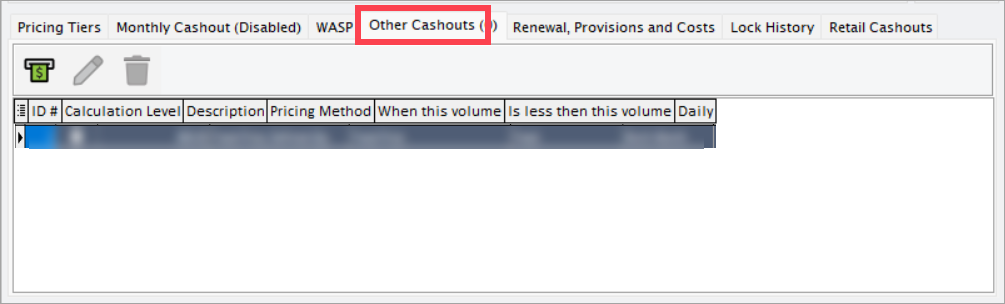
Other cashouts tab
Define custom cashout scenarios that operate outside standard swing rules by completing these fields:
| Fields | Description |
|---|---|
| ID # | Auto-generated identifier for each custom rule. |
| Calculation level | Agreement, Facility, or Portfolio. This sets the scope of application for the rule. |
| Description | Free-text label that appears in reports and invoices. |
| Pricing method | Fixed, Index, or Formula. The selection controls which pricing fields are active. |
| When this volume/Is less than this volume | Defines a conditional range that triggers the rule. |
| Daily | Calculates the cashout daily when enabled. |
| End user ID/Facility ID | Links the rule to a specific end user or facility data source. |
Renewal, provisions, and cost tab
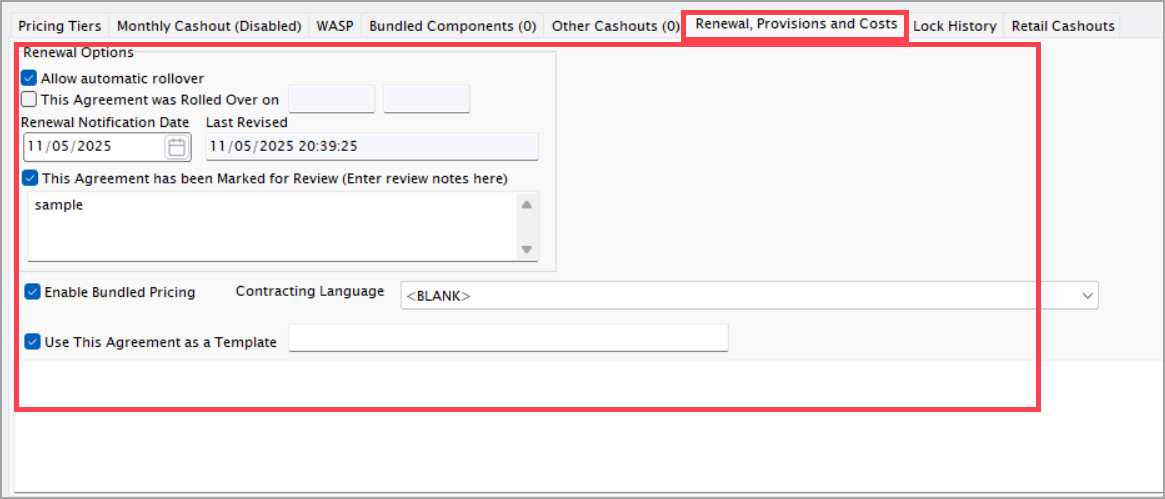
Manage renewal, review, and bundled pricing settings with these fields:
| Fields | Description |
|---|---|
| Allow automatic rollover | Extends the agreement upon expiry and creates a successor record with new dates. |
| This agreement was rolled over on | Read-only timestamp of the renewal event. |
| Renewal notification date | Sets the alert date for renewal reminders and workflow notifications. |
| Last revised | Tracks the most recent modification and updates on every save. |
| This agreement has been marked for review (enter review notes her) | Flags the record for compliance or legal review and adds it to the “Agreements under review” queue. |
| Enable bundled pricing | Combines all price components into one displayed rate and locks component-level edits. |
| Contracting language | Stores the legal or commercial terms and includes them in contract PDFs. |
| Use this agreement as a template | Saves the configuration for reuse and lists it in the Template Selector for new setups. |
Lock history tab
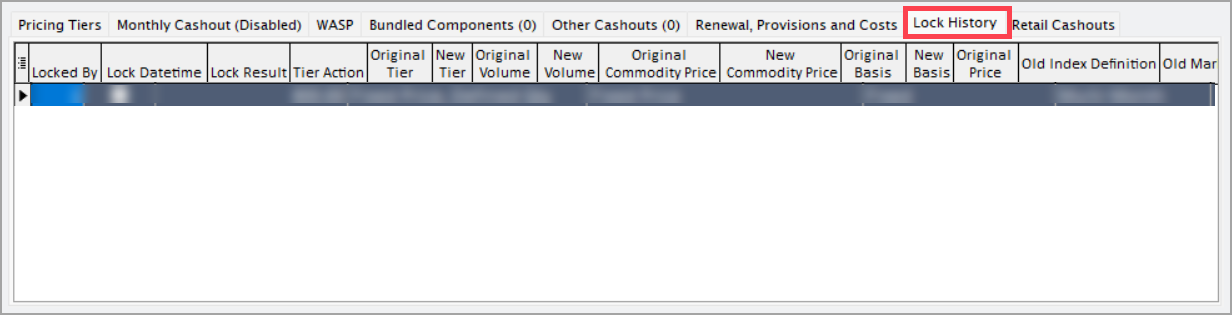
This tab displays log of all locking actions and audit details:
| Fields | Description |
|---|---|
| Locked by/Lock date & time/Lock result | Captures the user, timestamp, and success status of the lock action. |
| Tier action | Indicates the operation type such as Lock, Unlock, or Re-lock. |
| Original → New fields | Shows before/after changes for tier, volume, prices, basis, markups, and related values. |
| Basis All-In Old/New + Index IDs | Indicates whether basis was merged with the commodity rate and shows related index IDs. |
| New date time created/Description/Fixed price/Index definition/Comm status/Action notes | Records new version details and reason entries. |
| Price lock request history ID | Links to the initiating lock request for traceability. |
Retail cashouts tab
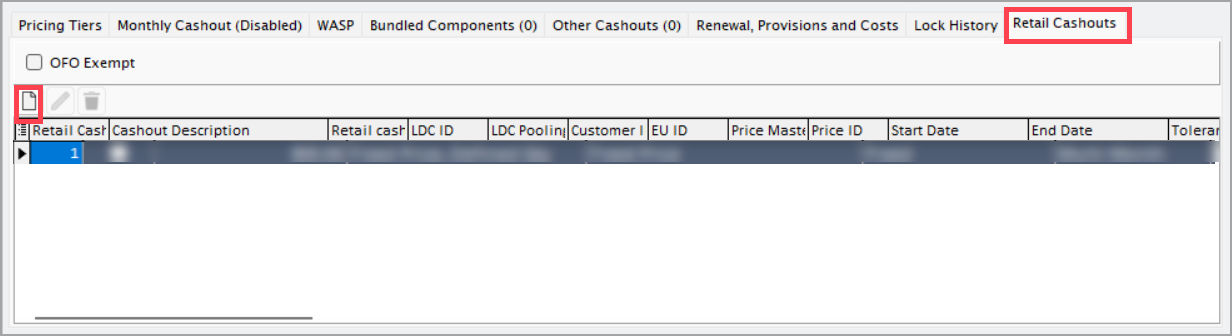
Click on the Add new cash out to Configure end-user-level cashouts.
Each retail cashout record includes a unique Retail cashout apply ID, which identifies the specific rule in the system. The Cashout description provides a descriptive label that appears on invoices, helping to clarify the purpose of each charge or credit.
The Retail cashout def ID serves as a template reference that automatically populates default tolerance and index settings. The LDC ID/Pooling ID associates the retail cashout with the appropriate Local Distribution Company and pool, ensuring correct linkage.
The Customer ID/End user ID defines the customer hierarchy and specifies which end user the rule applies to. The Price master ID/Price ID ensures currency and rate consistency with the parent agreement.
The Start date determines when the retail cashout becomes active. The Tolerance sets the acceptable variance before a charge or credit is triggered.
The Is daily calculation option defines whether the settlement frequency is daily or monthly. Selecting OFO exempt excludes the retail cashout from Operational Flow Order (OFO) penalties; if left unselected, LDC-defined surcharges will apply during OFO events.
For step-by step procedure for cashout refer to the Retail cashouts article.
Step 3: Save the pricing agreement
After completing all configurations across all tabs, click the Save icon to store the pricing agreement in the system.
Summary
Configuring a price agreement in nGenue involves navigating to the end user configuration screen, defining comprehensive pricing terms across multiple tabs including general details, pricing tiers, cashout rules, and renewal settings, then saving the complete configuration to establish automated billing, ensure pricing accuracy, maintain regulatory compliance, and provide the foundation for all natural gas transactions between buyers and sellers.