Adding LDC as a new counterparty
The Add LDC as a new counterparty feature in nGenue allows you to instantly register the selected Local Distribution Company (LDC) from the LDC configuration screen as a counterparty in the system. A counterparty represents any entity with which your organization engages in commercial transactions, such as buying, selling, transporting, or storing gas.
Note
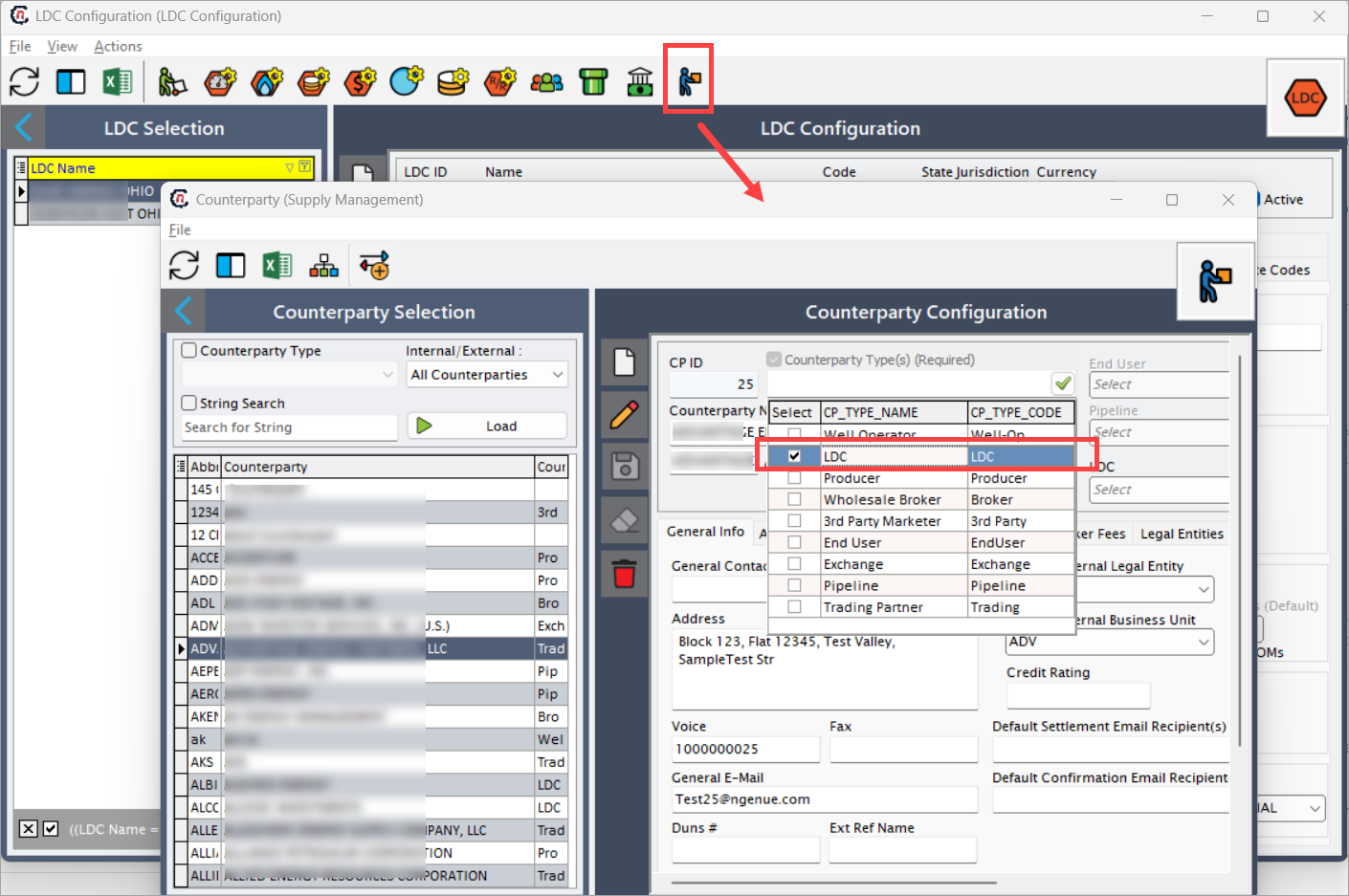
You can access this feature by clicking the Add this as a new counterparty icon in the toolbar of the LDC Configuration screen.
When you click Add this as a new counterparty icon:
- The system generates a counterparty record based on the current LDC’s details.
- The new counterparty appears in the Counterparty screen with the Counterparty type as LDC selected.
- You can further edit or enrich the counterparty record to include commercial terms, contact details, and other relevant information.
- The LDC remains linked to its counterparty record, ensuring alignment across modules.
Why should an LDC be created as a counterparty?
While an LDC configuration record is primarily technical (focused on operational attributes like pools, pipelines, and rates), designating it as a counterparty elevates its role in the commercial layer.
Key reasons include:
- Commercial recognition – Transactions require a counterpart on the other side. Without creating an LDC as a counterparty, it cannot formally participate in contracts or settlements.
- Seamless integration – Having the LDC both as a configuration record and as a counterparty ensures data consistency between operational and financial modules.
- Reduced duplication – Prevents re-entering the same entity details separately in the counterparty module.
Typical use cases
- Engaging in contracts – When you need to sign agreements with an LDC, it must exist as a counterparty in the system.
- Billing and settlements – Charges like tariffs, storage, or balancing fees require the LDC to be a counterparty.
- Audit preparation – To demonstrate all external parties with whom transactions occur, LDCs must appear in counterparty reports.
- Data governance – Prevents discrepancies where an LDC exists operationally but not in the financial transaction layer.
Key points to remember
- Only LDCs that are expected to participate in transactions need to be registered as counterparties.
- Once created, the counterparty record can be maintained independently in the Counterparty screen.
- Changes in the counterparty record do not overwrite the LDC configuration but remain linked.
- This feature eliminates the need for manually creating duplicate counterparty records for existing LDCs.
- For step-by-step setup instructions and field-level details for Counterparty screen, always refer to the Create a new counterparty article.