Review sales contracts
The Review sales contracts screen enables users to efficiently access, view, and manage sales contracts for end users. It provides a centralized interface to:
- Search and filter contracts using multiple criteria.
- View detailed contract information, including contract terms, renewal, approval, and guaranteed sections.
- Access related data such as end user details, facility information, addresses, and price agreements.
- Monitor the status of contracts and maintain accurate records.
This screen supports various contract types and renewal scenarios while ensuring data consistency and traceability. It is designed for administrators and account managers to streamline contract management and maintain a complete audit trail of all sales contract activities. This tab consist of below icons:
| Icons | Icons name | Description |
|---|---|---|
 |
View end user details | Opens the selected end user’s detailed information, including account and contact details. For more information, refer to the End user article. |
 |
View facility details | Opens the facility details associated with the selected end user, including location and operational data. For more information, refer to the Facility article. |
 |
View address information | Displays the address information linked to the selected end user or facility. For more information, refer to the Add address to end user or facility article. |
 |
View sales contracts | Opens the sales contracts associated with the selected end user for review and management. For more information, refer to the Sales contracts article. |
 |
View price agreements | Displays price agreements related to the selected end user or contract, including terms and pricing details. For more information, refer to the Price agreements article. |
Prerequisites
Before working with the Review sales contract screen, ensure the following prerequisites are met:
- User permissions: You must configure the security settings including User type, Security user, Security Group, Security assign user, and Security assign permissions in their respective screens to ensure you have the required access and permissions for Review sales contracts screen actions.
- LDC: The relevant Local Distribution Company (LDC) must exist within the application.
- LDC pool: An LDC pool must be configured to classify customers for efficient billing and distribution.
- LDC rate configuration: An LDC rate class must be defined to categorize customers and establish delivery terms.
- Sales contract: At least one sales contract must exist in the system.
Procedure to manage sales contracts
Step 1: Access the review Sales contract screen
- Log in to the nGenue application.
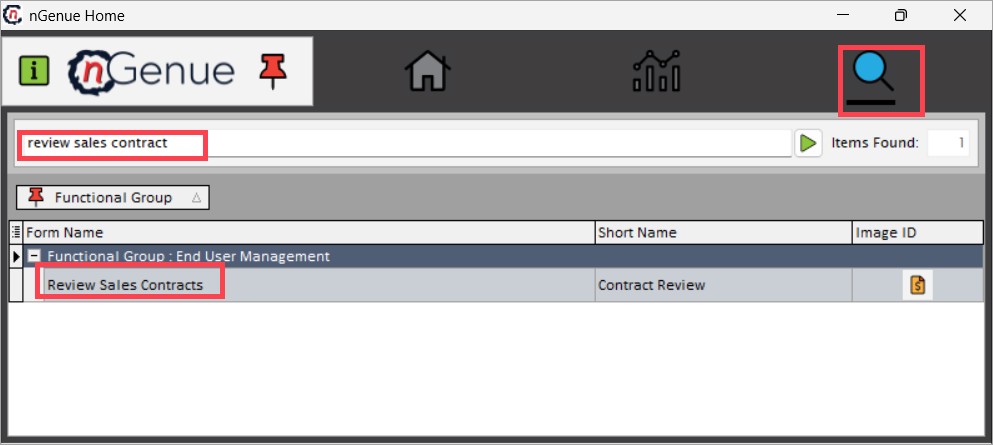
- Click the Search icon and enter review sales contract in the search bar.
-
Double-click the Review sales contracts to open the respective screen.
-
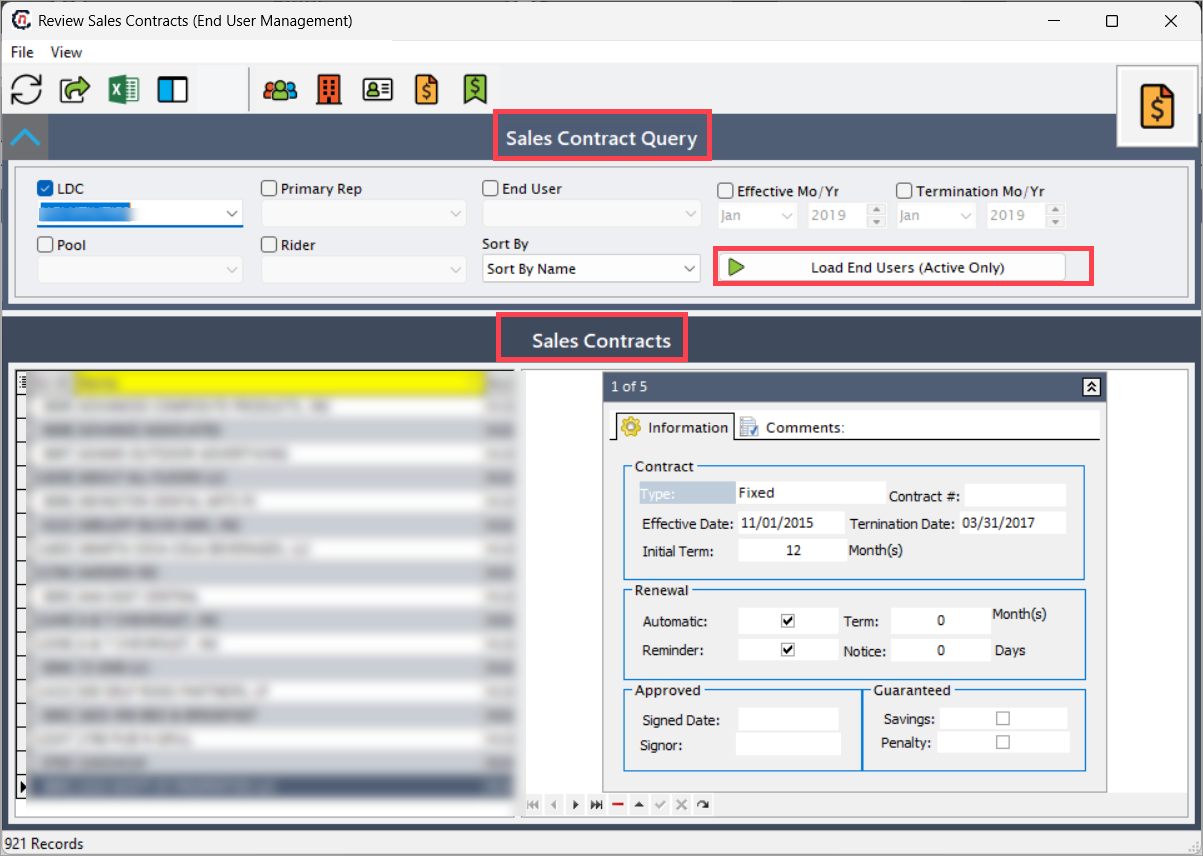
The screen contains two main sections:
- Sales contract query: Use this section to filter and find specific contracts.
- Sales contracts: This section displays the list of contracts that match your query.
Sales contract query
This section provides filters to narrow down the list of contracts.
| Fields | Description |
|---|---|
| LDC | The LDC responsible for gas delivery. |
| Primary rep | The main account holder or designated contract manager. |
| End user | The final consumer of the natural gas. |
| Effective month & year | The start date when the contract becomes active. |
| Termination month & year | The end date when the contract expires. |
| Pool | The group of accounts under a single contract or pricing structure. |
| Rider | An additional provision that modifies the standard contract terms. |
| Sort By | Choose to sort the results by name or by account. |
After selecting your filters, click Load end users (Active only) to display the matching sales contracts.
Sales contracts section
This table displays the sales contracts that match your query.
| Fields | Description |
|---|---|
| EU ID | The unique identifier for the end user. |
| Name | The name of the end user. |
| Account No | The unique LDC account number. |
| Status | The current status of the contract. |
| LDC ID | The unique identifier for the LDC. |
| LDC | The name of the gas supplier. |
| Sales account | The account that tracks revenue and transactions. |
| LDC pooling ID | The identifier for the LDC pool. |
| Pool | The name of the pool. |
| LDC RR ID | The identifier for the LDC rate rider. |
| Rider | The rider type. |
| Rep ID | The unique identifier for the account representative. |
| Rep name | The name of the account representative. |
Step 2: Review contract details
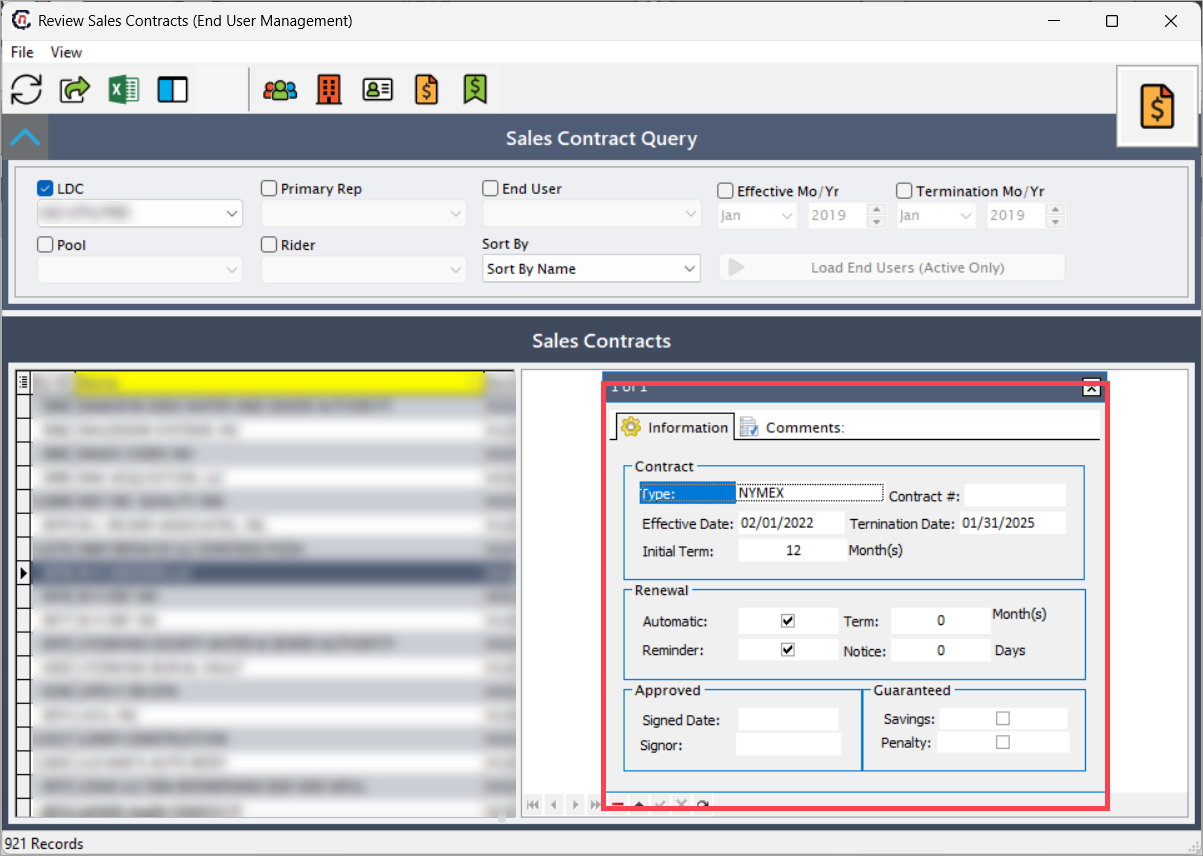
Select an end user from the list on the left to display their contract details on the right. The details appear in two tabs: Information tab and Comments tab.
Information tab
The Information tab contains the following sections: Contract, Renewal, Approved, and Guaranteed.
1. Contract
| Fields | Description |
|---|---|
| Type | Displays the contract type. Users can create custom types via the Sales contract type screen. Common types include: • Fixed: A fixed price for the entire contract term. • GSA: A Gas Supply Agreement under specific terms. • Index: Pricing based on an external market index. • Market sensitive: Pricing that fluctuates with market conditions. • Month to month: A contract that renews monthly. • NAESB: A standardized industry gas supply contract • NYMEX: A contract based on NYMEX pricing. |
| Contract number | Displays the unique contract identifier. |
| Effective date | Displays the contract start date. |
| Termination date | Displays the contract end date. |
| Initial term | Specifies the original length of the contract in months. |
2. Renewal
| Fields | Description |
|---|---|
| Automatic | A checkbox indicating if the contract renews automatically. |
| Reminder | A checkbox indicating if the system sends a notification before renewal. |
| Term | The number of months for the renewal period. |
| Notice | The number of days notice required before renewal. |
3. Approved
| Fields | Description |
|---|---|
| Signed date | The date when the contract was signed. |
| Signor | The name of the person who signed the contract. |
4. Guaranteed
| Fields | Description |
|---|---|
| Penalty | Includes clauses for non-performance (for example, late delivery fees, minimum volume commitments, early termination fees). |
| Savings | Includes cost reduction benefits (for example, indexed price reductions, bulk purchase discounts, energy efficiency savings). |
Comments tab
The Comments tab displays any comments that were entered when creating the sales contract.
Note
The system displays data only when a sales contract exists for the selected end user, showing contract details and related information only for end users who have an associated sales contract.
Summary
The Review sales contract screen provides comprehensive tools for managing the entire sales contract lifecycle. With flexible filtering options, detailed contract views, and multiple creation methods, users can efficiently handle both automatic and manual contracts. The system supports various contract types and renewal scenarios while maintaining clear audit trails.