Review pipeline release contracts
The Pipeline Release Contracts screen is used to configure, review, and manage capacity release agreements for pipeline transport and storage contracts.
It provides a centralized view of released capacity details, which includes release type, counterparty, contract terms, released quantities, thresholds, and audit information. This screen supports operational oversight, regulatory compliance, and accurate capacity tracking when pipeline capacity is released to third parties.
The Pipeline Release Contracts screen allows users to define how capacity is temporarily or permanently released, track release terms over time, and ensure released volumes are properly applied during nominations, scheduling, and valuation.
The primary purpose of the Pipeline Release Contracts screen is to:
- Create and maintain pipeline capacity release agreements.
- Define release type, duration, and released quantities.
- Associate released capacity with counterparties and transport agreements.
- Track initial and ongoing released volumes.
- Support compliance with pipeline and regulatory capacity release rules.
- Provide audit visibility into release creation and updates.
Prerequisites
Before using the Pipeline Release Contracts screen, ensure the following prerequisites are met:
- The user has view or modify permissions for the Pipeline Release Contracts screen.
- The associated pipeline is configured and active in the system.
- Relevant transport or storage contracts exist and are active.
- Required counterparties are configured in the system.
- Capacity release business rules are defined by pipeline and contract type.
Procedure to review and manage pipeline release contracts
Step 1: Navigate to the Pipeline Release Contracts screen
- Log in to the nGenue application.
-
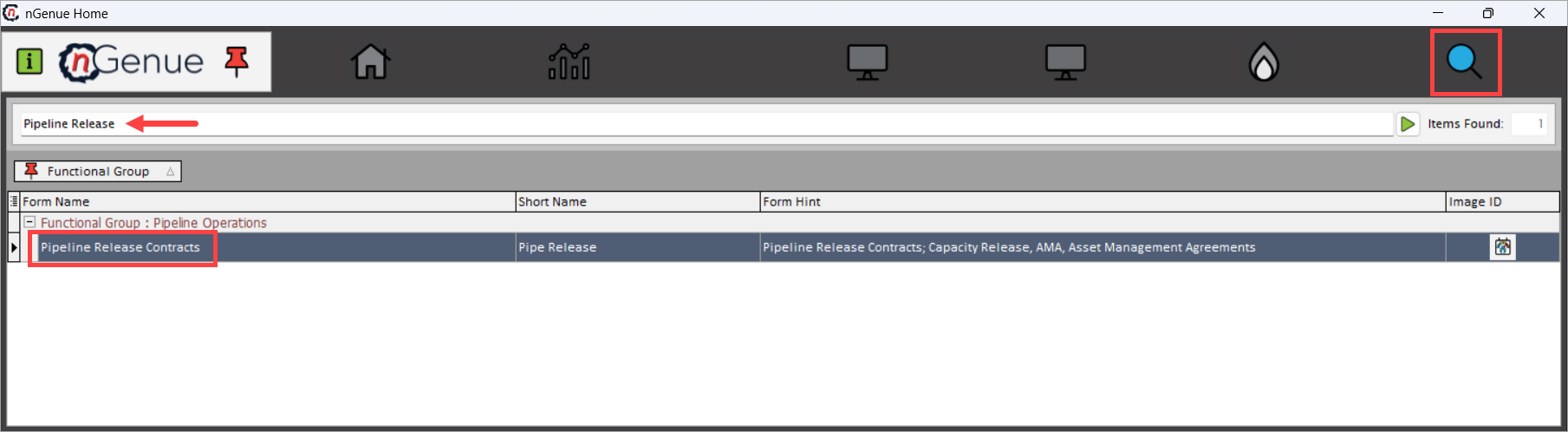
Click Search and enter Pipeline Release in the search bar.
-
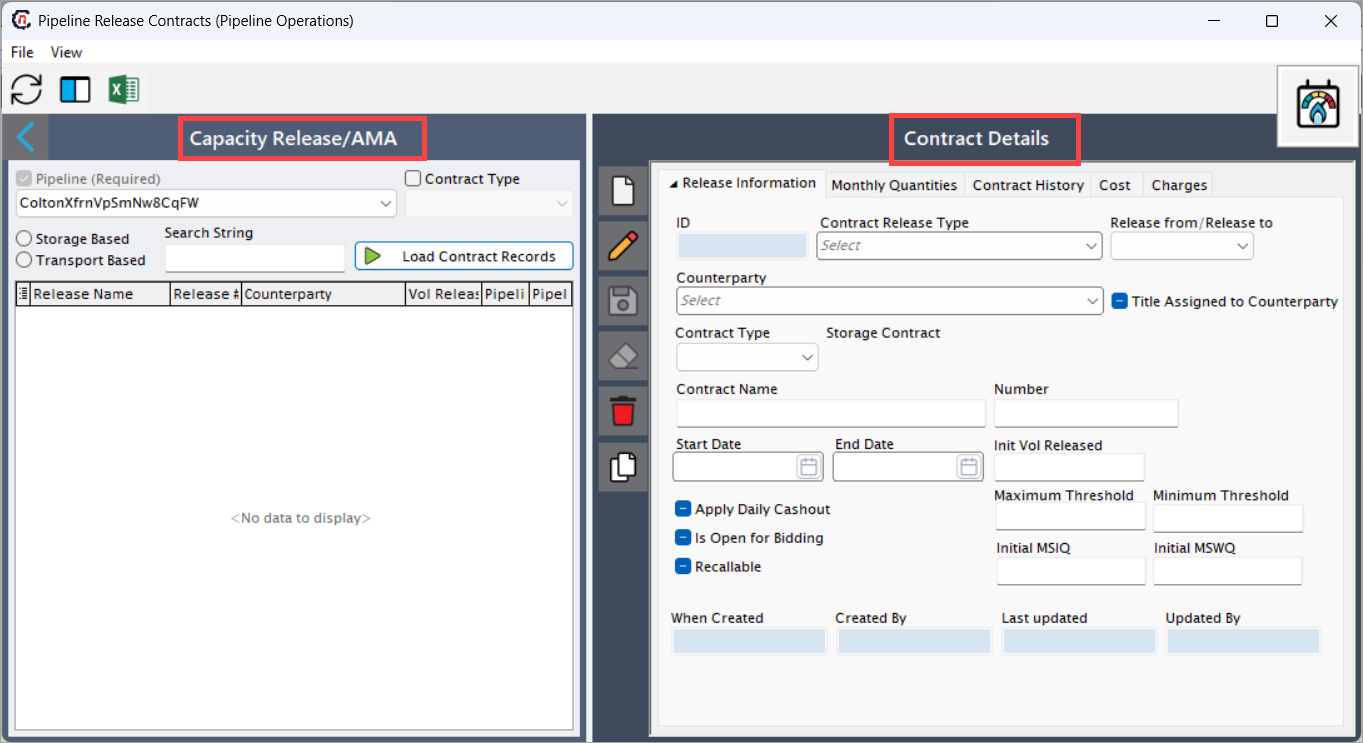
Double-click Pipeline Release Contracts to open the Pipeline Release Contracts (Pipeline Operations) screen.
- The screen is divided into two main sections:
- Capacity Release / AMA: Used to filter and list release contracts.
- Contract Details: Used to view and configure detailed release information.
Step 2: Filter and load release contracts
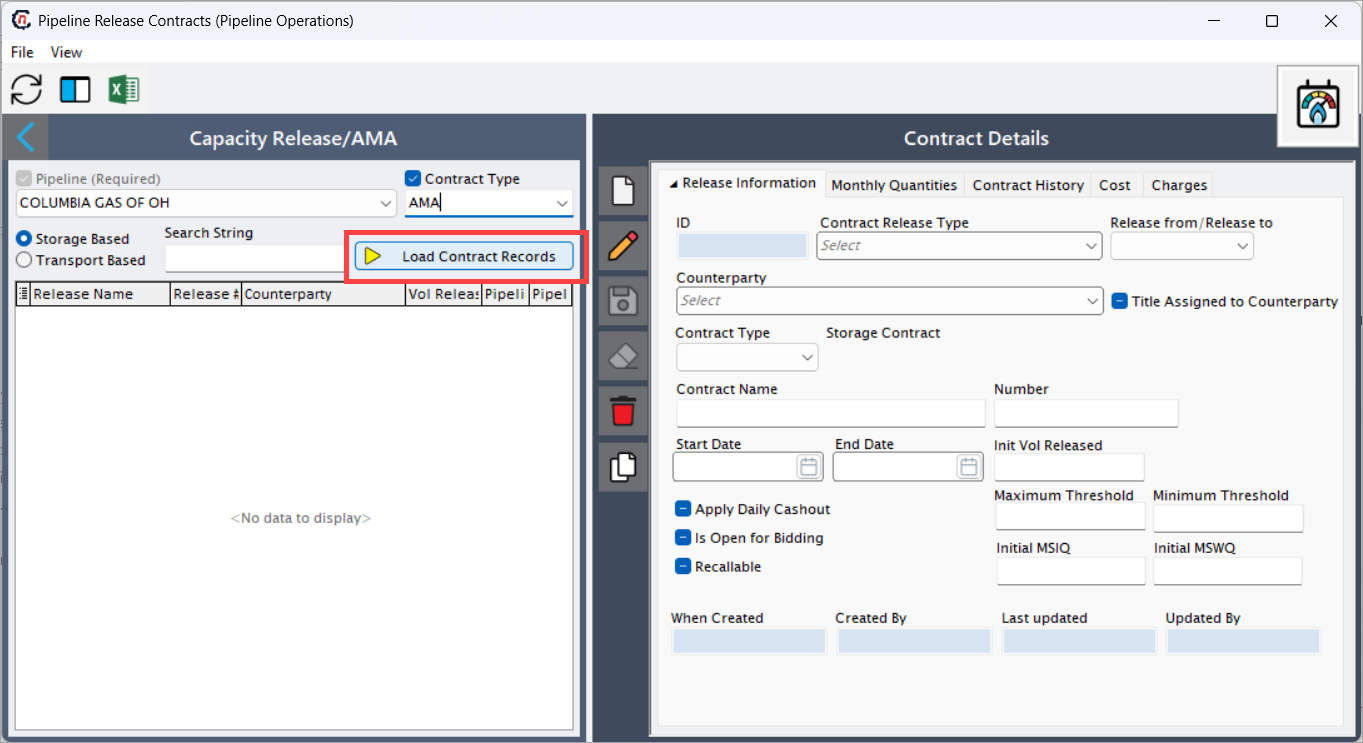
The Capacity Release / AMA section is used to identify which release contracts to review.
- Select the Pipeline. This is a required field.
- Enable Contract Type when filtering by a specific release type.
- Choose whether the contract is Storage Based or Transport Based.
- Optionally enter a Search String to narrow results.
-
Click Load Contract Records to display matching release contracts.
-
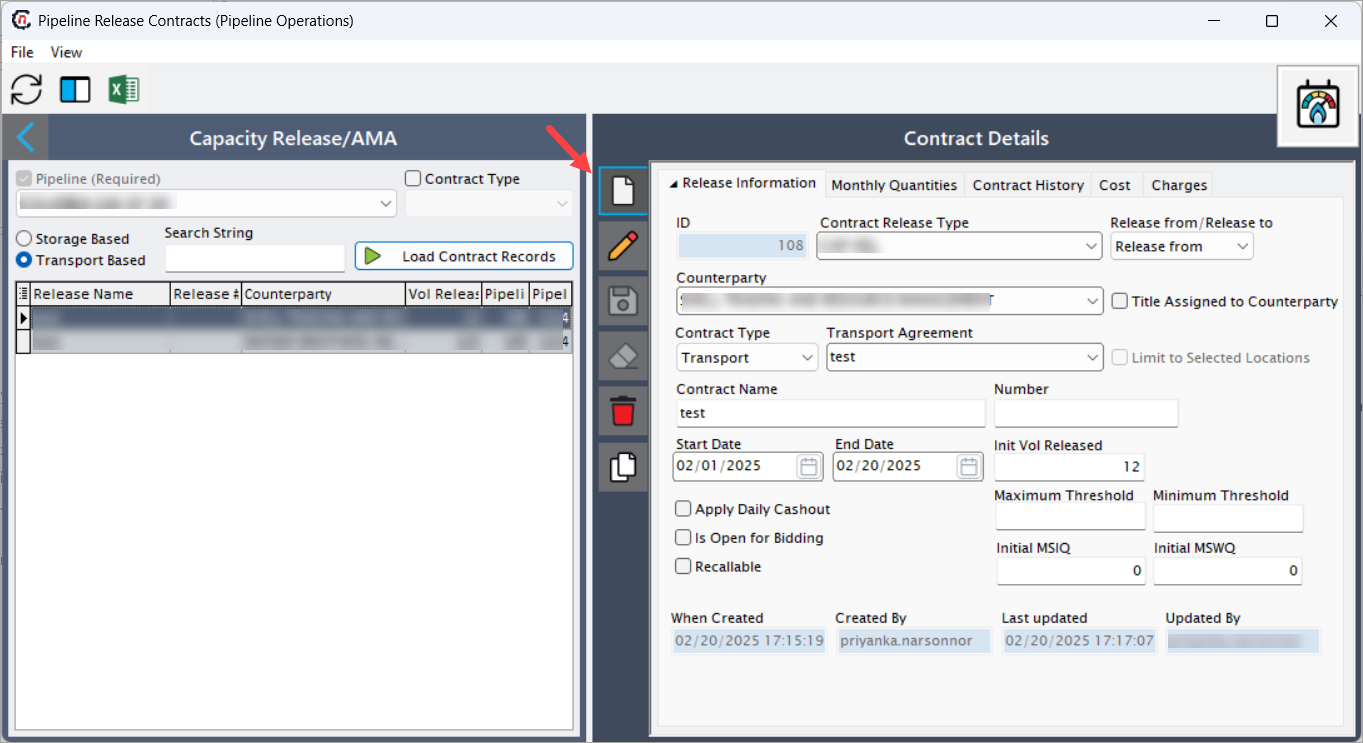
Once loaded, existing release contracts appear in the list with key identifiers such as release name, counterparty, and released volume.
Step 3: Create a new pipeline release contract
-
Select a release contract from the list to view details in the Release Information tab, or click the Add a Release Contract record button to create a new one.
-
Fill in the remaining fields available in different tabs:
Release Information tab
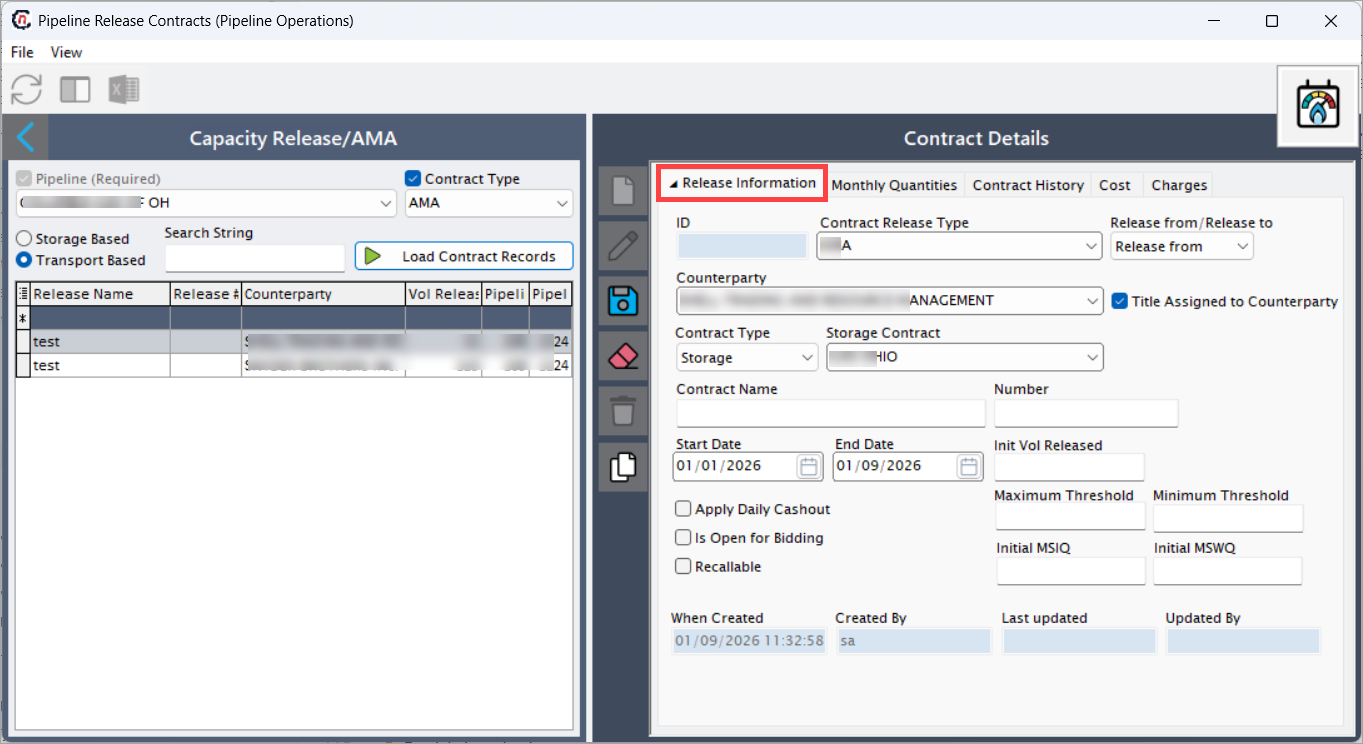
This tab captures the core definition of the capacity release. The following table lists the fields available on this screen.
| Fields | Description |
|---|---|
| ID | Displays the unique system-generated identifier for the release contract. |
| Contract Release Type | Indicates the release classification (for example, CAP-REL). |
| Release from / Release to | Specifies whether the release is outgoing or incoming. |
| Counterparty | Displays the entity receiving or providing the released capacity. |
| Contract Type | Indicates whether the release applies to Transport or Storage. |
| Transport Agreement | Displays the underlying transport agreement associated with the release. |
| Contract Name | Displays the user-defined name of the release contract. |
| Number | Displays the reference number associated with the release. |
| Start Date | Displays the effective start date of the capacity release. |
| End Date | Displays the effective end date of the capacity release. |
| Init Vol Released | Displays the initial quantity of capacity released. |
| Maximum Threshold | Displays the maximum allowed release threshold, if applicable. |
| Minimum Threshold | Displays the minimum allowed release threshold, if applicable. |
| Initial MSIQ | Displays the initial maximum storage injection quantity, if defined. |
| Initial MSWQ | Displays the initial maximum storage withdrawal quantity, if defined. |
| Apply Daily Cashout | Indicates whether daily cashout applies to the released capacity. |
| Is Open for Bidding | Indicates whether the release is available for competitive bidding. |
| Recallable | Indicates whether the released capacity can be recalled by the releasing party. |
| Title Assigned to Counterparty | Indicates whether title transfers to the counterparty. |
| When Created | Displays the date and time when the release was created. |
| Created By | Displays the user who created the release. |
| Last Updated | Displays the most recent update timestamp. |
| Updated By | Displays the user who last updated the release. |
Monthly Quantities tab
The Monthly Quantities tab displays how released capacity is allocated across months.
This tab helps users validate:
- Monthly released volumes.
- Changes in release quantities over time.
- Alignment with contractual and regulatory rules.
Each row represents a month within the release period and shows the quantity of capacity released for that month.
Contract History tab
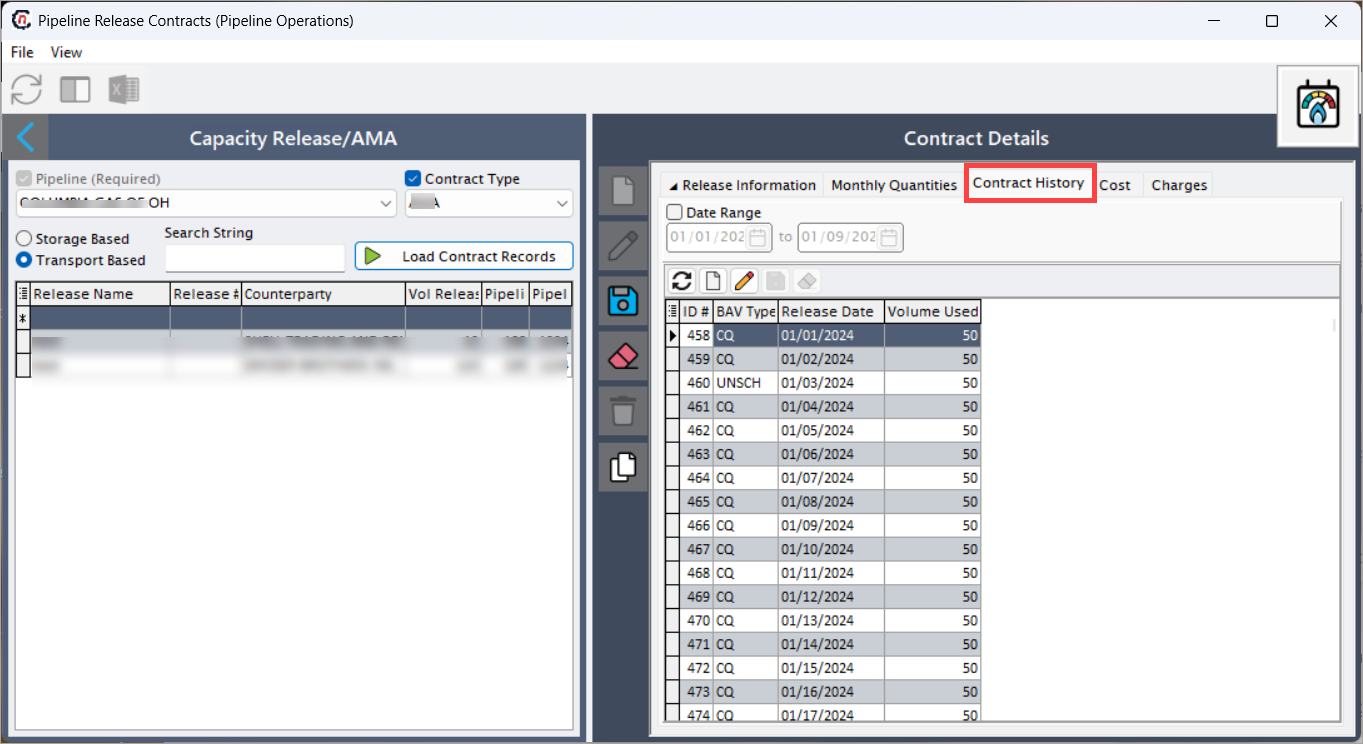
The Contract History tab provides a full audit trail of released capacity usage and supports reconciliation, compliance checks, and dispute resolution.
This includes:
- Field-level changes.
- Old and new values.
- User who made the change.
- Date and time of modification.
| Fields | Description |
|---|---|
| ID # | Unique identifier for usage record |
| BAV Type | Balancing account volume classification (e.g., CQ, UNSCH) |
| Release Date | Date of capacity usage |
| Volume Used | Quantity used on the specified date |
Cost tab
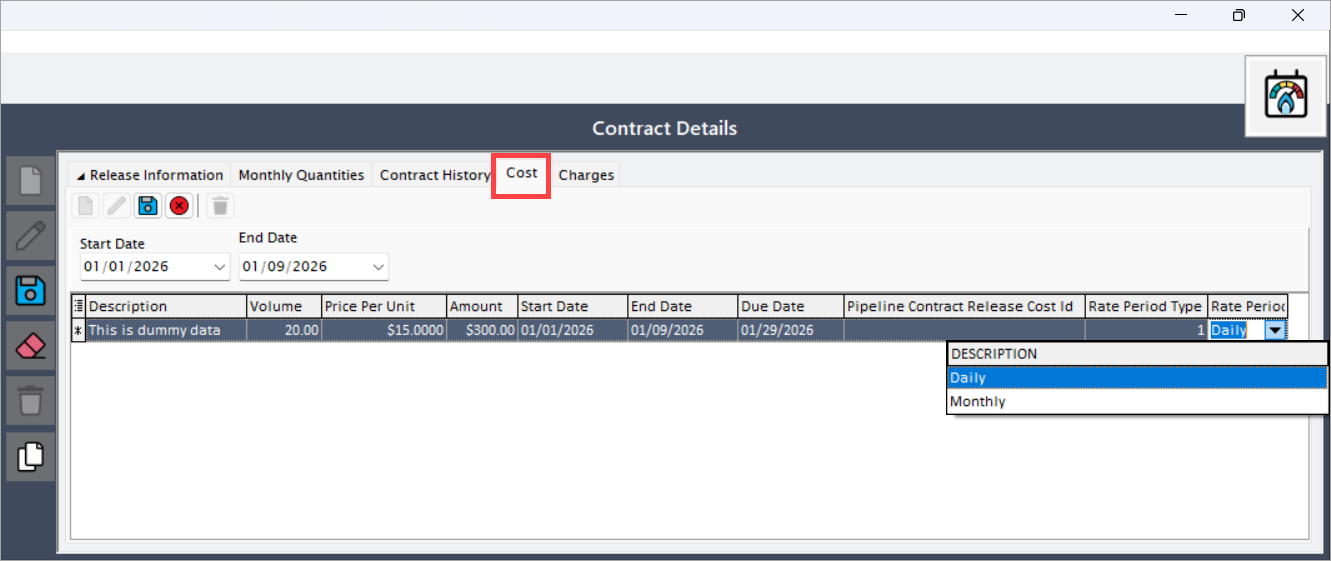
In the Cost tab, add any cost-related configuration associated with the release, such as fees or financial impacts tied to released capacity.
- Click the Add a New Contract Cost button.
-
Fill in the details as mentioned in the table below:
Fields Description Description Description of the cost entry Volume Volume to which the cost applies Price Per Unit Cost per unit of volume Amount Calculated total cost Start Date Cost applicability start date End Date Cost applicability end date Due Date Due date for cost settlement Pipeline Contract Release Cost Id System-generated cost record ID Rate Period Type Frequency of cost application (Daily / Monthly) -
Click Save.
Note:
- Daily costs are applied per operational day.
- Monthly costs are prorated or applied based on contract rules.
Charges tab
In the Charges tab, the user can assign the charge, including recurring or transactional charges, to the pipeline release contract.
- Click the Assign Charges button.
-
In the Pipeline Release Charges popup screen, assign the pipeline charges eligible from Available to the Selection grid using the > and < arrow keys.
- Available grid: Lists all pipeline charges eligible for release
- Selected grid: Lists charges applied to the release.
-
Click Close to save the changes. The selection charge definition will now list down under the Charges tab.
Fields Description Charge Name Pipeline charge applicable to the release Negotiated Rate Rate negotiated for the release Start Date Charge effective start date End Date Charge effective end date Rate Period Indicates Daily or Monthly application 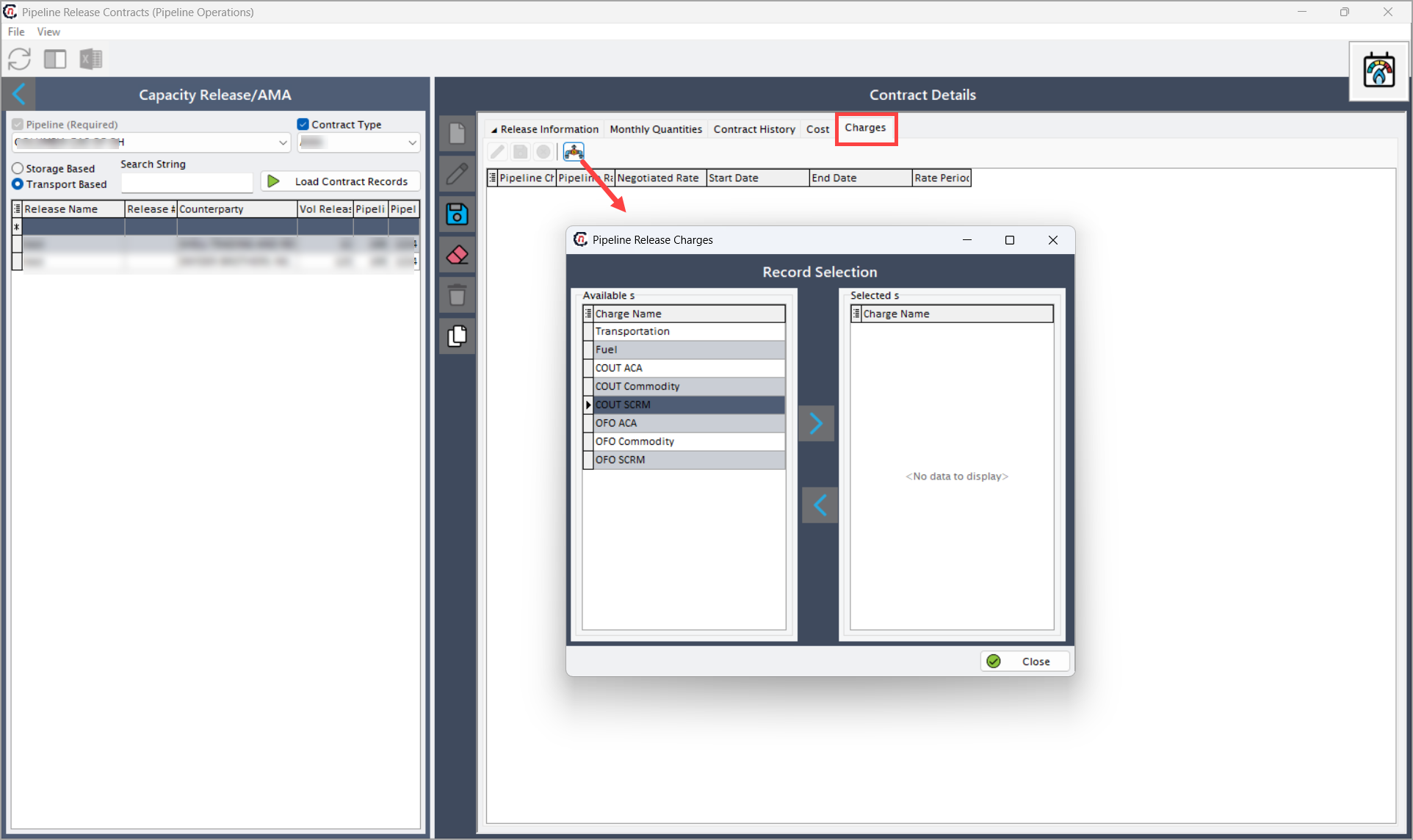
Review the changes
Once all the fields are filled in, click Save to record your changes.
Data interpretation
Once a release contract is loaded:
- Released volumes reduce available capacity on the original contract.
- Released capacity becomes available to the counterparty during nominations and scheduling.
- Recallable releases can be reversed based on contract terms.
- Thresholds help prevent over-release or underutilization.
- Monthly quantities provide time-based control over released capacity.
All release data directly impacts nominations, scheduling, valuation, and compliance reporting.
Key points
- Pipeline selection is mandatory.
- Release contracts can be Transport Based or Storage Based.
- Released capacity is governed by start and end dates.
- Recallable releases allow capacity to be reclaimed.
- Monthly quantities control how release volumes change over time.
- Audit history ensures full traceability of changes.
Summary
The Pipeline Release Contracts screen provides a comprehensive framework for managing pipeline capacity releases by allowing users to:
- Define release terms and quantities.
- Associate releases with counterparties and transport agreements.
- Track released capacity over time.
- Ensure compliance with pipeline and regulatory rules.
- Maintain full audit visibility of release activity.
This screen plays a critical role in ensuring accurate capacity management, transparent release tracking, and operational compliance across pipeline operations.