Configuring pipeline storage type
The Pipeline Storage Type screen is used to define and manage storage service classifications offered by a pipeline. Storage types determine how storage capacity behaves operationally, how it is valued, and how it is treated in contracts, nominations, and settlements.
The primary purpose of the Pipeline Storage Type screen is to:
- Define storage service categories for a pipeline
- Classify storage as Firm or Interruptible
- Establish parent–child storage type relationships
- Provide standardized abbreviations for downstream usage
- Ensure consistent behavior across contracts, valuation, and reporting
Correct configuration ensures that storage contracts behave correctly in scheduling, valuation, and accounting workflows.
Prerequisites
Before configuring a pipeline storage type, ensure the following prerequisites are met:
- The user has the add or modify permission for the Pipeline Storage Type screen
- The Pipeline is already configured in the system.
- Business understanding of pipeline storage offerings (Firm vs Interruptible).
Procedure to configure a pipeline storage type
Step 1: Navigate to the Pipeline Storage Type screen
- Log in to the nGenue application.
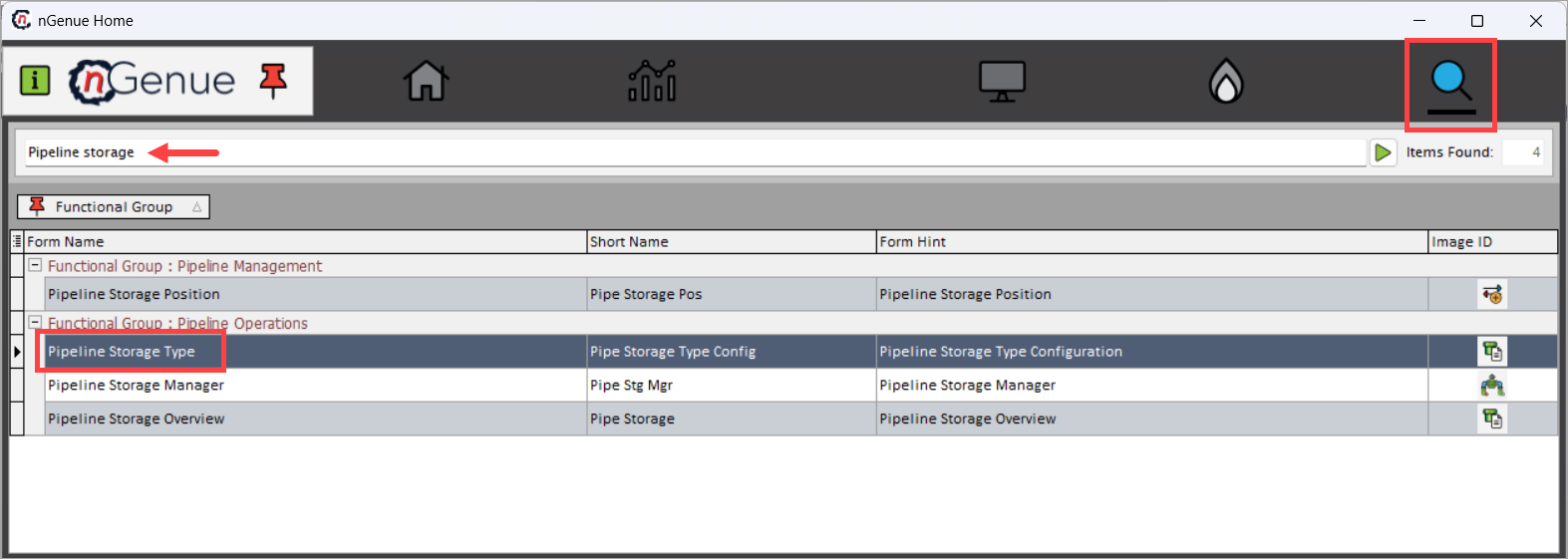
- Click the Search icon and enter Pipeline storage.
- Double-click Pipeline Storage Type to open the Pipeline Storage Type (Pipeline Operations) screen.
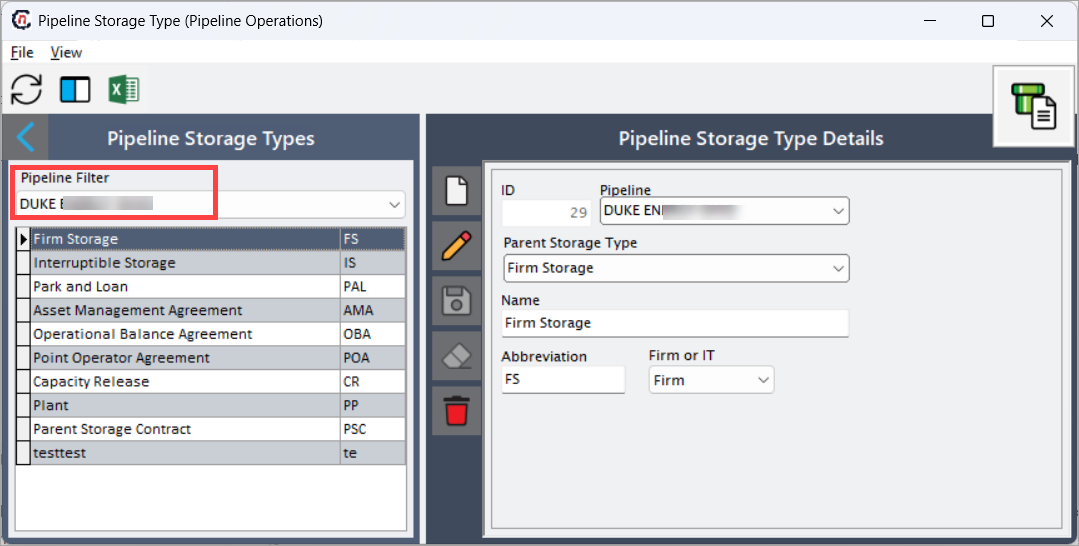
- The screen is divided into two sections:
- Pipeline Storage Types list on the left.
- Pipeline Storage Type Details panel on the right.
Step 2: Filter storage types by pipeline
- In the Pipeline Filter field, select the required pipeline.
- The left-hand grid refreshes to display all storage types configured for the selected pipeline. This helps ensure storage types are always configured within the correct pipeline context.
Step 3: Create or edit a storage type
-
To create a new storage type, click on Add a Pipeline Storage Type Record button.
-
Fill in the details as mentioned in the table below:
Fields Description ID System-generated unique identifier for the storage type. This value is automatically assigned when the record is saved and is used internally for references across contracts and transactions. Pipeline Displays the pipeline to which the storage type belongs. This value is inherited from the selected Pipeline Filter and cannot be changed once saved. Parent Storage Type Defines a hierarchical relationship between storage types. This allows child storage services (for example, Interruptible Storage) to inherit logical grouping from a parent type (such as Firm Storage). This hierarchy is useful for reporting and rule-based processing. Name The descriptive name of the storage type. This name is displayed throughout the system in contracts, nominations, valuation screens, and reports. Abbreviation A short code representing the storage type. This is used in grids, reports, and downstream references where space is limited. Example: FS,IS,PAL.Firm or IT Defines whether the storage type is Firm or Interruptible.
• Firm: Guaranteed service with priority access to capacity. Used for firm storage contracts and protected inventory.
• Interruptible: Lower-priority service that may be curtailed during constraints. Used for optional or market-driven storage services.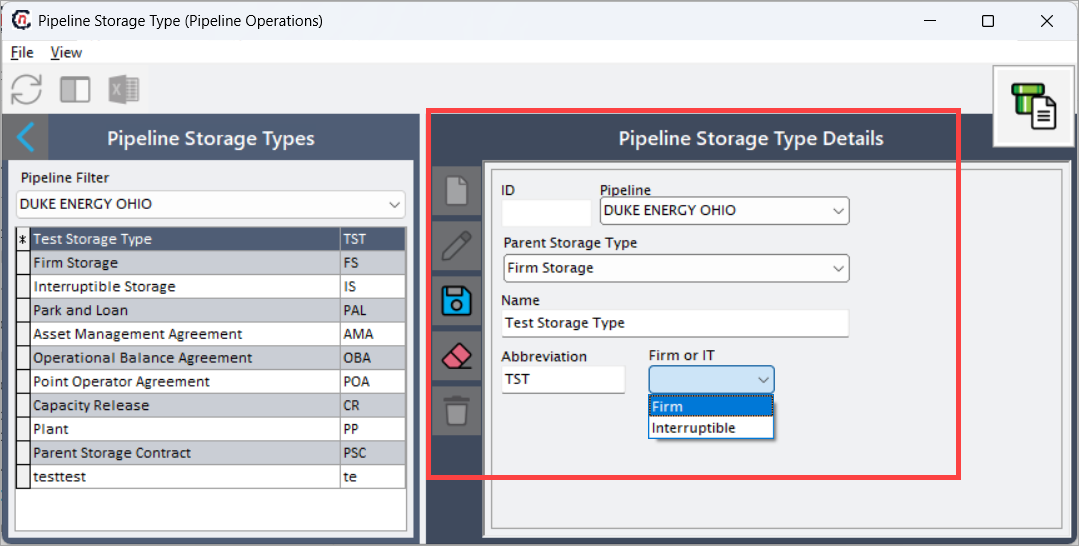
-
Once a storage type is saved, it appears in the Pipeline Storage Types list on the left.
Key points
- Storage types are master data and impact multiple downstream processes.
- The Firm or IT selection directly affects scheduling priority and curtailment behavior.
- Parent Storage Type enables logical grouping and reporting consistency.
- Abbreviations must be unique and meaningful for operational clarity.
- Changes to storage types should be carefully governed, as they affect existing contracts.
Summary
The Pipeline Storage Type screen provides a structured way to define how different storage services behave within a pipeline. By configuring storage types correctly, organizations ensure:
- Consistent contract behavior
- Accurate valuation and settlement
- Proper scheduling priority
- Clear operational and financial reporting
This configuration serves as a critical foundation for all storage-related activities in the system and should be set up carefully before creating storage contracts or nominations.