Configure limit sub group
A limit sub group is a categorization within a limit type that helps organize and apply credit or risk thresholds to specific groups of accounts, facilities, or transactions. Configuring limit sub groups allows finer control over credit and risk management by grouping related entities under a defined classification.
Prerequisites
Before working on the Limit sub group screen, ensure the following prerequisites are met:
- Ensure the nGenue application is installed and use valid login credentials to log into the application.
- User permissions: Configure the user permissions including User type, Security user, Security group, Security assign user, and Security assign permissions in their respective screens to enable access to the Limit sub group screen.
Procedure to configure limit sub group settings
Step 1: Navigate to the Limit sub group screen
- Log in to the nGenue application.
- Click the Search icon and enter Limit sub group in the search bar.
-
Double-click Limit sub group to open the respective screen.

-
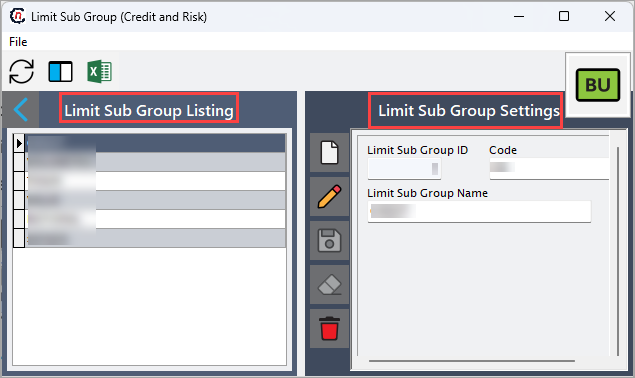
The Limit sub group (credit and risk) screen has two sections:
- Limit sub group listing: This section displays all the existing sub groups.
-
Limit sub group settings: This section allow you to add or modify sub groups.
Step 2: Adding a limit sub group
-
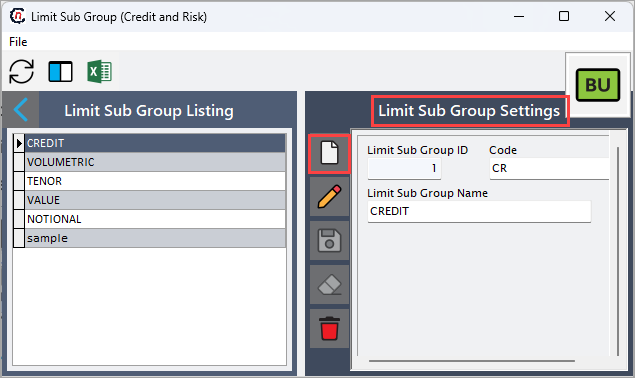
In the Limit sub group settings, click Add a limit sub group record to add new limit sub group.
-
Complete the required fields available in the Limit sub group settings section as mentioned in the following table along with brief description.
Fields Description Limit sub group ID Specifies the official name or description of the facility. Code Specifies the date and timestamp when the activity logged. Limit sub group name Describes the action or event. -
Click the Save changes to current limit sub group icon to save the record or click the Cancel changes to limit sub group record icon to discard the changes.
Summary
Configuring limit sub groups organizes entities under defined classifications for better credit and risk management. This ensures structured control over exposure, improves operational accuracy, and supports compliance with financial policies.