Configuring LDC Daily Quantity (DQ) types
The LDC Daily Quantity types screen is used to define and configure daily quantity values for Local Distribution Company (LDC). These values represent the limits and tolerances applied to energy consumption, nominations, and contractual obligations at either the end user or facility level.
The primary purpose of the LDC DQ configuration is to:
- Establish a standard method to calculate daily quantity limits.
- Define whether limits vary monthly or remain constant.
- Control how rounding is applied to daily values.
- Link configurations to Maximum Daily Contract Quantity (MDCQ), Maximum Daily Nomination (MDN), or cashout tolerances.
- Set an effective date range for applicability.
Prerequisites
Before configuring LDC DQ types, ensure the following prerequisites are met:
- LDC is already configured and is active in the system.
- You have the read and the write permissions to modify the LDC Daily Quantity (DQ) and LDC configuration screens.
- You have access to contractual details such as MDCQ, MDN, and tolerance limits.
- Effective date ranges do not overlap with existing configurations.
- The applicable end users or facilities are already defined within the system.
Procedure to configure LDC DQ types
Step 1: Navigate to the LDC Daily Quantity types (DQ) screen
- Log in to the nGenue application.
- Click the Search icon and enter LDC daily in the search bar.
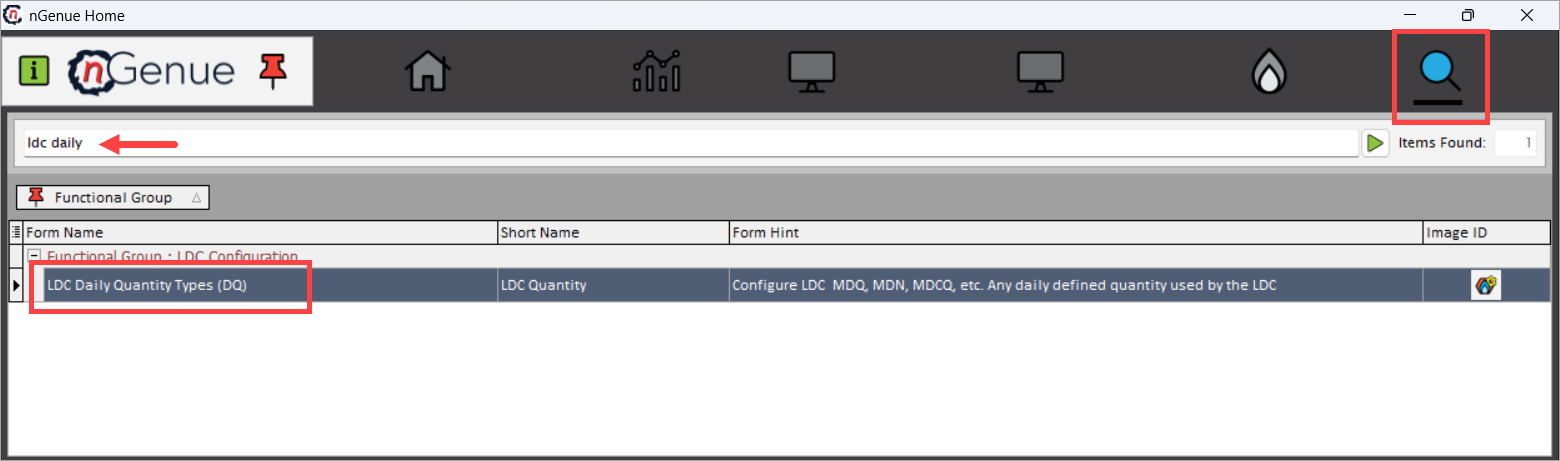
- Double-click LDC Daily Quantity types (DQ) to open the respective screen.
- From the LDC selection dropdown, select the desired LDC.
- Click on the Add button to add the configuration details.
-
Fill in the details as mentioned in the table below:
Fields Description Name Enter a meaningful name for the LDC daily quantity configuration. This name helps identify the configuration when assigning it to LDCs or end users. Example: “Monthly Constant DQ” or “Facility Based DQ.” Abbreviation Enter a short, unique code for the configuration. This abbreviation is used as a quick reference throughout the system. Example: “MC_DQ” or “FAC_DQ.” This value Select how the daily quantity value should behave. Choose Changes every month if the value will vary each month, or Remains constant if the value stays the same for all months. This value is Select the level at which the value is determined. Choose End user based if each end user has a specific daily quantity value, or Facility based if the value is defined at the facility level.
1. When End user based is selected, values are fetched in the End user MDQ values screen for the selected LDC.
2. When Facility based is selected, values are fetched in the Facility MDQ values screen for the selected LDC.
Point to note: Ensure the daily factor is assigned to the LDC. To do this, navigate to the LDC rate configuration (rate rider/rate class) screen and assign the daily factor using the Assign daily factors to this tariff ( ) icon.
Rounding method Choose the method used to round the daily quantity value. Options include None (no rounding), Standard (rounds to the nearest value), Round up (always rounds to the next higher number), or Round down (always rounds to the next lower number). Rounding level Select whether rounding should be applied at the End user level or Facility level. This determines where the rounding logic is executed. Use this value as MDCQ Check this box if the configured value should be treated as the Maximum Daily Contract Quantity (MDCQ), which defines the highest daily contracted quantity allowed. Use this value as MDN Check this box if the configured value should be treated as the Maximum Daily Nomination (MDN), which specifies the maximum quantity that can be nominated in a day. Value represents cashout tolerance % Check this box if the configured value represents a cashout tolerance percentage, used for determining acceptable usage variations during cashout calculations. Monthly value Check this box if the configured value should be interpreted as a monthly value rather than a daily one. This is useful when the system should treat the entered value as a total for the month. Effective date range Enter the start date and end date to define when this configuration should be active. The system applies this configuration only within the specified date range. Comments Enter any additional notes, remarks, or clarifications about this configuration. This can include the purpose, business rules, or references to related setups.
Step 2: Validate and save the changes
-
Click Save to apply the configuration.
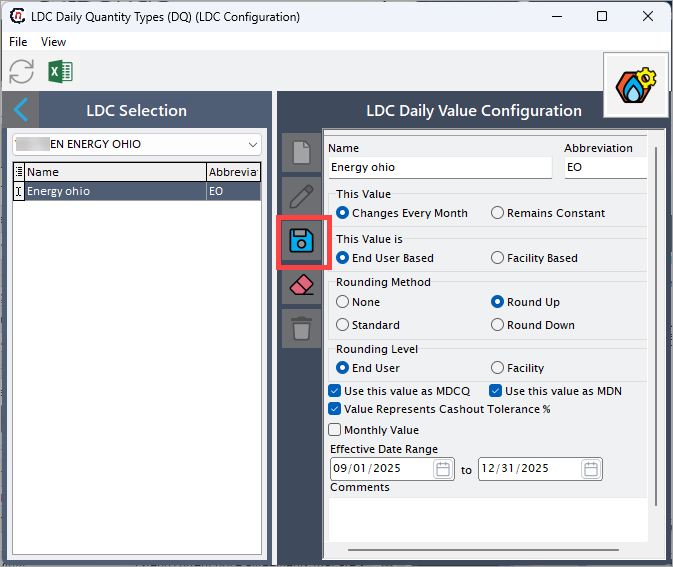
Key points to remember
- Ensure that effective date ranges do not overlap with existing configurations for the same LDC.
- If Monthly value is selected, ensure proper mapping to monthly allocation logic.
- Use comments to track rationale for configuration decisions.
- You can further edit, delete or update the daily value configuration as per the needs.
What's next
-
Once configured, these values are automatically pulled into dependent modules/screens such as:
- LDC charge definition – For applying daily quantity-based charges.
- End user/ Facility DQ values – For displaying calculated limits at end user or facility level.
- Prospect Quote Engine – For accurate quoting based on contractual daily limits (under the DQ values tab in the Prospect Quote Engine (End user configuration)) screen.
-
Refer to the following screenshots for visual reference of how the configured values appear in each screen:
-
LDC charge definition screen
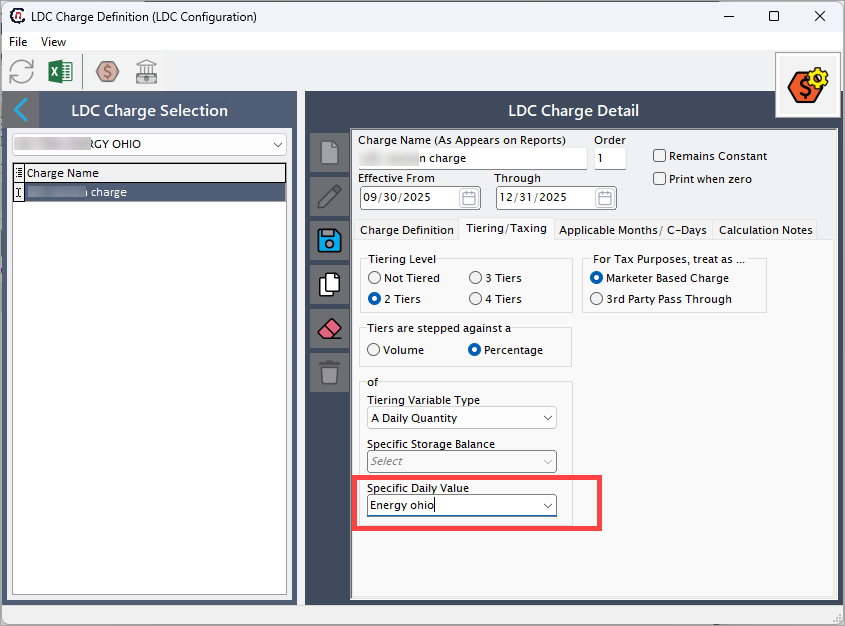
-
End user MDQ values screen
For the level at which the value is determined is End user based: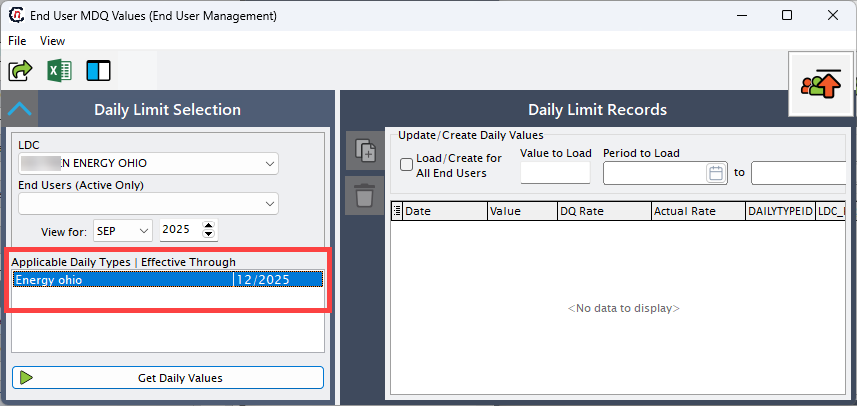
-
Facility MDQ values screen
For the level at which the value is determined is Facility based: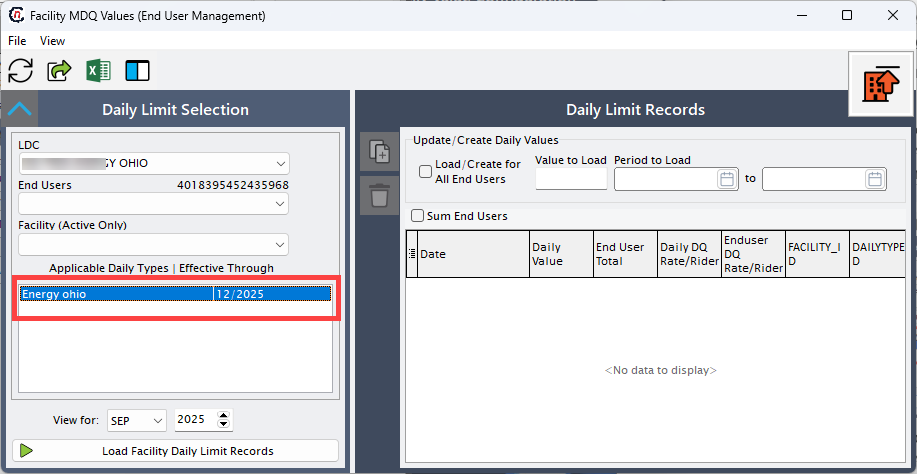
-
Example scenarios
Scenario 1: End user-based MDCQ configuration
In this scenario, the LDC XYZ ENERGY OHIO has configured the following:
- Configured daily quantity type so that the MDCQ changes every month and is determined at the end user level. This means each end user will have a distinct MDCQ value for each month.
- The LDC has selected the “Changes every month” option under This value, and “End user based” under This value is.
- The rounding method is set to Round up, ensuring that the system always rounds the MDCQ value to the next higher number to avoid underestimating the contractual quantity.
- The rounding level is defined at the End user level, meaning rounding is applied individually for each end user’s value.
- The option Use this value as MDCQ is enabled, indicating that the configured value will serve as the official MDCQ limit for usage calculations and validations.
- The configuration is valid for the effective date range from
09/01/2025 to 09/30/2025, ensuring it applies only within this billing period.
This setup is useful when each end user has varying consumption patterns or contractual obligations month over month.
Scenario 2: Facility-based MDN with cashout tolerance
In this configuration, the same LDC XYZ ENERGY OHIO defines:
- A MDN value that remains constant throughout the configuration period.
- The option “Remains constant” is selected under This value, and the value is set at the facility based level, meaning the same MDN value applies to each facility rather than to individual end users.
- The rounding method is set to Standard, which rounds values to the nearest whole number, and the rounding level is set at the Facility level to apply rounding collectively for each facility’s total MDN.
- The Use this value as MDN checkbox is enabled, indicating that the value represents the maximum daily nomination allowed per facility.
- Additionally, the Value represents cashout tolerance % option is checked, signifying that the configured value also serves as a tolerance percentage used during cashout calculations to balance over- or under-nominations.
- The configuration is valid from
09/01/2025 to 09/30/2025.
This scenario is ideal when the LDC wants to maintain uniform MDN values across facilities while incorporating a tolerance limit to handle variations in daily nominations.
Summary
The LDC Daily Quantity (DQ) types configuration defines the core daily quantity logic that drives several downstream processes across the system.
Once configured, these values are automatically pulled into dependent modules/screens such as:
- LDC charge definition – For applying daily quantity-based charges.
- End user/ Facility DQ values – For displaying calculated limits at end user or facility level.
- Prospect Quote Engine (PQE) – For accurate quoting based on contractual daily limits.
These visuals help validate that your setup is functioning correctly and ensure alignment between configuration and operational use.