Print end user daily
An End user daily report provides a day-by-day view of gas delivery, usage, and related activity for individual end users within a selected month and year. It details daily volumes by LDC, pool, and rate, and can optionally include imbalance calculations based on nominations or actual deliveries.
This report is used to monitor daily consumption patterns, validate delivered versus nominated volumes, calculate imbalances, and support accurate billing and settlement. It is especially useful for operations, billing, and risk management teams to analyze daily performance, investigate discrepancies, and respond to customer or LDC inquiries.
The report includes daily volume details for each end user, optional daily breakdowns, and imbalance calculations. It can be previewed or printed directly from the nGenue application to support operational tracking, billing validation, and audit requirements.
Prerequisites
Before working on the Print end user daily (Reports) screen, ensure the following prerequisites are met:
- Ensure the nGenue application is installed and use valid login credentials to log into the application.
- Configure the user permissions including User type, Security user, Security group, Security assign user, and Security assign permissions in their respective screens to enable access to the Print end user daily (Reports) screen.
Procedure to print end user daily report
- Log in to the nGenue application.
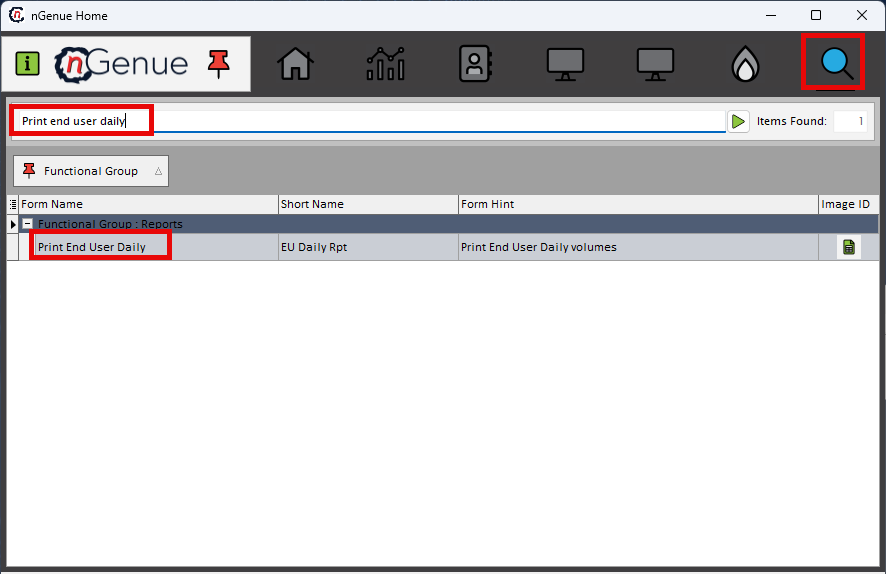
- Click the Search icon and enter Print end user daily in the search bar.
-
Double-click the Print end user daily from the search results to open respective screen.
-
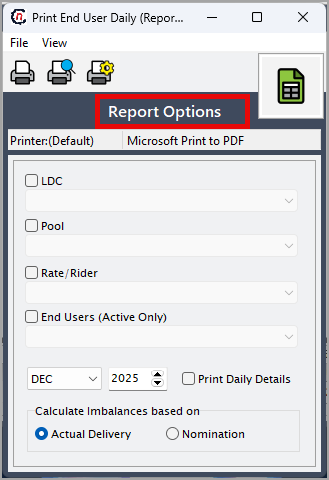
In Print end user daily (Reports), the Report options section allows to specify report filters, delivery period, and output preferences.
-
Complete the required fields available in the Report options section as listed in the table below:
Fields Description LDC Select the Local Distribution Company whose end user daily volumes will be included in the report. Pool Select the pool to filter end users and daily volumes included in the report. Rate/rider Select the applicable rate or rider to limit the report to end users billed under that rate. Month Select the delivery month for which daily end user activity is to be reported. Year Select the delivery year associated with the selected month. Print daily details Select this option to include a detailed, day-by-day breakdown of volumes for each end user. Calculate imbalances based on actual delivery or nomination Select how imbalances should be calculated—either using actual delivered volumes or nominated volumes for comparison. 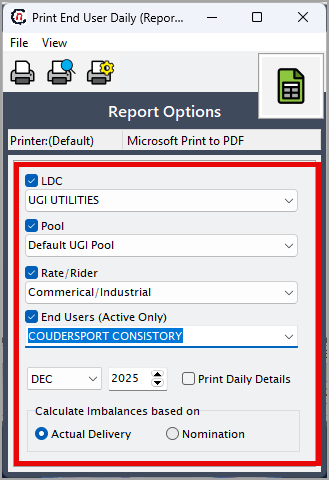
-
Select any of the printing options available in the top header as described in the table below:
Icons Icon name Description 
Print Click Print icon to print the aging detail report. 
Print preview Click Print preview icon to view the aging detail report. 
Printer setup Click Printer setup icon to configure printing settings. -
Click Printer setup to configure print settings such as printer name, paper size, orientation, properties, and network.
- Click Ok to save the configuration.
- Click Cancel to discard changes.
-
Click Print preview to review the report and make any necessary adjustments.
- Click Print to generate the end user daily report based on the selected month, year, and filters.retail price confirmation (single month) report for the selected delivery month, year, and pool.
Summary
The end user daily report provides detailed, day-level visibility into gas delivery and usage for individual end users. It supports daily monitoring, imbalance analysis, and billing validation by ensuring accurate comparison of nominated versus actual volumes. This report is essential for operational oversight, discrepancy resolution, and maintaining accurate and auditable billing records.