Create a physical retail deal
This guide shows how to add and manage a Physical Retail deal using a step-by-step scenario. Follow the instructions to complete the process efficiently.
Step 1: Navigate to the Deal Management section
- Log in to the nGenue application using your credentials.
- Click the Search icon and enter deal management in the search bar.
- Select Deal management.
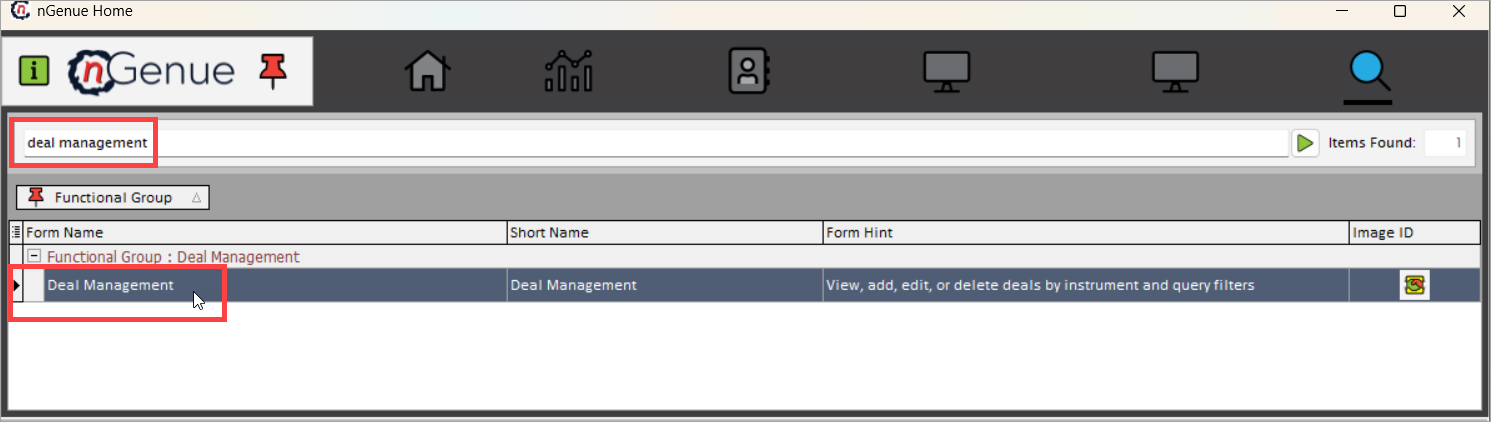
- The next screen is divided into two sections: Deal query and Deal details. For detailed information and a list of fields available in both sections, refer to the navigating deal management screen article.
Step 2: Create a new physical retail deal
- Click on Add Physical Retail Deal or use the (Alt+B) keyboard shortcut.
-
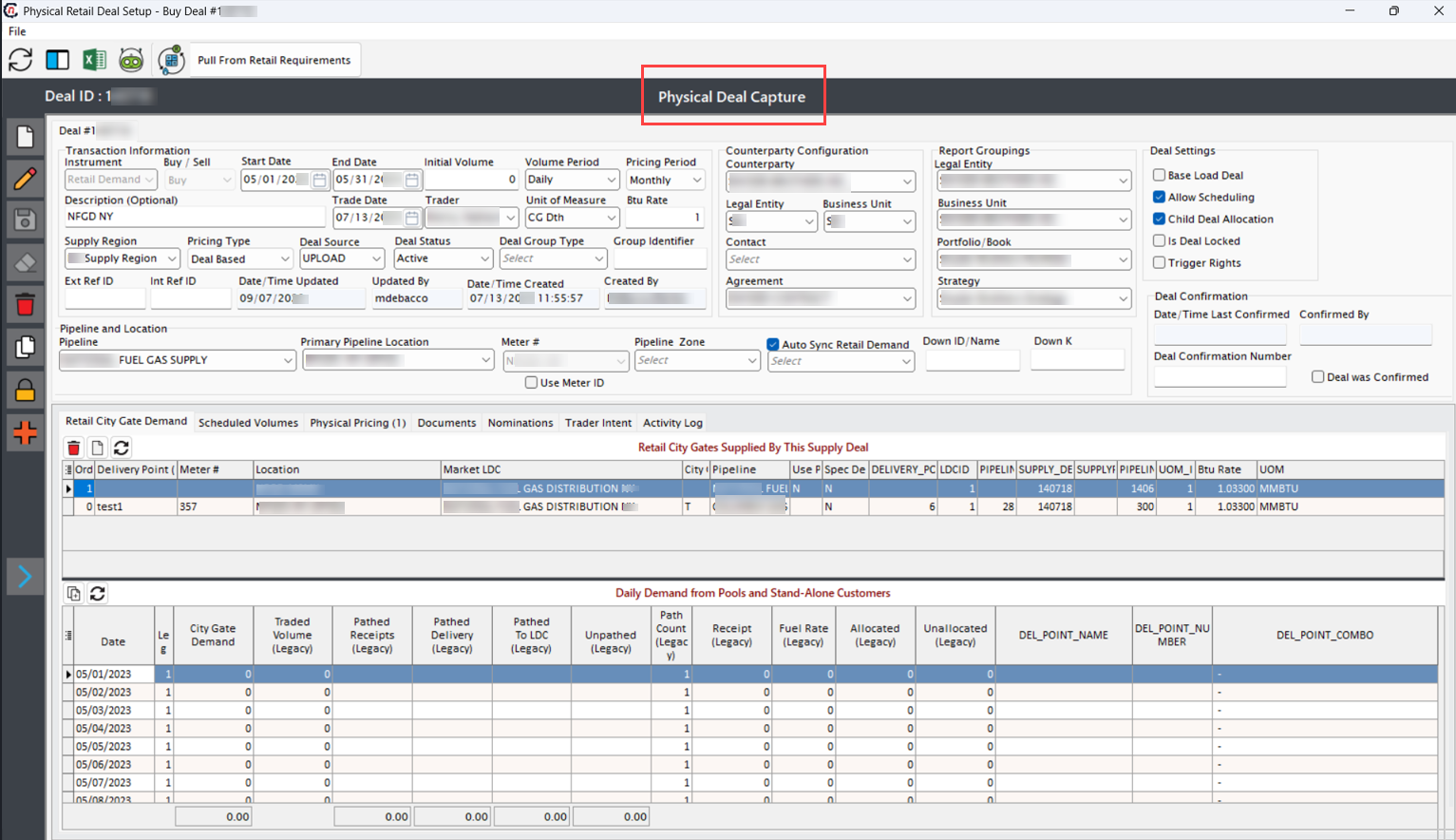
You'll be navigated to the Physical Retail Deal capture screen, where you need to fill in the details as mentioned in the table below:
Transaction information fields
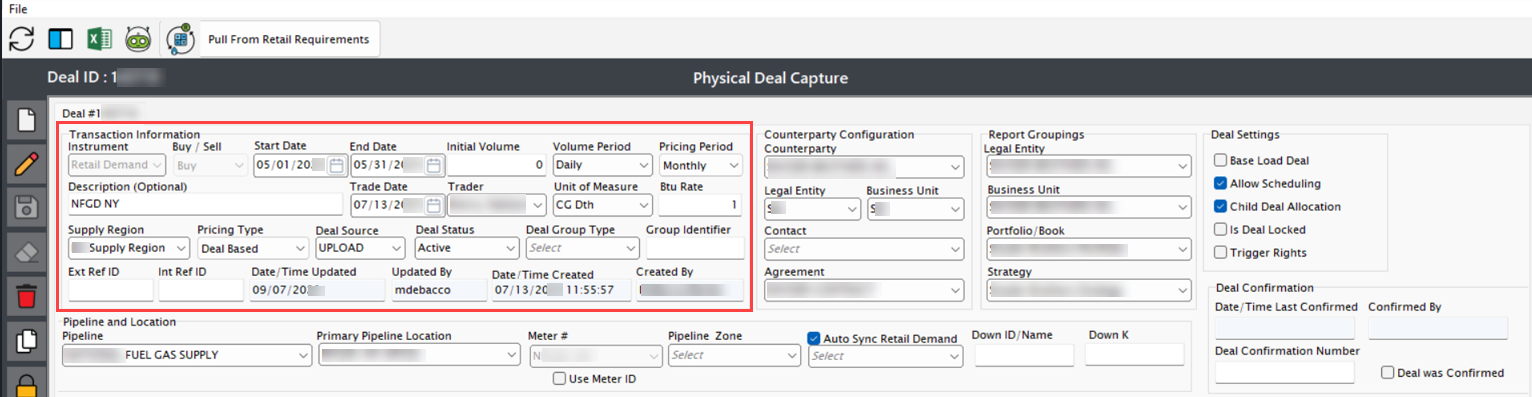
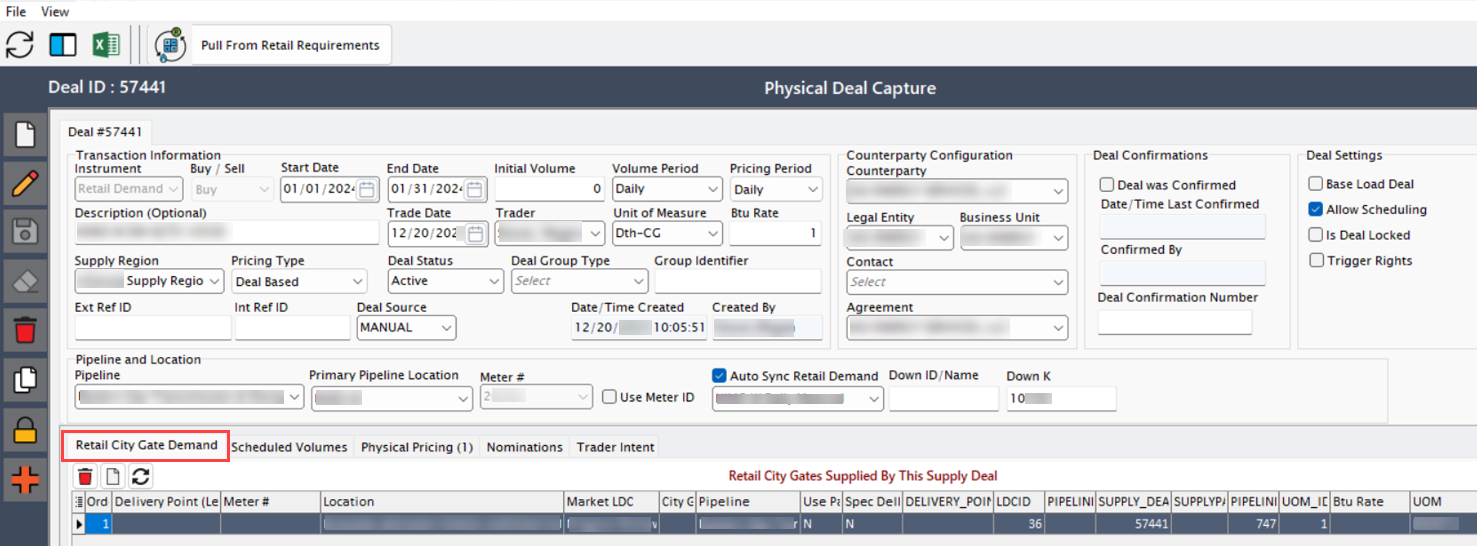
Fields Description Instrument Defines the type of deal being created. In this case, Physical NG (Natural Gas) is selected as it involves the physical delivery of natural gas. Selecting the correct instrument ensures the deal is processed under the appropriate market rules and contract terms. Buy/Sell Specifies whether the deal is a buy (purchase of gas) or a sell (sale of gas). This is crucial for financial accounting and tracking gas flow. It also determines whether the company is acquiring gas from a supplier or selling it to an end user. Start Date and End Date Defines the duration of the deal. The start date indicates when the deal becomes active, and the end date marks its expiration. Setting the correct date range ensures that contractual obligations, pricing periods, and gas deliveries align correctly. Initial Volume Specifies the total amount of natural gas committed under this deal. The volume is important for scheduling deliveries, ensuring compliance with contract terms, and forecasting supply needs. Underestimating or overestimating this value can impact financial and operational planning. Volume Period Determines whether the initial volume is distributed on a daily or monthly basis. This selection affects billing calculations, scheduling logistics, and contract fulfillment. Daily volumes are used in short-term contracts, while monthly volumes are common in long-term agreements. Pricing Period Specifies whether the price for the volume is set on a daily or monthly basis. This aligns with the pricing model agreed upon with the counterparty. Daily pricing is typically used for volatile markets, whereas monthly pricing provides stability. Description A brief summary or identifier for the deal. Helps users quickly understand the nature, purpose, or special conditions of the deal. Typically includes relevant details like deal type, counterparty, or special pricing conditions. Trade Date The date when the deal was executed. Important for historical tracking, regulatory reporting, and risk assessment. Trade dates impact financial reporting, as well as compliance with market regulations. Trader The person or entity responsible for executing the deal. Ensures accountability and allows for tracking individual traders’ activity for audit and risk management purposes. Unit of Measure Defines how the gas volume is measured (e.g., MMBtu, Therms, Dekatherms). Ensures accurate calculations for billing, transportation, and reporting. Different pipelines or markets may require specific units. Btu Rate The heat content conversion factor for natural gas. Used to standardize gas pricing and volume conversions across different suppliers, pipelines, and contracts. Ensures accurate valuation of gas energy content. Supply Region Identifies the geographical region from which the gas is sourced. This field is necessary for logistics, regulatory compliance, and pricing calculations, as gas costs vary by location due to transportation fees and supply availability. Pricing Type Specifies whether pricing is deal-based or location-based:
1. Deal-Based Pricing: The price is set at the deal level, meaning the cost remains fixed for that particular deal regardless of location.
2. Location-Based Pricing: The price is determined by the pipeline location or market hub. This allows for variable pricing based on regional price fluctuations, market demand, or LDC rules.Deal Source Specifies how the deal was created (e.g., manually entered, imported from an external system, or generated via an API). Helps in data validation and troubleshooting by tracking deal origins. Deal Status Indicates the current lifecycle stage of the deal, such as Created, Confirmed, Partially Pathed, Canceled, Active, or Scheduled. Essential for workflow management and tracking deal progress. Deal Group Type Defines the category under which the deal falls (e.g., wholesale, retail, physical, financial). Helps in grouping and filtering deals based on their nature and purpose. Group Identifier A unique grouping ID used to link related deals together. Helps in tracking multiple deals that are part of a larger transaction, such as parent-child deal structures. Ext Ref ID An external reference identifier used when deals are imported from third-party trading systems or market platforms. Helps in cross-referencing deals with external data sources. Int Ref ID An internal reference ID used within nGenue for tracking and linking deals across different modules. Helps in ensuring data consistency across deal management and financial reporting. Date/Time Updated The timestamp of the last modification made to the deal. Useful for audit tracking and version control, ensuring transparency in deal modifications. Updated By The user who last modified the deal. Ensures accountability by tracking changes made by different users. Useful in audits and internal reviews. Date/Time Created The timestamp when the deal was initially created. Used for tracking deal history, financial reporting, and auditing purposes. Created By The user who originally created the deal. Important for audit trails and compliance reporting, ensuring transparency in deal creation. Counterparty Configuration fields
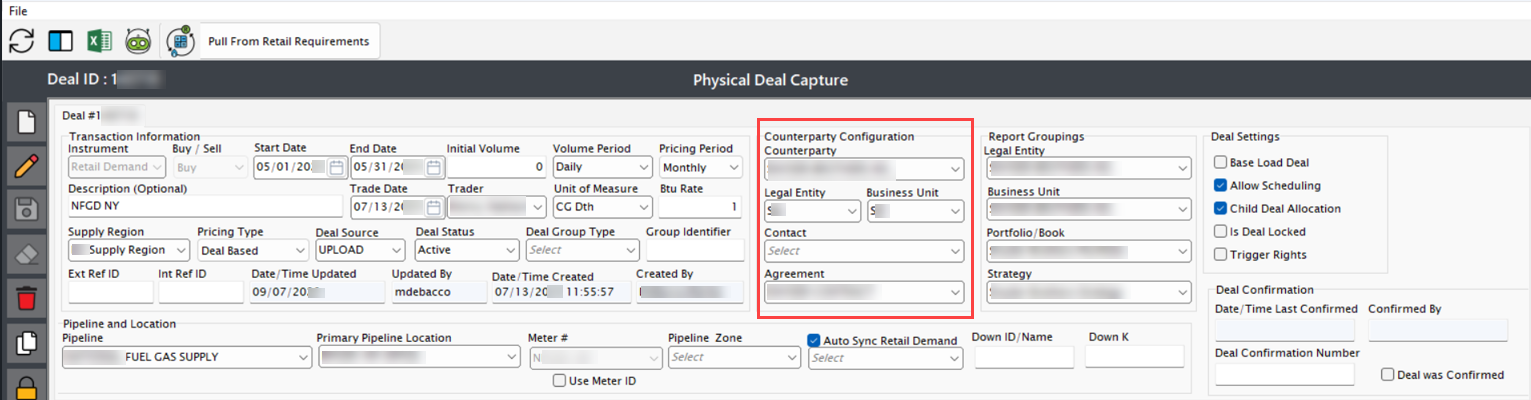
Fields Description Counterparty The entity (supplier or customer) with whom the deal is being made. This could be a wholesale supplier, marketer, or retail customer. Correct selection ensures accurate contract execution, billing, and risk management. Legal Entity The registered business entity of the counterparty. Some counterparties operate under multiple legal entities, so selecting the correct one ensures compliance with contracts and legal requirements. Business Unit The internal division of the company managing this deal. Different business units handle wholesale, retail, or trading operations. Proper selection ensures accounting and reporting accuracy. Contact The point of contact for the selected counterparty. This information is useful for communication regarding contract negotiations, scheduling, and issue resolution. Agreement The contract governing the deal. Specifies the terms and conditions, pricing structures, penalties, and obligations between the supplier and buyer. Ensures compliance and minimizes disputes. Report Groupings fields
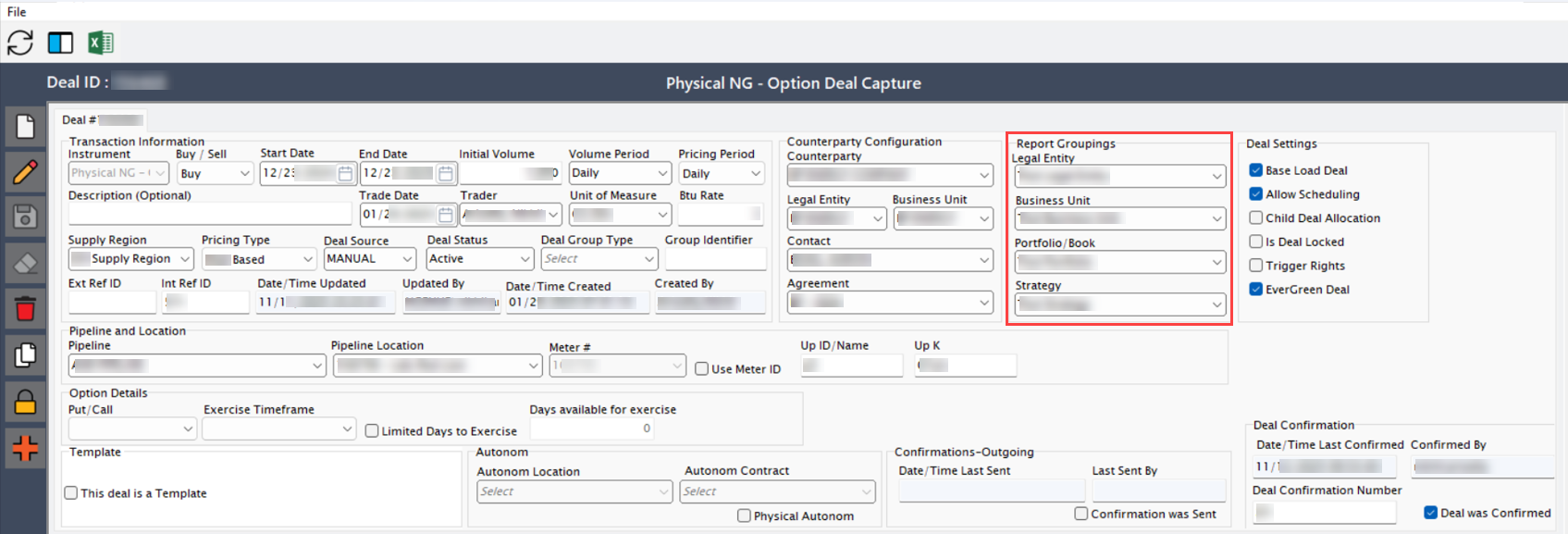
Fields Description Legal Entity The company division responsible for the deal. This helps in financial reporting, compliance, and taxation. Business Unit The internal business segment handling the transaction. Used for operational control and profit/loss allocation. Portfolio/Book The portfolio or trading book where the deal is recorded. This is important for risk management and financial analysis. Strategy Categorizes the deal based on the company's market strategy, such as hedging, speculative trading, or customer supply. Helps in risk assessment and profitability tracking. Deal Settings fields
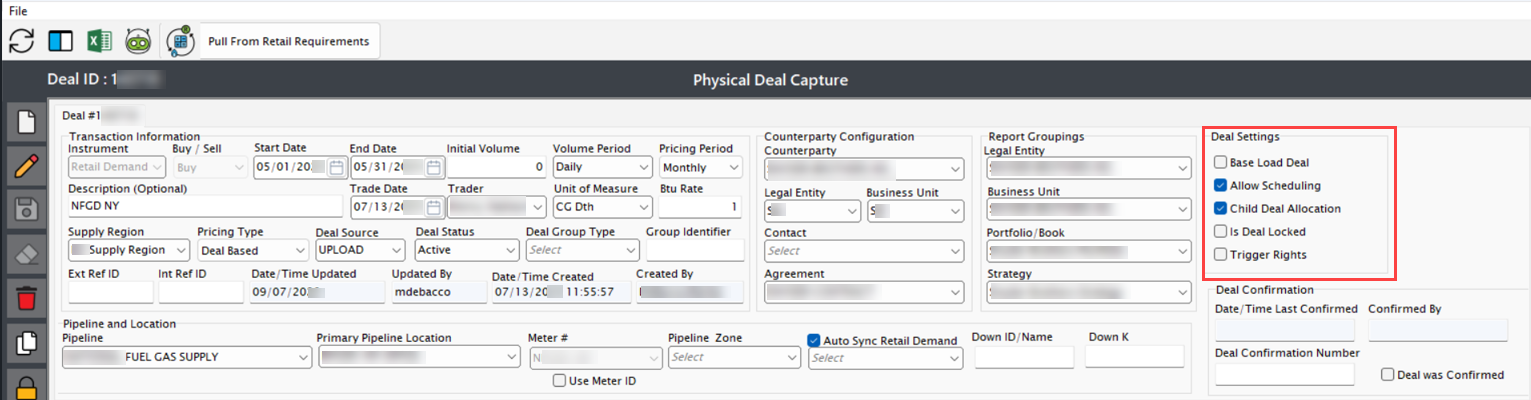
Fields Description Base Load Deal If checked, the deal follows a base load contract, meaning a fixed quantity of gas is delivered daily/monthly. Used in long-term supply contracts for consistent gas flow. Allow Scheduling If checked, pipeline scheduling is enabled. Required for deals where gas deliveries need pre-approval from the pipeline operator. Child Deal Allocation Allows gas allocation to sub-deals. Used for dividing a large contract into smaller units for different buyers or locations. Is Deal Locked If checked, prevents further modifications to the deal. Used for finalized contracts that shouldn't be altered after approval. Trigger Rights If enabled, this setting allows triggering rights such as the ability to call upon specific contract options, like adjusting volumes, extending terms, or initiating optional deliveries, based on predefined conditions in the deal. It enables contract flexibility based on market conditions or counterparty agreements. Pipeline and location fields
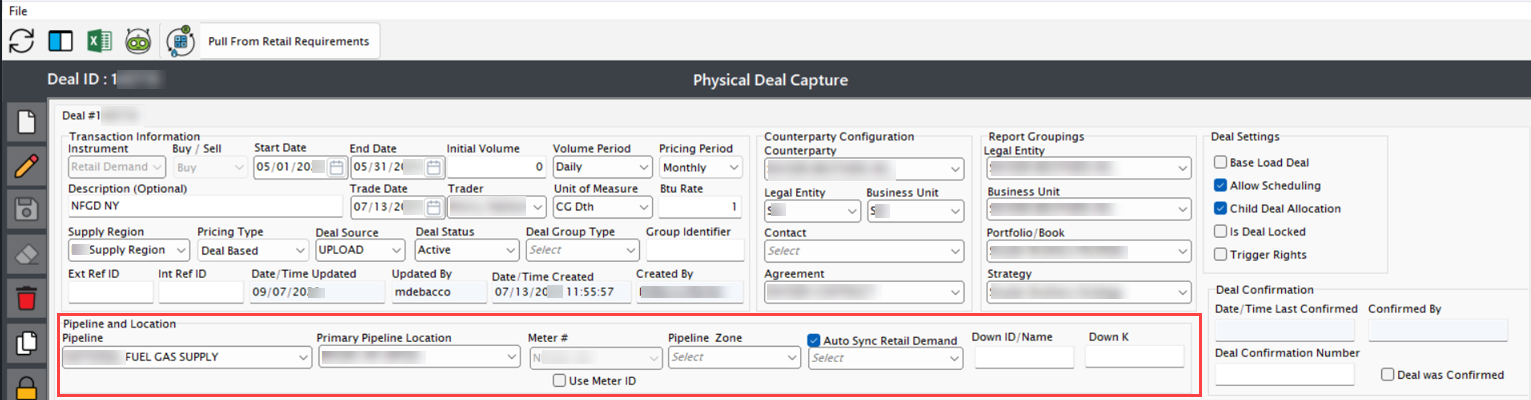
Fields Description Pipeline The transportation system used to move the gas from the supplier to the end user. Selecting the correct pipeline ensures proper scheduling, tracking, and delivery coordination. Pipelines have capacity constraints and require scheduling approvals, making this a critical field. Pipeline Location A more specific designation within the pipeline system where the gas transaction occurs. This could be a receipt point (where gas enters the pipeline) or a delivery point (where gas is delivered to the end user). This ensures accurate transportation and delivery tracking. Use Meter ID If checked, the meter# field is enabled, allowing users to specify a unique meter for tracking gas flow. This is used when tracking gas consumption at specific locations is required. Meter# The unique identifier for the meter measuring gas flow for this deal. This ensures that actual usage data is captured for accurate billing and reconciliation. Essential for tracking consumption at a facility level. Auto Sync Retail Demand Displays a list of existing demand pools and lets users edit and update the selected supply-demand pool record. Refer page, Retail Demand pool. Down/ID Name A unique identifier for the downstream entity or deal. This helps in tracking related deals and transactions efficiently, especially when multiple deals are linked. Down K A reference field used for internal tracking of downstream transactions within nGenue. Useful for linking deals with parent transactions or supplier agreements. Deal confirmation fields
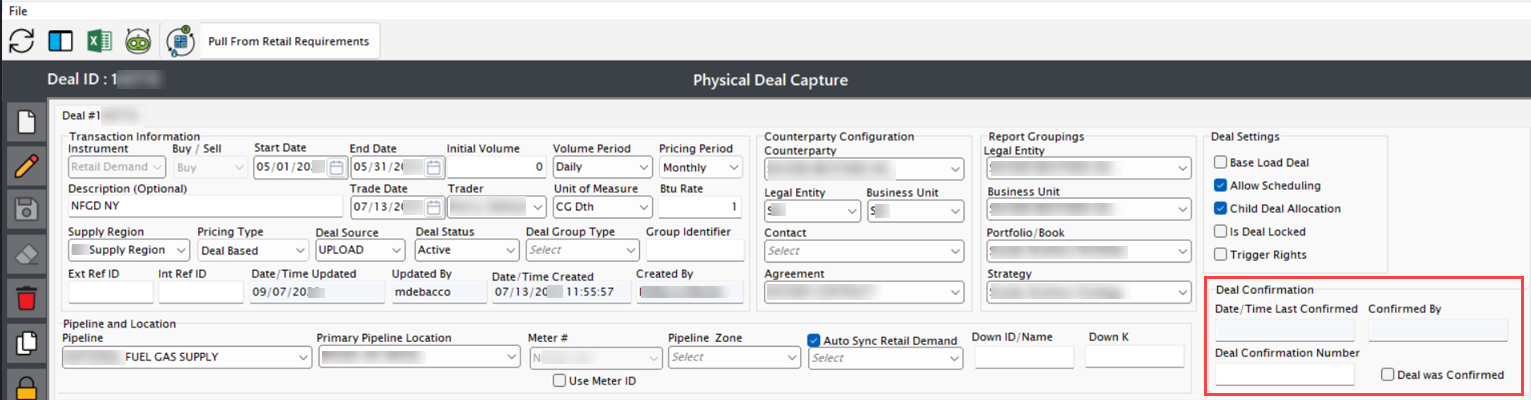
Fields Description Date/Time Last Confirmed Displays the most recent date and time when the deal was confirmed. This ensures that the transaction is officially recorded. Confirmed By The name of the user who confirmed the deal. This is important for tracking who approved and finalized the transaction. Deal Confirmation Number A unique identifier assigned to each confirmed deal. The number increases sequentially with each confirmation, making it easy to track past confirmations. Deal was Confirmed If checked, it indicates the deal is officially confirmed. This helps ensure that the deal is finalized and cannot be modified without further action.
Step 3: Saving the deal
Once all mandatory fields are filled, click Save to finalize the deal. This ensures that all details are stored and processed correctly. You will navigate to the Retail City Gate Demand tab where a concise overview of the deal is displayed.
Additional tabs in the Physical retail deal capture screen
The Physical Retail Deal capture screen provides multiple tabs, each serving a specific function to manage, review, and analyze a physical retail deal effectively. Below is a detailed explanation of each tab and its functionality.
1. Retail City Gate Demand
1.1 Retail City Gates Supplied By This Supply Deal

| Fields | Description |
|---|---|
| Order | Shows content in a numbered, ordered list. |
| Delivery Point (Legacy) | Represents an exit location where gas leaves the pipeline. |
| Meter # | The unique identifier for the meter measuring gas flow for this deal. This ensures that actual usage data is captured for accurate billing and reconciliation. Essential for tracking consumption at a facility level. |
| Location | Identifies the city gates that this supply deal serves for the specified location. |
| Market LDC | Identifies the local distribution company (LDC) that serves market for the gas transaction. |
| City Gate | Identifies the delivery point as the official city gate for the market LDC and determines how the system allocates volumes and passes them through for billing and balancing. |
| Pipeline | Identifies the pipeline into which you sell gas for the market. |
| Use Paths | Specifies whether the supply deal uses defined pipeline paths for city gates. |
| Spec DelPt Req | Specifies whether the supply deal requires a specific delivery point for city gates. |
| DELIVERY_POINT_ID | Identifies the specific delivery point for the city gate in the supply deal. |
| LDCID | Identifies the local distribution company (LDC) for the city gate in the supply deal. |
| PIPELINE_ID | Identifies the pipeline that delivers natural gas to a city gate and specifies which pipeline the system uses for gas delivery, tracking, and settlement. |
| SUPPLY_DEAL_ID | Identifies the supply deal linked to a city gate and specifies which supply agreement provides natural gas for delivery and settlement. |
| SUPPLYPATH | Identifies the route used to deliver natural gas to a city gate and defines how gas flows from the supply source to the city gate for delivery and settlement |
| PIPELINE_LOCATION_ID | Identifies the specific pipeline location associated with a city gate and specifies where natural gas enters or exits the pipeline for delivery and settlement. |
| UOM_ID | Identifies the unit of measure for recording natural gas quantities at a city gate and specifies how the system measures volumes for delivery, tracking, and settlement. |
| Btu Rate | Measures the energy content of natural gas at a city gate and determines values for billing and settlement. |
| UOM | (Unit of Measure) specifies how the system measures natural gas quantities at a city gate, ensuring accurate tracking, delivery, and settlement. |
1.2 Daily Demand from Pools and Stand-Alone Customers

| Fields | Description |
|---|---|
| Date | Indicates the day associated with a city gate for tracking, delivery, and settlement. |
| Leg | Represents a segment of a city gate, showing the portion of gas flow for tracking and settlement. |
| City Gate Demand | Represents the amount of natural gas required for delivery and settlement. |
| Traded Volume (Legacy) | Shows the total gas volume traded at the selected City Gate for the deal. |
| Pathed Receipts (Legacy) | Shows scheduled gas volumes received through defined pipeline paths. |
| Pathed Delivery (legacy) | Shows scheduled gas volumes delivered through specified pipeline paths. |
| Pathed to LDC (Legacy) | Shows the gas volume scheduled for delivery to the Local Distribution Company. |
| Unpathed (Legacy) | Shows the portion of gas volumes not assigned to a specific pipeline path. |
| Path Count (Legacy) | Indicates the quantity of gas received at the City Gate. |
| Receipt (Legacy) | Displays the number of pipeline paths used for scheduling receipts or deliveries. |
| Fuel Rate (Legacy) | |
| Allocated (Legacy) | Gas volumes assigned to specific delivery or receipt paths |
| Unallocated (Legacy) | Gas volumes not yet assigned to any delivery or receipt path |
| DEL_POINT_NAME | Name of the delivery point |
| DEL_POINT_NUMBER | Unique identifier of the delivery point |
| DEL_POINT_COMBO | Combined name and number of the delivery point |
2. Scheduled Volumes tab
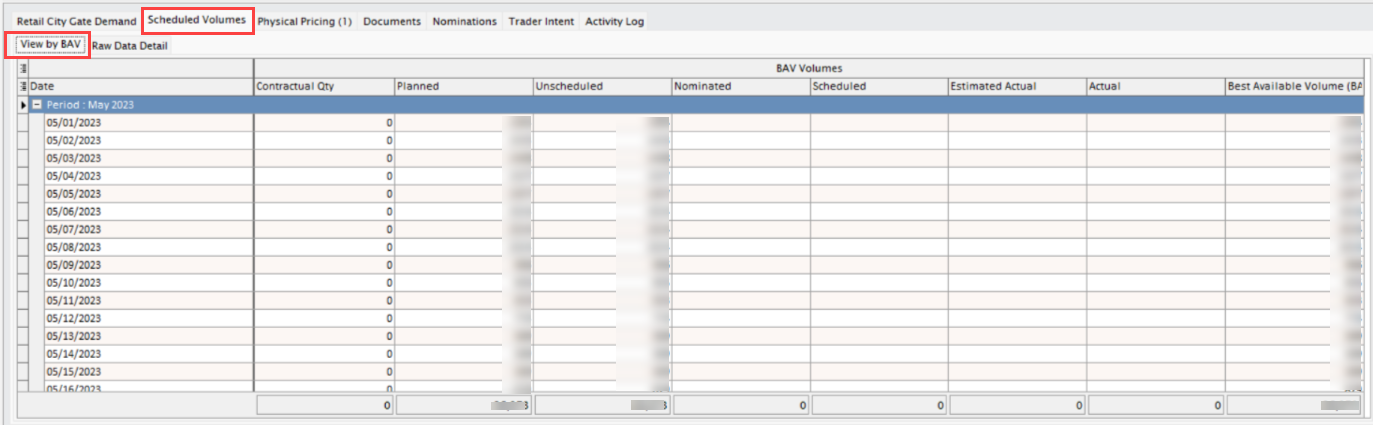
2.1 View by BAV tab
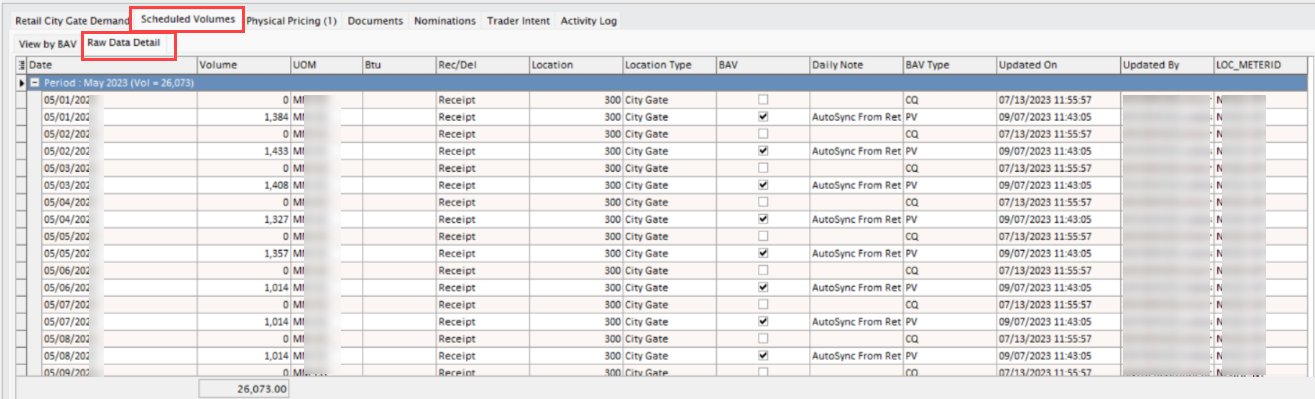
2.2 Raw Data Detail tab
3. Physical Pricing tab
This tab allows users to configure pricing tiers for the deal. By default, pricing tiers are auto-generated when a physical NG deal is created. Users can click add a new tier to configure additional pricing structures. Refer to How to configure a pricing deal.

4. Nominations tab
This tab displays nominations associated with the deal. When the physical autonom checkbox is enabled, the system automatically generates nominations based on the nominated volumes defined in the view by BAV tab.
5. Trader Intent tab
This tab captures the trader’s reasoning or strategy behind executing the deal. It is useful for audit trails and business insights, helping management and risk teams understand deal objectives and context.

Next steps
After the deal is created, the following post-deal activities are required to ensure proper execution, compliance, and tracking.
-
Pricing configuration
- Setting up a physical pricing for the deal:
- Set up pricing components for transportation or delivery services.
- Configure any applicable surcharges or adjustments based on market conditions.
- Setting up a physical pricing for the deal:
-
Nominations and scheduling
-
- Allocate volumes to the chosen pipeline paths or storage facilities as per the deal terms.
- Ensure nominations comply with pipeline rules and available capacity.
-
- Coordinate with counterparties and pipeline operators to set up the delivery timelines.
- Update and track the schedules within nGenue for real-time monitoring.
-
By following this procedure, deals are created, executed, and monitored efficiently in nGenue, with proper post-deal activities ensuring smooth operations and compliance.