Pricing adder type
A Pricing adder type defines any additional charge or price adjustment applied to a base price during the pricing calculation of gas supply, retail, financial, or brokered deals. These adders represent various cost components such as transportation fees, fuel costs, marketing margins, risk premiums, or other factors that influence the final unit rate.
In nGenue, pricing adder types are used whenever a deal includes additional cost elements beyond the base index or fixed price. They ensure that all cost components are systematically captured and applied during deal pricing, billing, and settlement processes. Configuring pricing adder types ensures that pricing logic remains consistent, auditable, and aligned with business rules across various deal configurations. Each adder type can be referenced within deal templates, pricing formulas, or rate calculations to automate the inclusion of associated cost components in the final price.
Prerequisites
Before working on the Pricing adder type (Supply management) screen, ensure the following prerequisites are met:
- Ensure the nGenue application is installed and use valid login credentials to log into the application.
- Configure the user permissions including User type, Security user, Security group, Security assign user, and Security assign permissions in their respective screens to enable access to the Pricing adder type (Supply management) screen.
- Ensure the Deal management retail, physical, financial, to assign relevant adders.
- Ensure that Unit of Measure (UOM) and codes used for pricing are defined.
Procedure to configure pricing adder type
Step 1: Navigate to Pricing adder type screen
- Log in to the nGenue application.
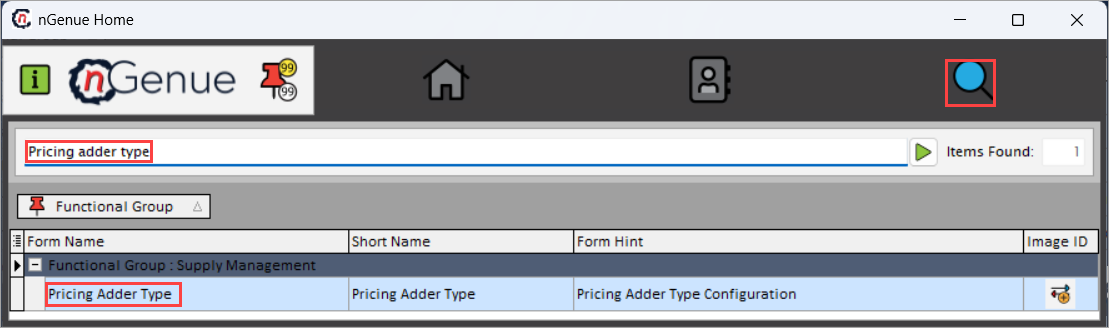
- Click the Search icon and enter Pricing adder type in the search bar.
-
Double-click the Pricing adder type from the search results to open respective screen.
-
Pricing adder type (Supply management) screen has two sections:
- Adder type selection: Lists all existing adder type records.
-
Adder type details: Displays and allows editing of the details for the selected adder type.

Step 2: Configure a pricing adder type record
The following table lists the icons available on the Pricing adder type (Supply management) screen and their respective functions:
| Icons | Icon name | Description |
|---|---|---|
 |
Add a adder types record | Creates a new pricing adder type record. |
 |
Edit current adder types | Modifies the details of the selected adder type. |
 |
Save changes to current adder types | Saves the modifications made to the current adder type record. |
 |
Cancel changes to adder types record | Discards unsaved changes made to the adder type record. |
 |
Delete current adder types record | Permanently removes the selected adder type. |
Add a New Adder Type Record
- Click the Add a adder types record icon to add a new adder type.
-
Complete the required fields available in the Adder type details section as listed in the table below:
Fields Description ID It is a unique system-generated identifier for the adder type record. It is non-editable field. Name Enter the name of the pricing adder. This name appears in pricing, billing, and deal setup screens. Description Provide a brief explanation of the adder’s purpose to help understand when and why the adder should be applied. Default value Enter the default amount or percentage that the system should apply when this adder is added to a deal or pricing structure. Sort order Specify the order in which this adder should be applied during pricing calculations. UOM code Select the appropriate unit of measure used to apply the adder’s calculation. Automatically insert this adder for new deals Select this checkbox to automatically include this adder type whenever a new deal is created. This adder applies to retail pricing Select this checkbox to allow this adder type to be used in retail pricing configurations. This adder applies to physical supply deals Select this checkbox to make the adder available for physical gas supply pricing. This adder applies to financial deals Select this checkbox to enable this adder for financial or derivative deal pricing. This adder applies to broker pricing Select this checkbox to allow use of this adder type in broker-related pricing or commission calculations. This adder applies to production deals Select this checkbox to include this adder type in production-related pricing processes. -
Click the Save changes to current adder types icon to save the configuration or click Cancel changes to adder types record to discard changes.
Step 3: Manage a pricing adder type record
Edit pricing adder type record
- Click the Edit current adder types icon to modify the selected adder type record.
- Update the necessary details and click the Save changes to current adder types icon to apply the changes.
- Click Cancel changes to adder types record to clear the changes made to the record.
Delete pricing adder type record
Click the Delete current adder types record icon to permanently remove the selected adder type record.
Summary
Configuring pricing adder types establishes the cost components that contribute to the final unit price within nGenue. Once defined, these adder types are integrated directly into deal pricing, billing, and settlement processes, ensuring that additional charges such as fuel adjustments, margin markups, and transportation fees are automatically applied during price calculations. The configuration drives consistent pricing behavior across pricing, billing, and reporting functionalities, supports automated deal setup, and ensures that all related financial transactions reflect the same pricing structure.