Update facility status
The Change Facility Status (User Tools) screen is used to update the operational status of a facility associated with an end user. This screen enables controlled activation or termination of facilities, ensuring that downstream processes such as usage calculation, billing, nominations, and settlement reflect the correct facility lifecycle state.
It is typically used when a facility becomes active, is temporarily inactive, or is permanently terminated.
Prerequisites
Before using the Change Facility Status screen, ensure the following prerequisites are met:
- The user has add or modify permissions for the Change Facility Status screen.
- The LDC and Pool are configured and active, if applicable.
- The end user exists and is currently active.
- The facility exists and is currently active or pending.
- Operational and billing dependencies have been reviewed prior to status change.
Procedure to change facility status
Step 1: Navigate to the Change Facility Status screen
- Log in to the nGenue application.
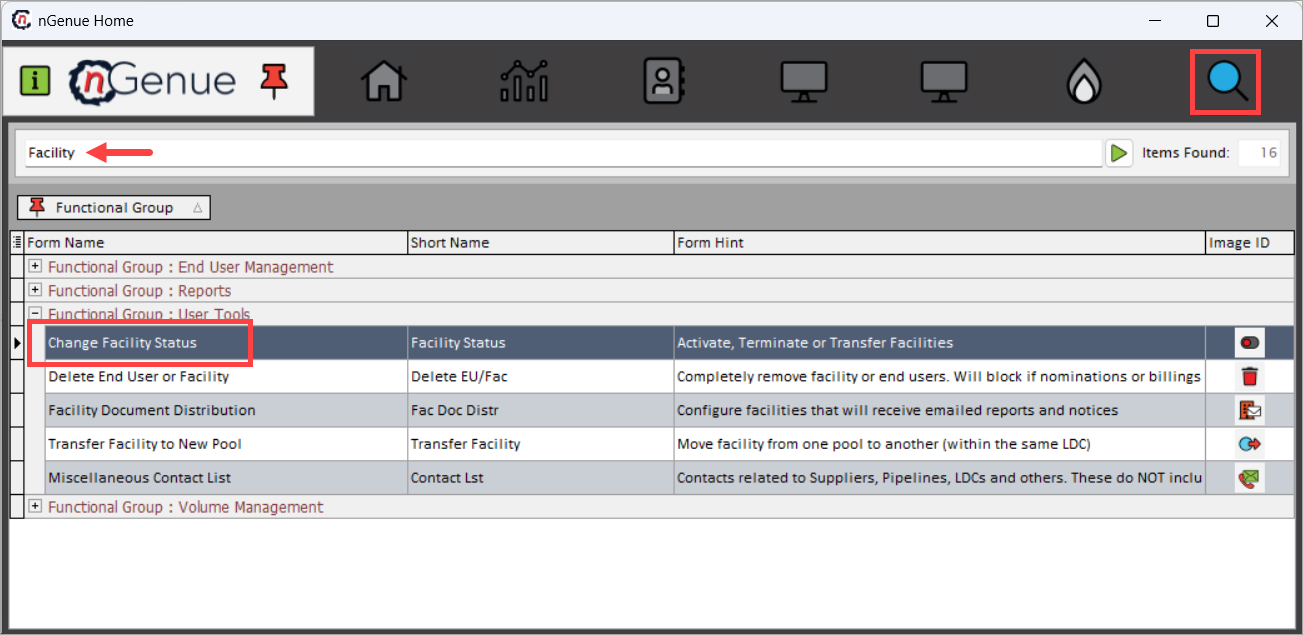
- Use the Search icon and enter Facility.
- Double-click Change Facility Status to open the Change Facility Status (User Tools) screen.
-
The screen is divided into two main sections:
- Facility Selection – Used to identify the facility.
- Facility Status – Used to define the new status and effective date.
-
Use the Facility Selection section to identify the facility whose status needs to be updated.
Fields Description LDC Select the Local Distribution Company associated with the facility. Pool Select the pool under which the facility is grouped. End Users (Active Only) Select the active end user associated with the facility. Facility (Active Only) Select the facility whose status is being changed. Note
Only active end users and facilities are available for selection.
-
The Current Status field displays the current status of the selected facility (for example, Active). This field is read-only and reflects the existing system state.
Step 2: Set new facility status
Use the Set New Status to options to define the updated facility status. The options available are:
- Setup / Pending: Indicates the facility is in setup and not yet active.
- Active: Marks the facility as active and eligible for operational processing.
- Terminated: Terminates the facility and excludes it from future operational and billing processes.
Step 3: Define effective date and confirm
- Enter the Effective Date, which determines when the status change takes effect.
- Review the selected facility, status, and date.
- Click Accept to apply the change.
- Click Cancel to exit without saving changes.
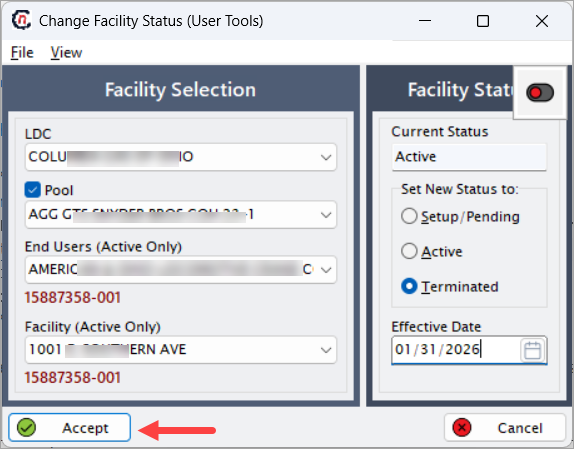
Once accepted, the facility status is updated system-wide based on the effective date.
Key points
- Facility status directly impacts usage, nominations, billing, and settlement.
- Effective dates control when the status change is enforced across all processes.
- Terminating a facility prevents future volume and billing calculations.
- Status changes should be coordinated with end user and billing timelines.
- Historical data remains available even after termination.
Summary
The Change Facility Status (User Tools) screen provides a controlled mechanism to manage the lifecycle of facilities within nGenue. By enforcing status selection and effective dating, this screen ensures accurate operational processing and prevents incorrect usage or billing for inactive or terminated facilities.